Printing Using the Computer
83
4
Printing from Your Computer 4
There are various methods for printing with this P-touch.
The following describes the procedure for printing from a computer using Cable Label Tool or P-touch Editor.
a Start Cable Label Tool or P-touch Editor, and then open the document you want to print.
b Create a tube or label design.
c Check the cutting options. (See Cutting Options on page 83.)
d Select [File] then [Print] from the menu bar or by clicking the [Print] icon.
Cutting Options 4
The cutting options allow you to specify how the item is fed and cut when it is printed. Use the printer driver
to select the cutting option for tubes or tape when printing from the computer using the application. Set the
cutting line (dotted or solid line) for tubes using [Device Settings] in the [Tube Settings] tab in the "Printer
Setting Tool".
See the following table for a list of all available settings:
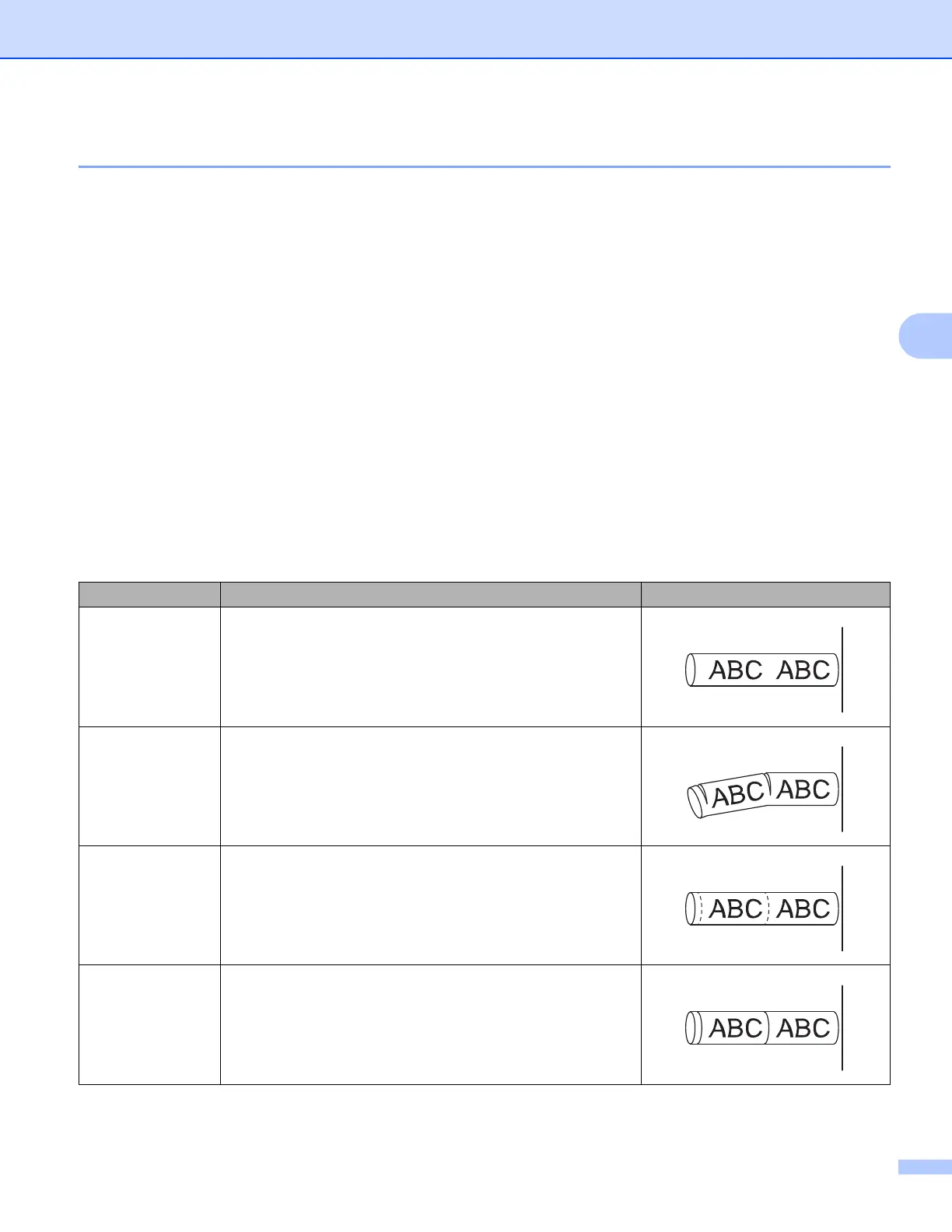
Tube Cut Option Table
Cut Option Description Image
No Half Cut The tubes are fully cut only after the last tube is printed.
Half Cut
The tubes are half cut in the margin before the first tube is
printed and after each of the remaining tubes is printed. The
tubes are fully cut after the last tube is printed.
Dot
A dotted line is printed in the margin before the first tube is
printed and after each of the remaining tubes is printed. The
tubes are fully cut after the last tube is printed.
Line
A solid line is printed in the margin before the first tube is
printed and after each of the remaining tubes is printed. The
tubes are fully cut after the last tube is printed.












 To Next Page