Section 3: Pinsetter Electronics 3-9
LCD Touchscreen - Operation
Overview
The Stringpin Controller has an interactive touchscreen display that allows the user to review the
current status of a pinsetter, set pins, select dierent modes, view the frame count, switch cluster
position, pinsetter ball status (depending on the set mode: ball 1, 2 or 3), and more. Refer to Figure 3-8
for the main screen - versions 1.1.14 and prior.Refer to Figure 3-9 for the main screen - versions 1.1.15
and later.
Main Screen - Versions 1.1.11 and Prior
(2)
CURRENT
BALL
(3)
MACHINE
SWITCH
POSITION
(6)
PRESENT
SET PINS
(5)
FRAME
COUNTER
(4)
OPTIONS
MENU
(8)
FIRMWARE
VERSION
PINSETTER
STATUS
(2)
CURRENT
BALL
(6)
PRESENT
SET PINS
(3)
MACHINE
SWITCH
POSITION
(5)
FRAME
(7)
PINSETTER
MODE
(7)
MODE
PINSETTER
STATUS
Options
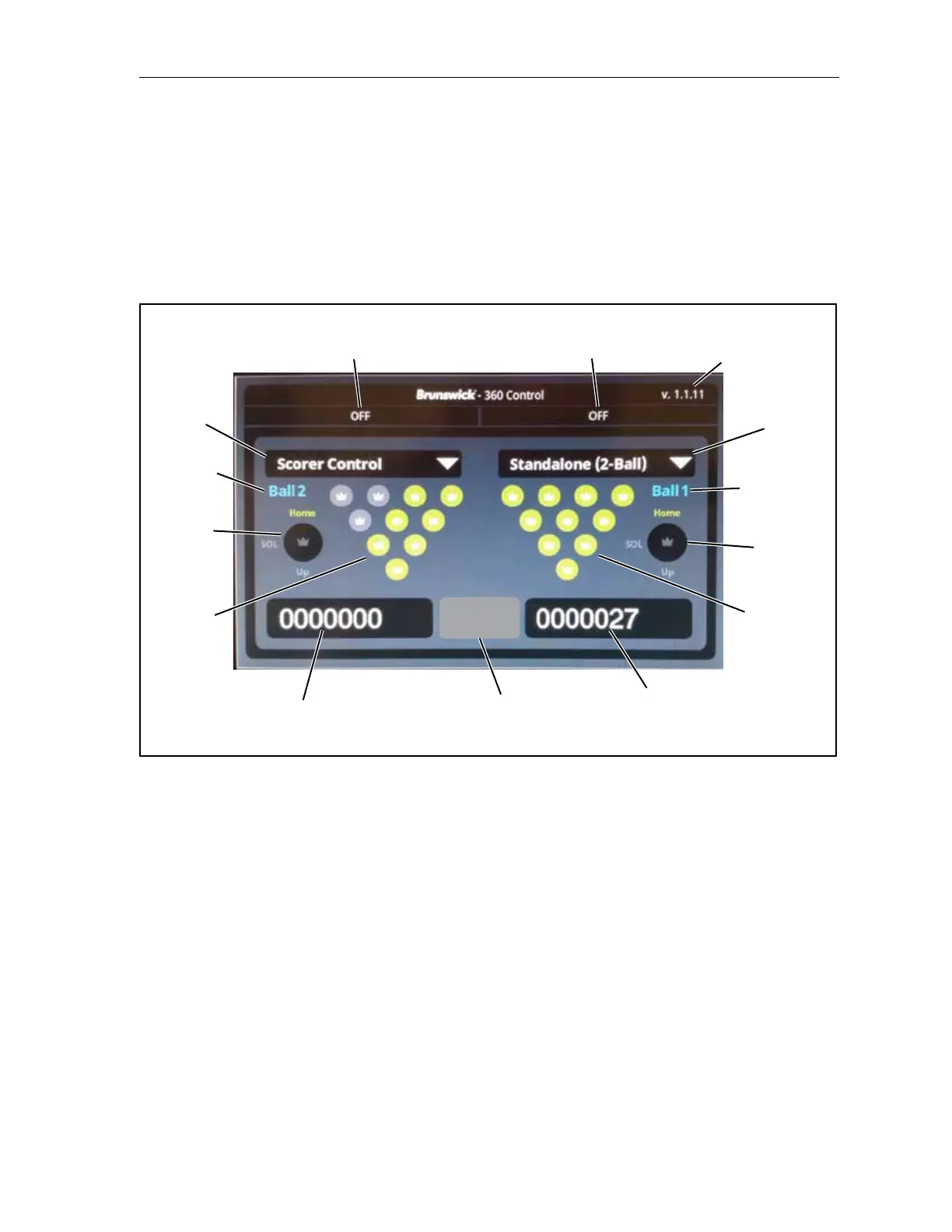
Figure3-8.LCDTouchscreen-Overview(MainScreen)Versions1.1.14andPrior
The functions of the Touchscreen include:
(1) Pinsetter Status - Pinsetter power and error code status (if applicable). This area will display
the OFF / RUN status or the error description if the pinsetter is in an error state. Refer to the
pinsetter error code chart for more information.
(2) Current Ball - Pinsetter ball count. This will display the current pinstter ball count. Depending
on the mode (2-Ball or 3-Ball), the pinsetter ball count could be one, two, or three. Each ball
count refers to the traditional cycle sequence of the pinsetter:
Ball 1 - 10 Pins, rst ball
Ball 2 - Spare Ball
Ball 3 - Cleanup (3-ball mode only)


 To Next Page