3-38 Section 3: Pinsetter Electronics
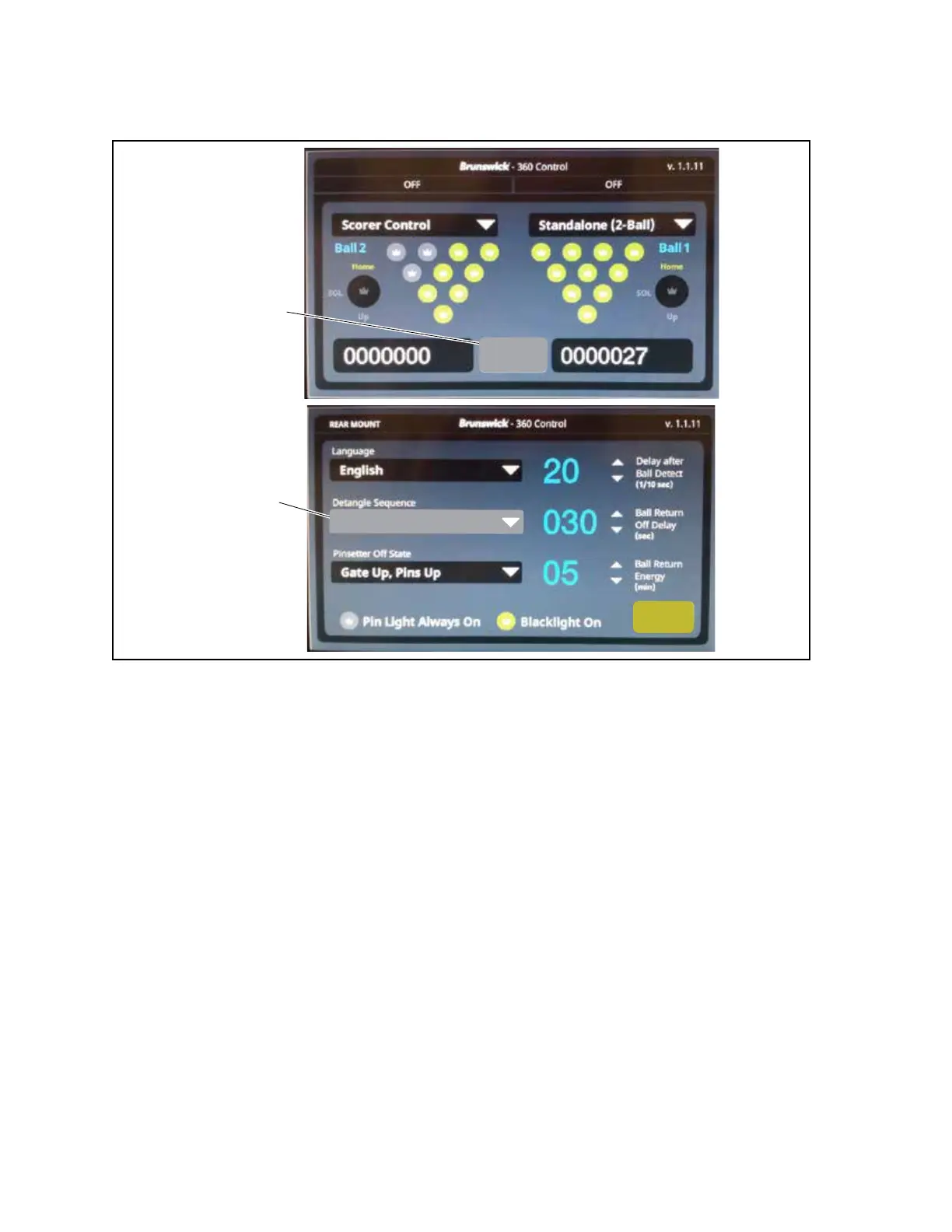
The de-tangle sequence used by the pinsetter is determined by the Detangle Sequence setting selected
on the options menu. Choose the sequence that is best for the installation. Refer to Figure3-28.
(2)
DETANGLE
SEQUENCE
(1)
SELECT FOR
OPTIONS MENU
Options
Default
Save
Figure3-28.LCDTouchscreen-OptionsMenu-DetangleSequence
(1) SELECTION FOR OPTION (2) DETANGLE SEQUENCE
MENU
Default Sequence
During the default de-tangle sequence, the drive motor will shut o to release the string tension and
allow gravity to lower all pins part way towards the pindeck. After one second, the motor turns back
on to raise the pins. If a tangle is still present it will again be detected by the de-tangle switch and the
motor will shut o for another second to lower the pins. After 5 attempts to de-tangle the strings, the
motor shuts o to lower the pins completely to the pindeck. The motor then turns back on to lift the
pins to begin another 5 attempt sequence. The pattern will repeat until the tangle is corrected or the
pattern has repeated 6 times (30 attempts). After 30 failed attempts to correct the problem, the motor
will shut o to allow the pins to lower to the pindeck, the trouble light will ash, and Controller will
show a “Tangle-01” error code. At this point a service person must turn o the machine and manually
correct the problem.
Hold 3 - Odd-Even - Wave
To further increase the chances that the de-tangle procedure will be successful, alternative shake
patterns are used when the Hold 3, Odd-Even, or the Wave sequence is selected. Unlike the default
sequence where all pins are lowered toward the pindeck, these options use the brakes within the PMI’s
to produce a repeating pattern during which only specic pins are allowed to lower.


 To Next Page