MicroDock II
User Manual
8
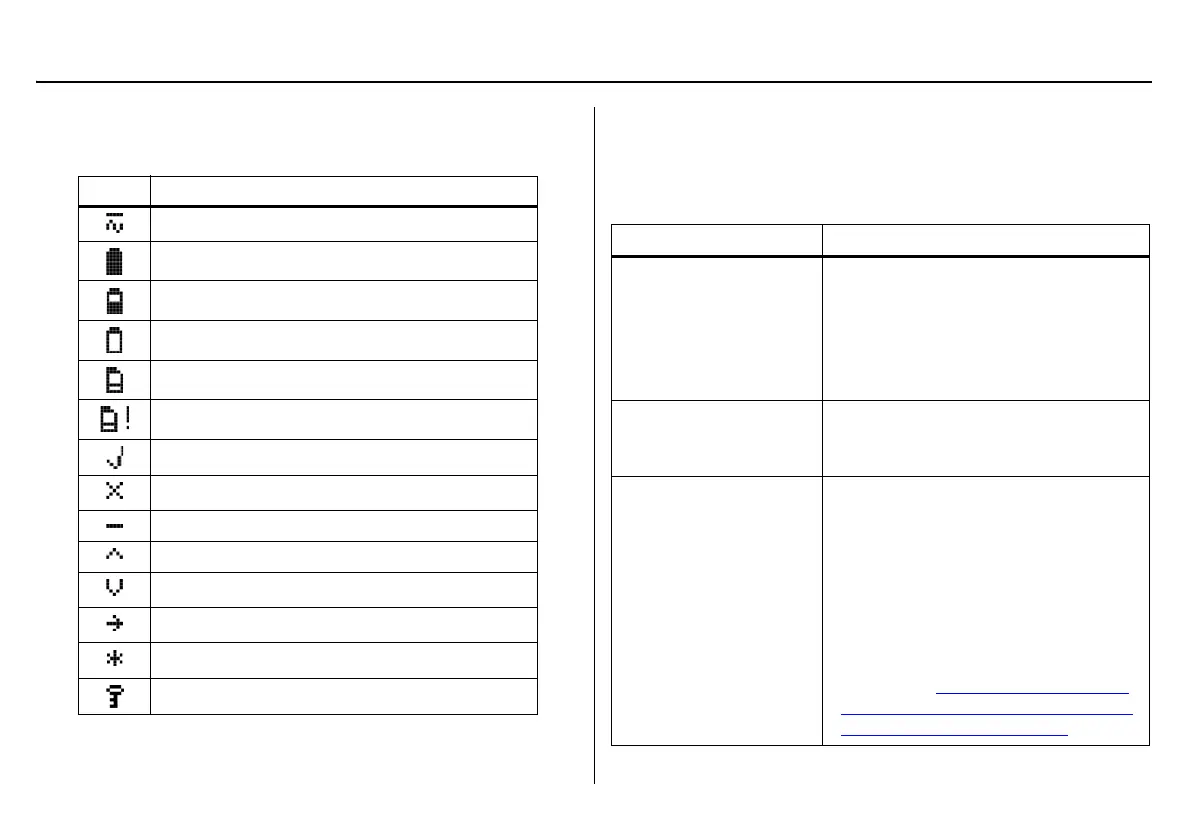
Display Elements
Table 3. Display Elements
* If powering the base station with batteries.
Pushbuttons
Docking Module Pushbuttons
Table 4. Docking Module Pushbuttons
Icon Description
AC power
Batteries charged*
Batteries half-charged*
Batteries at low level*
MMC or SD card
MMC or SD card not inserted
Test pass
Test fail
Cursor and sensor disabled
Scroll up
Scroll down
Selection arrow
Selected to be modified
Pass code protected
Pushbutton Description
C BUMP CHECK
To bump test a detector, press
C BUMP
CHECK.
After connecting a new docking module,
press and hold
C BUMP CHECK to
send a confirmation signal back to the
base station.
C CALIBRATION
To calibrate a detector, press
C CALI-
BRATION (all models excluding
GasAlertClip Extreme).
C DATA TRANSFER
To transfer datalog/event log information
from a detector, press
C DATA TRANS-
FER. (GasAlert Extreme,
GasAlertMicroClip, GasAlertMax XT, and
GasAlertQuattro only).
The Automatic Datalog Download option
is available for the GasAlertMicroClip,
GasAlertMax XT, and GasAlertQuattro
docking modules only. For more informa-
tion, refer to Automatic Datalog Down-
load (GasAlertMicroClip, GasAlertMax
XT, and GasAlertQuattro only).



 To Next Page