MicroDock II
User Manual
78
GasAlertMicro 5/PID/IR or GasAlertMicro has completed charg-
ing before beginning to charge.
• If another GasAlertMicro 5/PID/IR or GasAlertMicro is added, the
added detector will begin charging and one GasAlertMicroClip,
GasAlertMax XT, or GasAlertQuattro will stop charging. The
GasAlertMicroClip, GasAlertMax XT, or GasAlertQuattro will
begin charging when a GasAlertMicro 5/PID/IR or GasAlertMicro
has completed charging.
Charging Procedure
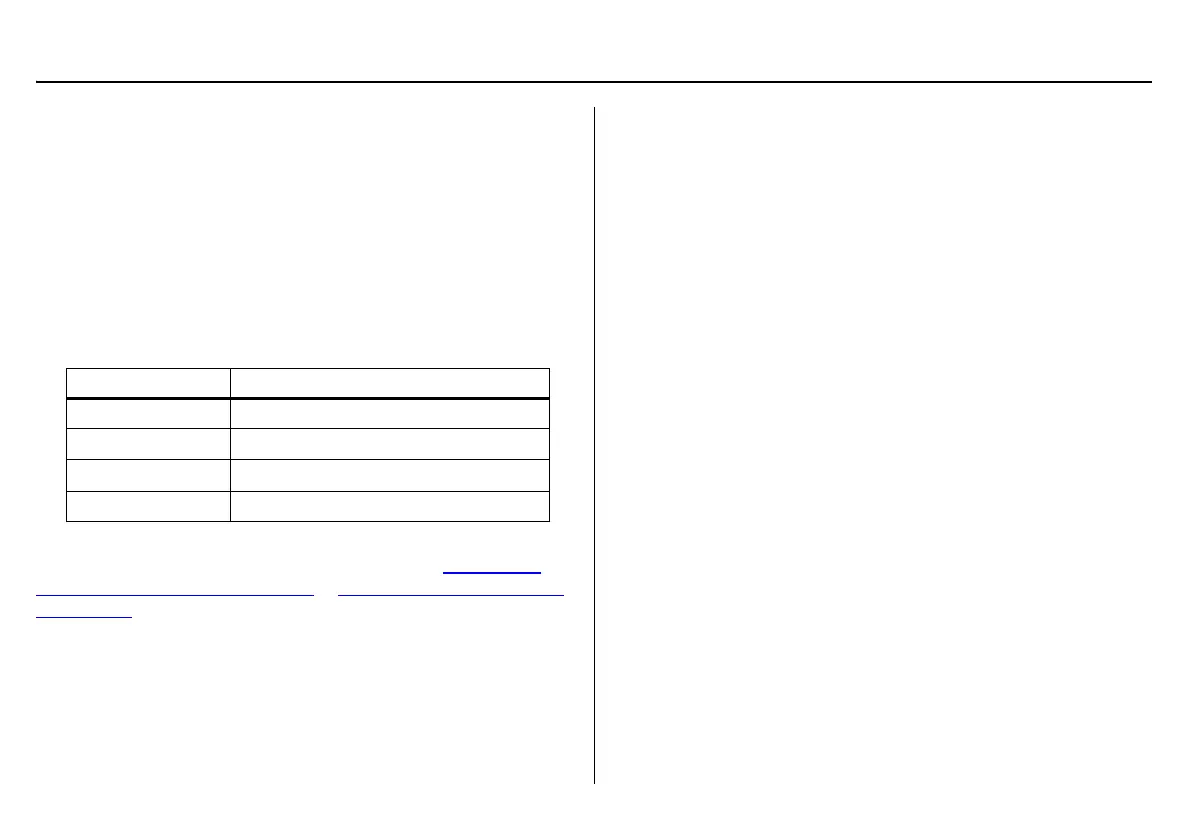
Table 21. Charger Status LED
The battery pack for the GasAlertMicro 5/PID/IR and GasAlertQuattro
can be charged separately from the detector. Refer to Inserting the
GasAlertMicro 5/PID/IR Battery Pack or Inserting the GasAlertQuattro
Battery Pack.
To charge a detector or battery pack in a charging docking module, com-
plete the following:
1. Connect the AC adapter of the charger to the CHARGE port on
the base station and then plug the cord into the AC outlet. The
CHARGE STATUS LED briefly lights red then green during the
self-test. The LED then deactivates.
2. If charging the detector, deactivate the detector and insert it into
the detector bay.
If charging the battery pack, remove the battery pack from the
detector. Insert it into the detector bay bottom first.
3. The charging LED then lights red.
Ensure the detector is inserted correctly onto the contact pins.
4. The CHARGE LED lights red.
5. Allow the battery to obtain a full charge (2 to 6 hours, depending
upon detector type and number of docking modules connected to
the base station).
If a docking module is in queue waiting to be charged, the
CHARGE LED flashes red (all charging modules). If there is not
an AC adapter plugged into the CHARGE port, the
GasAlertMicroClip and GasAlertMax XT modules’ CHARGE LED
flashes red.
When the docking module begins charging, the CHARGE LED
stops flashing and lights solid red.
The CHARGE LED lights green when the charging process is
complete. If there are other docking modules in queue waiting to
charge, the docking modules will begin charging.
The CHARGE LED deactivates when the detector is removed.
Charger Status Description
Red
Charging normally
Flashing red
Detector waiting in queue to charge
Green
Charge complete
Off
Charge or temperature fault



 To Next Page