MicroDock II
User Manual
22
Inserting the GasAlertMax XT
a Caution
Infrared or intense ambient light (sun or halogen) may interfere
with the base station/detector communication.
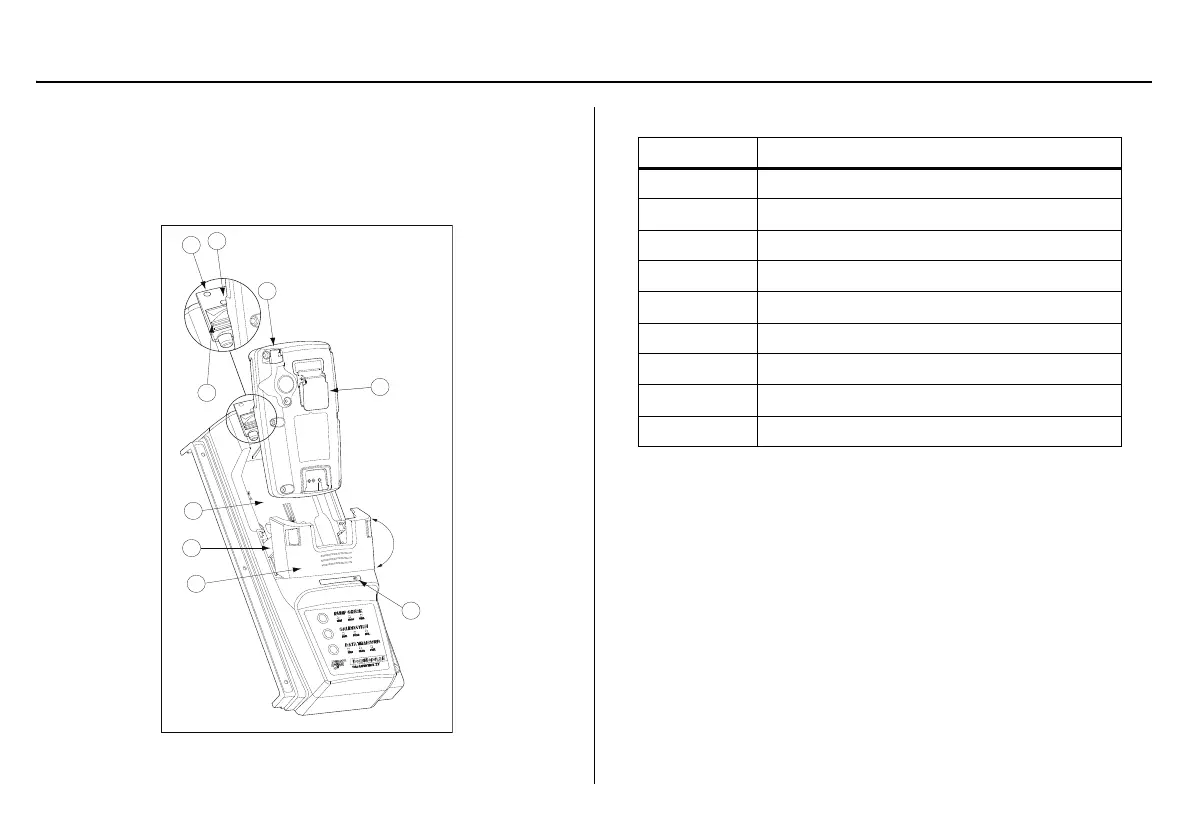
Figure 11. Inserting the GasAlertMax XT
Table 11. Inserting the GasAlertMax XT
1. Activate the detector and wait until it is in normal operation.
2. Ensure the alligator clip is closed and the ring is resting flat on
the detector to prevent disruptions with data transmission.
3. Press the two release tabs on the docking module and raise the
lid.
a Warning
The docking module lid only raises upward at a 30° angle. Do not
force the lid beyond its limit.
4. Insert the bottom of the detector (serial number label up) at a 30°
angle into the detector bay and then lower the top into place.
5. Push the pump connector towards the detector pump.
Item Description
1
Detector pump
2
Alligator clip
3
Charge status
4
Module lid
5
Release tabs
6
Detector bay
7
Pump connector
8
Indicator (closed)
9
Indicator (open)



 To Next Page