17
MicroDock II
Installation
Table 9. Inserting the GasAlertMicro 5/PID/IR
Note
If the GasAlertMicro 5/PID/IR is fitted with a calibration cap or
pump auxiliary filter, it must be removed prior to inserting it into
the docking module.
1. Activate the detector and wait until it is in normal operation.
2. Ensure the alligator clip is closed and the ring is resting flat on
the detector to prevent disruptions with data transmission.
3. Press the two release tabs on the docking module and raise the
lid.
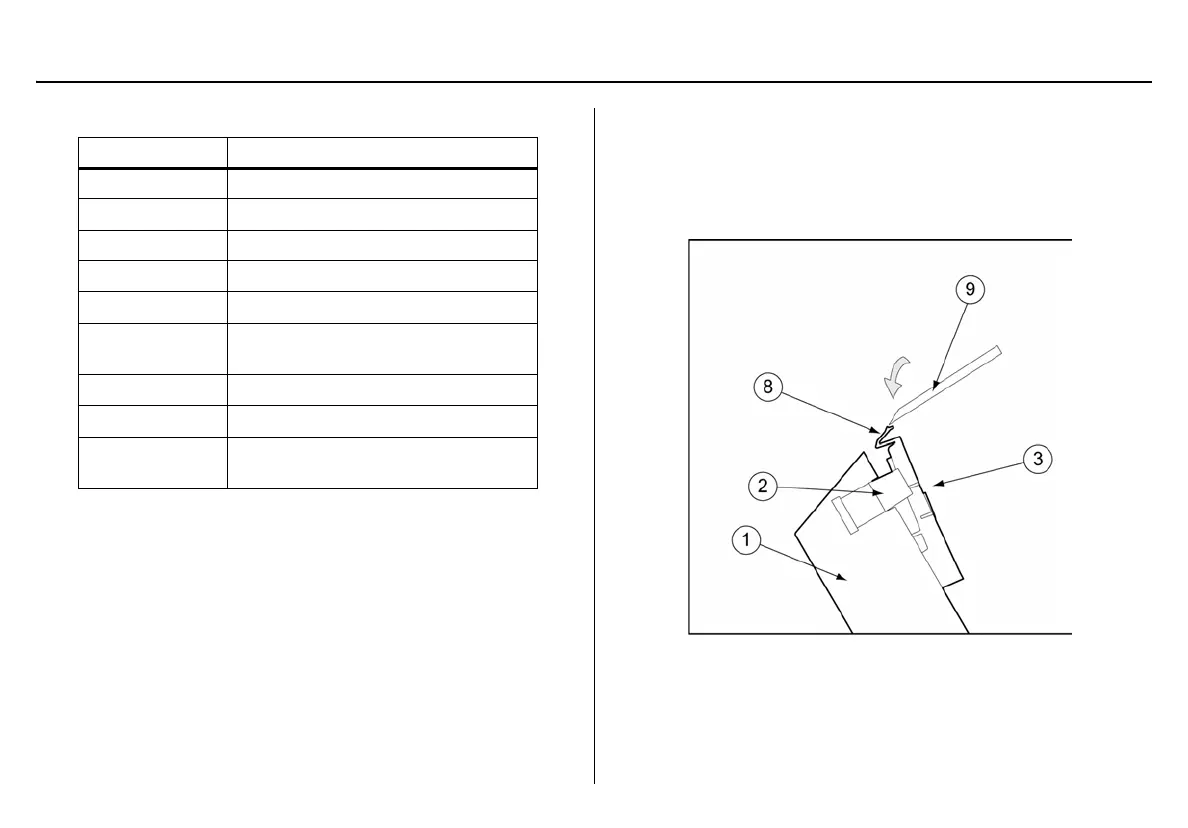
Important: If the GasAlertMicro 5/PID/IR detector is fitted with a
pump, the diffusion adapter must be removed from the docking
module lid.
Figure 8. Removing the Diffusion Adapter
Using a small flathead screwdriver, press the release tab down-
wards. Pull the adapter forward slightly and then lift upwards to
remove.
Item Description
1
Docking module lid
2
Release tabs
3
Diffusion adapter
4
Detector bay
5
Connector pins (charging model only)
6
Charge status indicator
(charging model only)
7
Connector outlets
8
Diffusion adapter release tab
9
Tool used to push down on diffusion
adapter release tab



 To Next Page