MicroDock II
User Manual
20
Inserting the GasAlertMicroClip
a Caution
Infrared or intense ambient light (sun or halogen) may interfere
with the base station/detector communication.
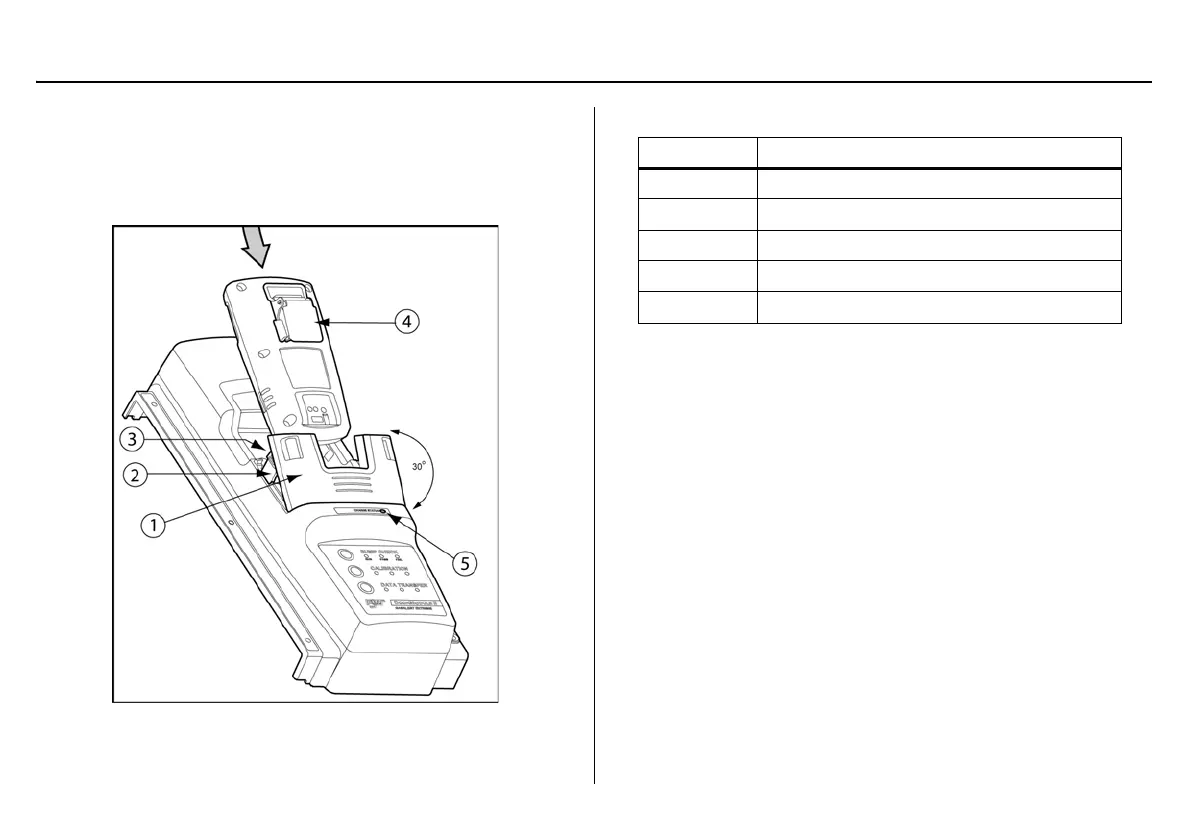
Figure 10. Inserting the GasAlertMicroClip
Table 10. Inserting the GasAlertMicroClip
Note
If the GasAlertMicroClip is fitted with a calibration cap or auxil-
iary filter, it must be removed prior to inserting the detector into
the docking module.
1. Activate the detector and wait until it is in normal operation.
2. Press the two release tabs on the docking module and raise the
lid.
a Warning
The docking module lid only raises upward 30° angle. Do not force
the lid beyond its limit.
3. Insert the bottom of the detector (serial number label up) at a 30°
angle into the detector bay and then lower the top into place.
Item Description
1
Module lid
2
Release tabs
3
Detector bay
4
Alligator clip
5
Charger status indicator



 To Next Page