57
MicroDock II
Gas Conflicts
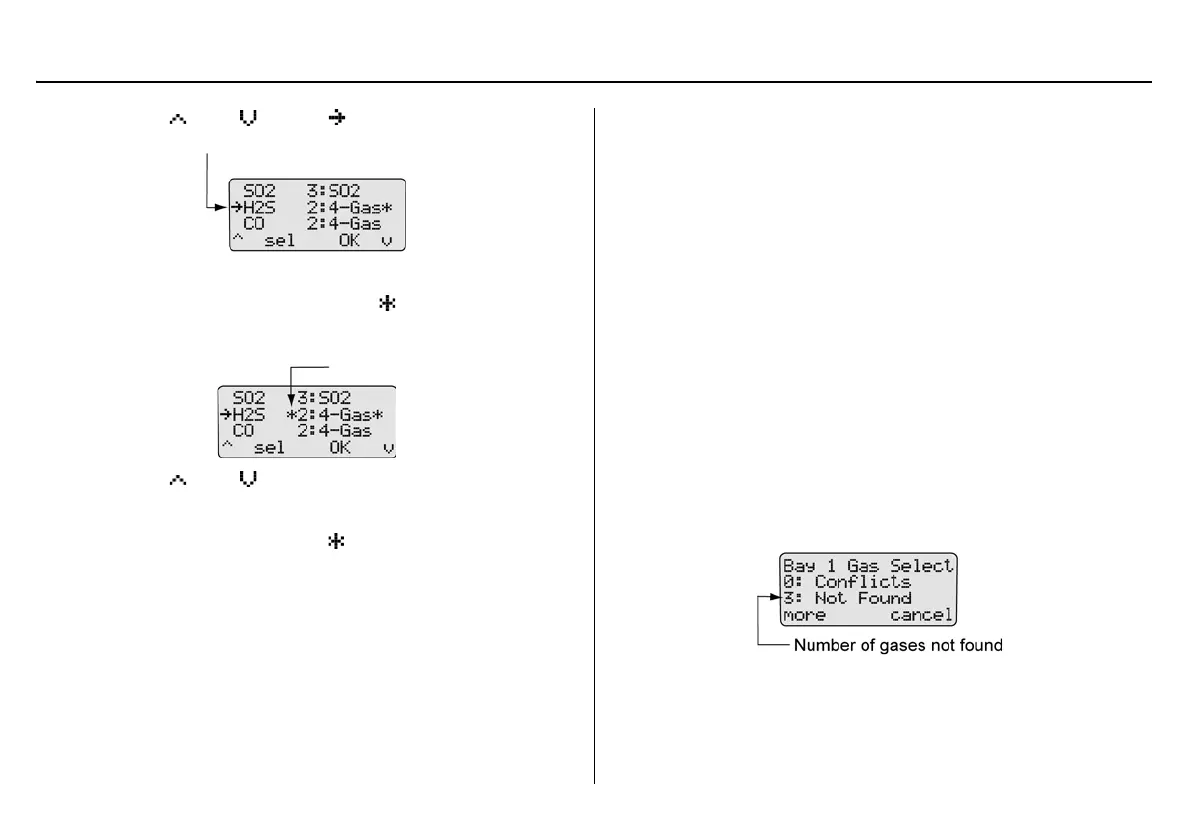
2. Press C or C to move to the gas that is in conflict.
3. Press
C sel to access the inlet field. automatically displays
on the left side of the inlet.
4. Press
C or C to scroll to the desired inlet (1-5).
5. When the required inlet value displays, press
C sel to confirm
the selection and exit the field. no longer displays to the right
of the inlet, indicating the conflict has been resolved.
Note
If
C sel is not pressed within 30 seconds, the base station
automatically defaults to the inlet it has selected.
Unsuccessful Conflict Resolution: If the conflict is not resolved by
selecting a different inlet, refer to the following:
• Ensure that the selected inlet is correct.
• Ensure the gas cylinder that is attached to the selected inlet is
correct.
• Press
C OK to accept the base station’s default selection.
Not Found
If a value of 1 or more displays before Not Found, the base station is
unable to locate the required gas type for a specific sensor on the detec-
tor.
Press
C cancel to exit the gas conflict screen and return to normal
operation. A bump test or calibration will not be performed.
To define the gas inlets, complete the following.
1. Press
C more in the gas conflicts screen to access the gas
type/inlet screen to view which gas type(s) cannot be found.



 To Next Page