43
MicroDock II
User Options Menu
7. To select a different gas type, press C sel. changes to to
indicate that the field is activated. Press
C or C to scroll
through the list of gas types.
8. When the desired gas type displays, press
C sel. changes to
to confirm the new selection and to deactivate the field.
9. To enter the gas concentration level for the selected gas, pro-
ceed to the following section Gas Concentration Level
.
Or
Press
C exit to return to the user options menu.
10. Press
C exit again to return to normal operation.
Gas Concentration Level
Depending upon the gas type selected, ppm, %LEL, or % displays
beside the gas concentration level.
Note
The following gas concentrations are factory configured and
cannot be changed:
• Four-gas-mix (4-Gas 2.5% vCH
4
)
• Four-gas equivalent (4-Gas Equiv.)
• Three-gas SO
2
mix (3-Gas SO
2
Mi)
• The Custom 4-Gas, Custom 3-Gas, and Custom 2-Gas can be
modified. However, only the gas concentration levels can be
changed.
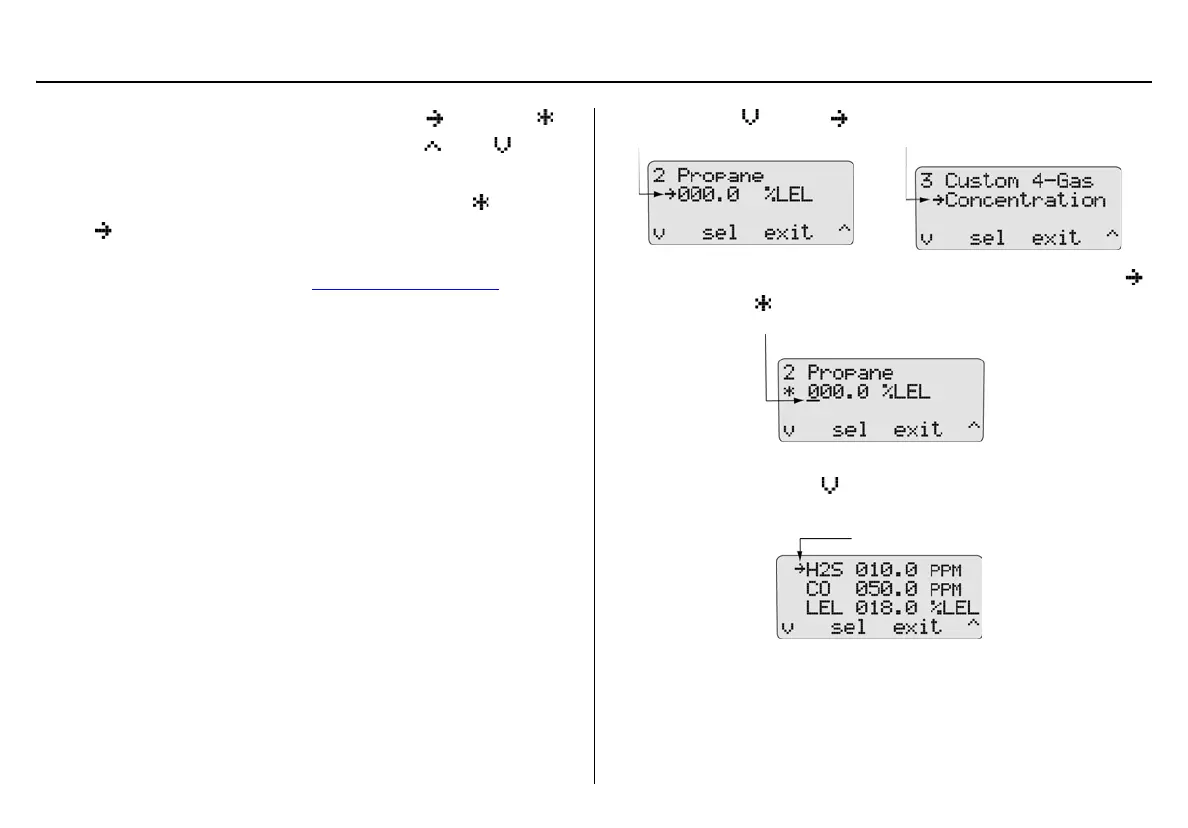
11. Press
C to move down to the gas concentration level.
12. Press
C sel. If the gas concentration level can be modified,
changes to and the cursor displays below the first value.
For custom and multi-gas: All of the applicable gases display
(for 4-Gas press
C to scroll to the remaining gas types cur-
rently not displayed).
or



 To Next Page