47
MicroDock II
User Options Menu
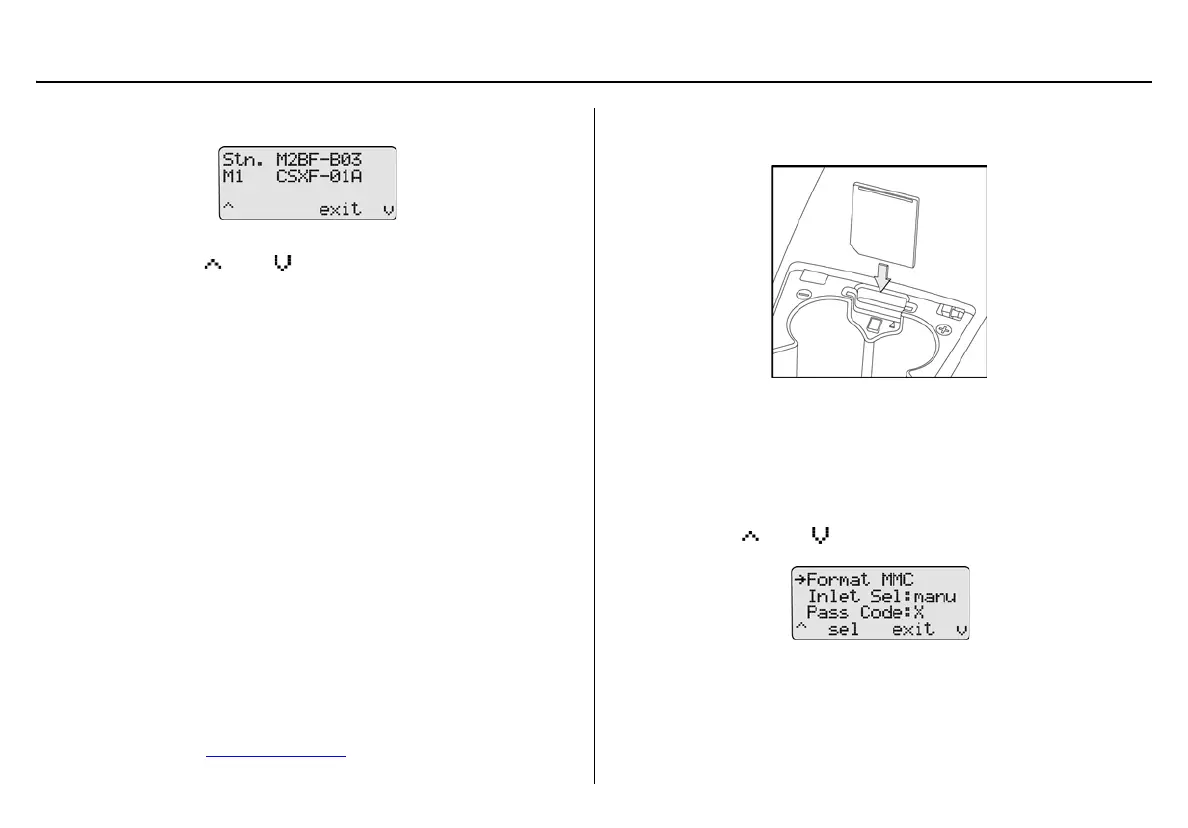
Press C sel to access the about base station screen.
If more than one docking module is connected to the base sta-
tion, press
C or C to scroll to the additional docking
module firmware revisions (M1 - M8).
Note
Maximum eight docking modules can be connected to a sta-
tion. There is a maximum limit of six charging modules. Six
charging modules plus two non-charging modules can be con-
nected to the station.
2. Press
C exit to return to the user options menu.
3. Press
C exit again to return to normal operation.
Formatting the MMC/SD Card
Format MMC formats the MultiMediaCard (MMC) or the Secure Digital
(SD) card.
a Caution
Formatting a MMC/SD card will erase all data on the card.
To format an MMC/SD card, complete the following:
1. Activate the base station if required.
2. On the base station, remove the cover from the battery compart-
ment. Refer to Battery Installation
.
3. Insert the MMC/SD card into the slot above the battery compart-
ment.
Figure 21. Inserting the MMC/SD Card into the Base Station
Note
If the MMC/SD card has never been formatted, the base sta-
tion will automatically prompt to format the card (refer to steps
#5-6).
4. Press
C or C to scroll to the Format MMC option.



 To Next Page