MicroDock II
User Manual
32
The factory default pump speed displays beside Pump Setup.
The base station pump speed is measured as a percentage (%)
and the flow meter measures speed in ml/min.
Note
The base station is shipped with the factory default pump
speed set to 350 ml/min. (40-45%).
14. Monitor the flow meter until it stabilizes (5-20 minutes depending
upon the type of flow meter).
15. From the base station, press
C or C until the flow meter
displays 350 ml/m.
16. From the base station, press
C exit to save the new value and
exit the Pump Setup field ( changes to ).
17. Press
C exit again to return to normal operation.
18. Repeat steps # 1-17 for each docking module that is added. Con-
tinue to step #18 and 19 for the last module added.
19. After all of the modules have been added, attach the end plate.
Refer to Figure 14.
20. Fasten the bottom cover plate to the space between the two
docking modules using six Phillips flat-head screws. Refer to
Figure 16.
Note
When assembling or reassembling parts of the base station
and docking modules, refer to the Table 13.
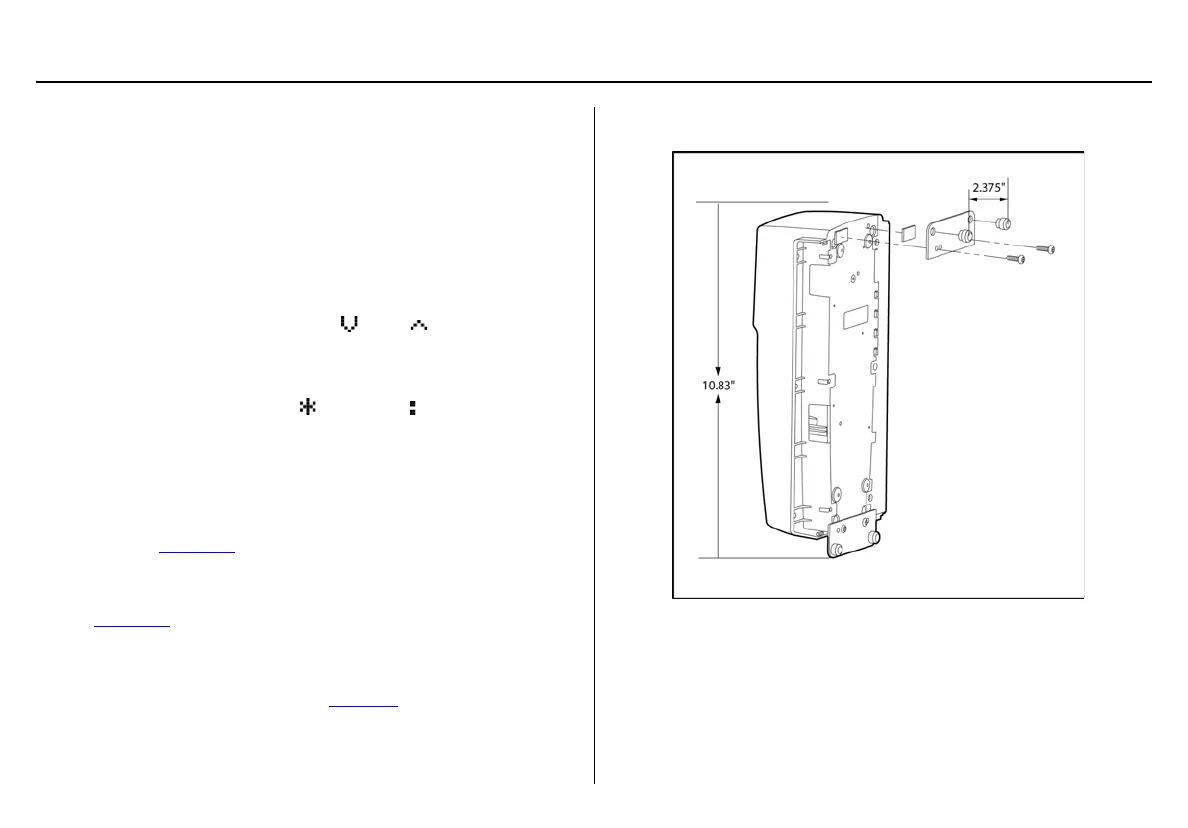
Mounting the MicroDock II
Figure 17. Attaching the Wall Mounting Plate
Note
When mounting two or more docking modules, each docking
module requires an individual set of wall mounting plates.
Because of the variety of surfaces that the base station can be
mounted to, mounting screws are not provided.



 To Next Page