MicroDock II
User Manual
42
Note
Scroll through options and functions when displays. dis-
plays when a field is selected and can be modified.
To select a gas type, complete the following:
5. From the required inlet screen, displays.
6. If the required gas type is displayed, press
C to move down
to the gas concentration level. Proceed to the Gas Concentration
Level section.
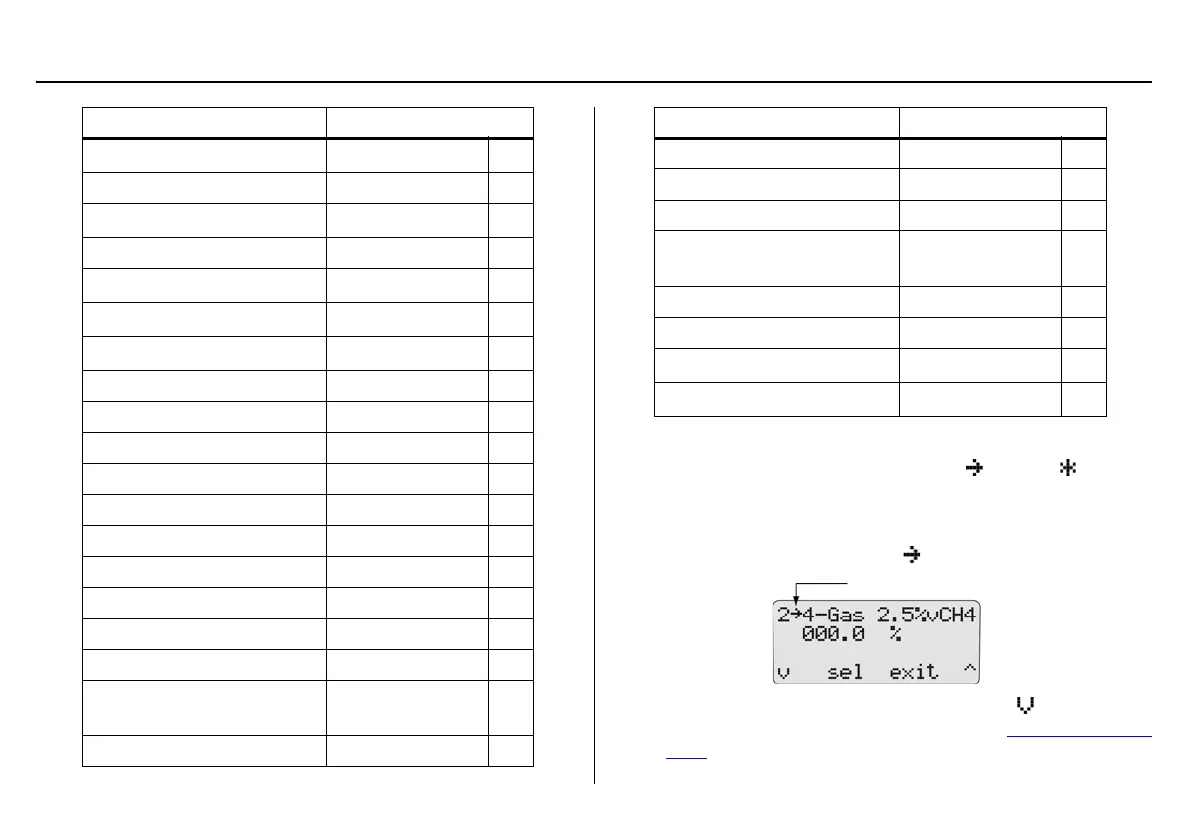
Gas Type Gas Concentration
Cl
2
(chlorine) bump only
ppm *
HCN (hydrogen cyanide) ppm *
H
2
S (hydrogen sulfide)
ppm *
NO (nitric oxide) ppm *
NO
2
(nitrogen dioxide)
ppm *
PH
3
(phosphine)
ppm *
SO
2
(sulfur dioxide)
ppm *
Ethanol % LEL *
Ethanol Equiv. % LEL *
Hexane % LEL *
Hexane Equiv. % LEL *
Methane % LEL *
Methane Equiv. % LEL *
Pentane % LEL *
Pentane Equiv. % LEL *
Propane % LEL *
Propane Equi % LEL *
4 – Gas 2.5%vCH4
(H
2
S, CO, LEL, O
2
)
ppm and %LEL
4 – Gas Equiv. ppm and %LEL
Gas Type Gas Concentration
Custom 4-Gas ppm and %LEL *
Custom 3-gas ppm and %LEL *
Custom 2-Gas ppm and %LEL *
3 – Gas SO
2
Mi
(3-gas mix)
ppm and %LEL
Isobutylene ppm *
LEL %LEL *
CO
2
ppm *
CO
2
zero / N
2
(nitrogen)
ppm *



 To Next Page