MicroDock II
User Manual
74
7. Under program options, select an option to reprogram the detec-
tor.
• Reprogram with user’s consent (but do not change
Date/Time): When selected, the base station asks if the
detector will be reconfigured each time a bump check or
calibration is initiated. The detector’s clock is not
changed to match the MicroDock II’s clock.
• Automatically reprogram (but do not change Date/
Time): When selected, the detector is automatically
reconfigured when a bump test or calibration is initiated.
The detector’s clock is not changed to match the
MicroDock II’s clock.
• Reprogram with user’s consent (including Date/
Time): When selected, the base station asks if the detec-
tor will be reconfigured each time a bump check or cali-
bration is initiated. The detector’s clock will be changed
to match the MicroDock II’s clock.
• Automatically reprogram (including Date/Time):
When selected, the detector is automatically reconfig-
ured when a bump test or calibration is initiated. The
detector’s clock is changed to match the MicroDock II’s
clock.
8. Ensure the base station is connected to the computer using a
USB cable.
9. Click Save in the lower left-hand corner.
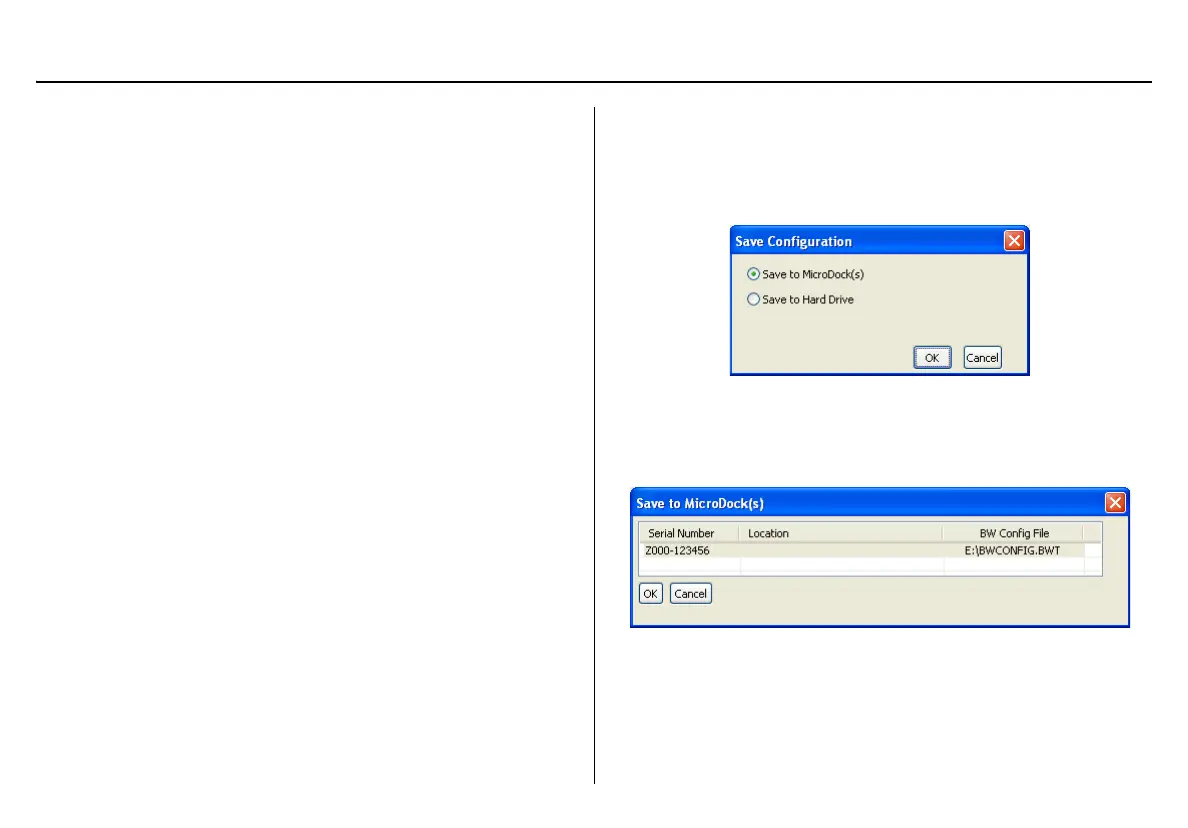
10. The Save Configuration dialog box displays.
Figure 23. Save Configuration Dialog Box
11. Click the Save to MicroDock(s) checkbox and click OK.
The Save to MicroDock(s) dialog box displays.
Figure 24. Save to MicroDock(s) Dialog Box



 To Next Page