COPYRIGHT © 1998 CANON INC. CANON PC400/420/430,FC200/220 REV.0 JAN.1998 PRINTED IN JAPAN (IMPRIME AU JAPON)
8-2
CHAPTER 8 INSTALLATION
II. UNPACKING AND INSTALLATION
Moving a metal object from a cold to warm place can cause droplets of water to
appear on its surface. The phenomenon is known as
condensation
, and condensation
in the copier can trigger such problems as blank copies. If any such problem is expect-
ed, leave the copier alone at the site of installation at least one hour before unpacking it.
Step Work Description
1 Open the shipping carton.
Take out the accessories.2
Make sure that the Operator’s Manual is in the box.
Remove the cover bag from the copier,
and detach all strips of tape that hold
parts.
3 • Check the covers for damage and deformation caused
during transit.
• Slide out the manual feed tray.
• Slide out the delivery tray.
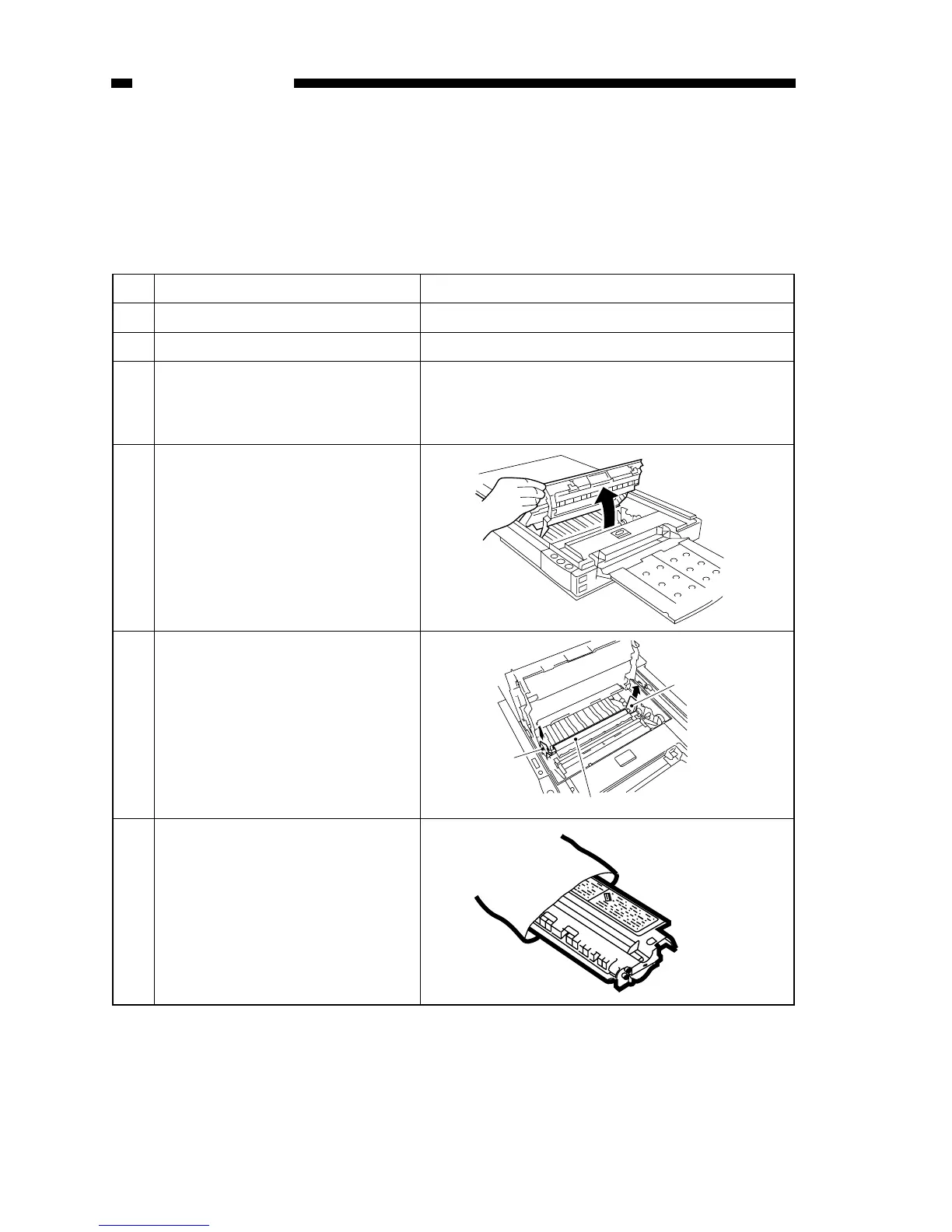
Move the copyboard to the left until it
stops, and press the open/close button
to open the copier’s top cover.
4
Take out the cartridge from the bag.
(If the cartridge is installed in the
copier, pull it out to the front.)
6
Pull the two cardboard pieces, if found
inside the copier at either end of the
charging roller, straight up and out of
the copier.
Note: Do not touch the transfer
charging roller inside the copier.
5
Cardboard
Transfer charging roller
Cardboard



 To Next Page