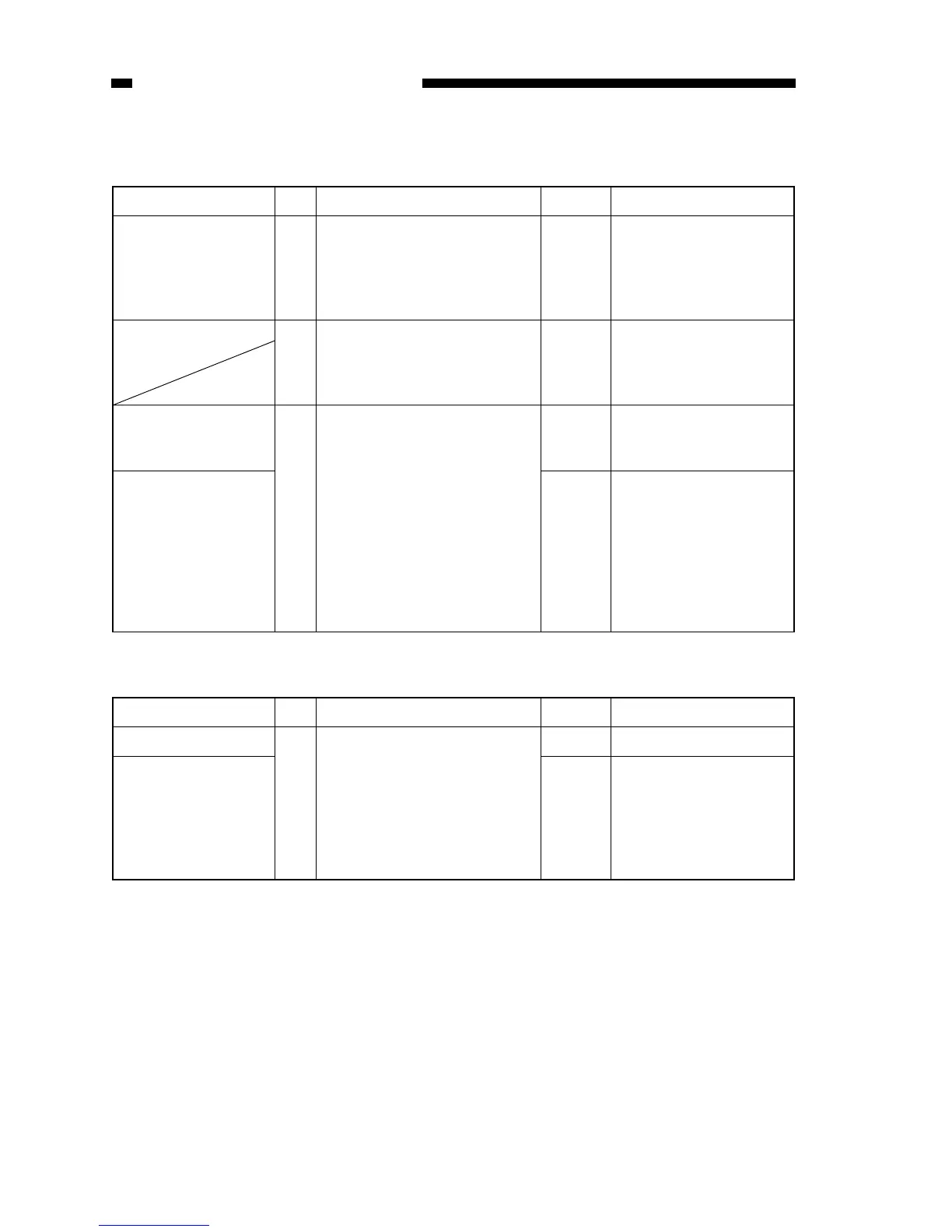
Cause Step Checks YES/NO Remedies
Copyboard 1 Does the copying operation start
with the copyboard at the left or
right?
YES Check the operation with
the copyboard moved to
the center; advise the user
that this is not the copier’s
problem
2 Does the copyboard move in
reverse? In addition, does it
move in reverse far too slowly?
NO See “The copyboard fails
to move.”
DC controller/DC
power supply PCB
3 Does the copyboard move in
reverse after copying operation
has started and move forward
after it has reached the copy-
board start position?
YES Replace the DC con-
troller/DC power supply
PCB.
Copyboard drive
assembly,
Copyboard glass
assembly
NO 1. Check the copyboard
position sensor (Q902).
2. Try replacing the copy-
board drive assembly.
3. Check the start position
cam and reversal cam
in the copyboard glass
assembly.
Cause Step Checks YES/NO Remedies
Control panel PCB 1
Replace the control panel PCB.
Is the problem corrected?
YES End.
DC controller/DC
power supply PCB
NO Check the harness from
the control panel PCB to
the DC controller/DC
power supply PCB; if
normal, replace/DC power
supply PCB.



 To Next Page