Use the Address List File (ral.csv)
Introduction
If an LDAP server is not available, you must use a remote address list file (ral.csv) for scan to
email. This file must contain the unique user codes and matching email addresses. The
PRISMAsync controller stores the address list file. Proceed as follows:
1. Download the file via the Settings Editor ([Configuration] -> [Connectivity], scroll down to the
[LDAP] section -> [Download address list file]).
2.
Edit the file in Microsoft
®
Excel
®
, for example.
3. Upload the file via the Settings Editor ([Configuration] -> [Connectivity], scroll down to the
[LDAP] section -> [Upload address list file]).
Syntax of the Address List File
The address list file must contain a header line (mandatory) and at least one line with an email
recipient.
A "," or ";" separates the items in a record.
<CR> or <LF> separates records.
The header record shows the fields that the address list uses (ruid,address,comment).
A profile record contains the unique user codes and matching email addresses. ruid and address
are mandatory. comment is optional.
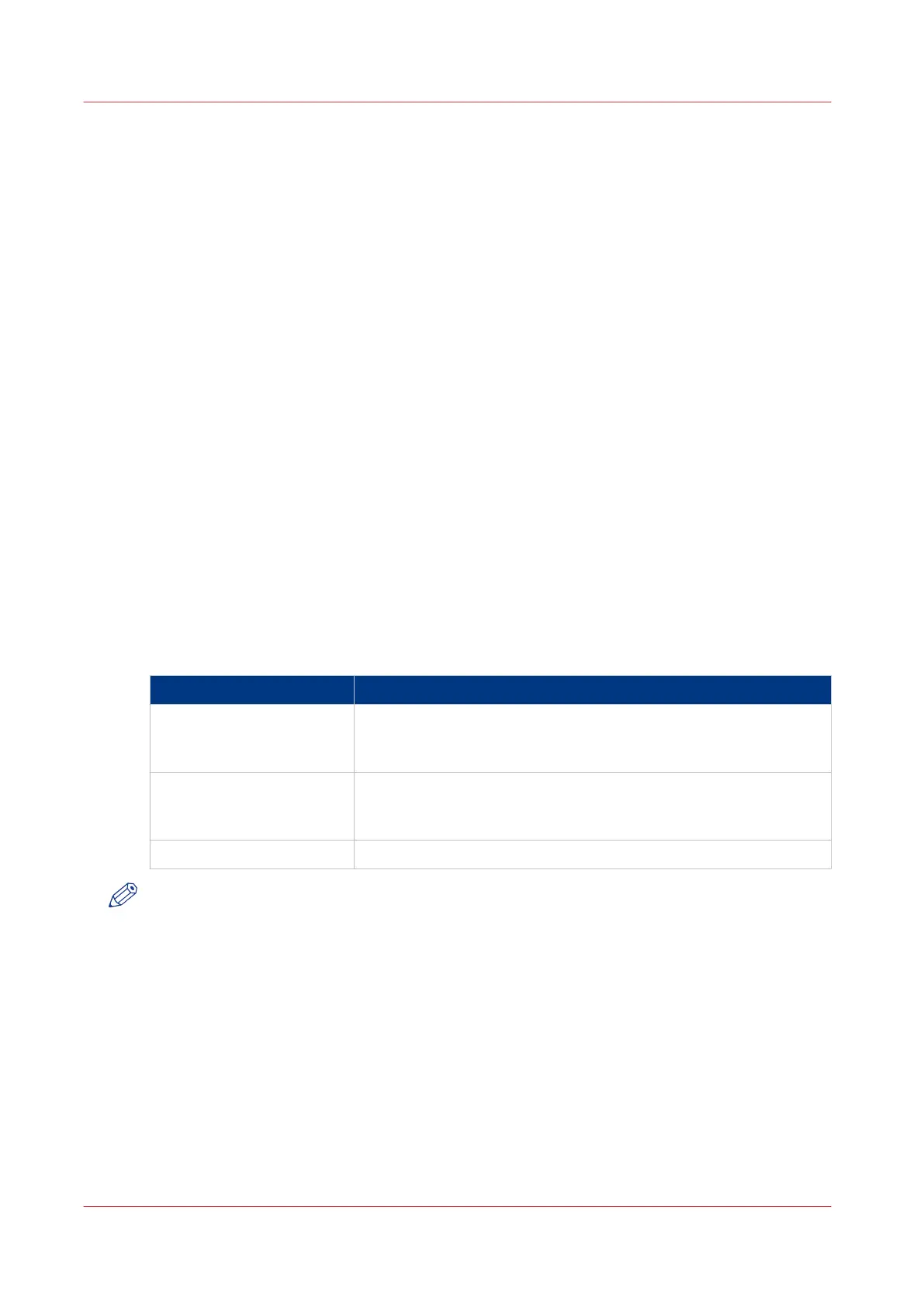
Record Items
Record items
Record item Description
ruid A unique user code, for example an employee number or tele-
phone number.
Maximum 20 digits. Leading zeros are allowed.
address The email address that matches the user code.
Maximum 40 characters. Do not use the characters <CR>, <LF>, ","
and ";".
comments Additional information, if required.
NOTE
Do not change the header information.
Examples of Correct Profiles
• 01234,userA@companyX.com
• 56789,userB@organizationY.com
Use the Address List File (ral.csv)
254
Chapter 8 - Carry Out Scan Jobs
Canon varioPRINT 135 Series














 To Next Page