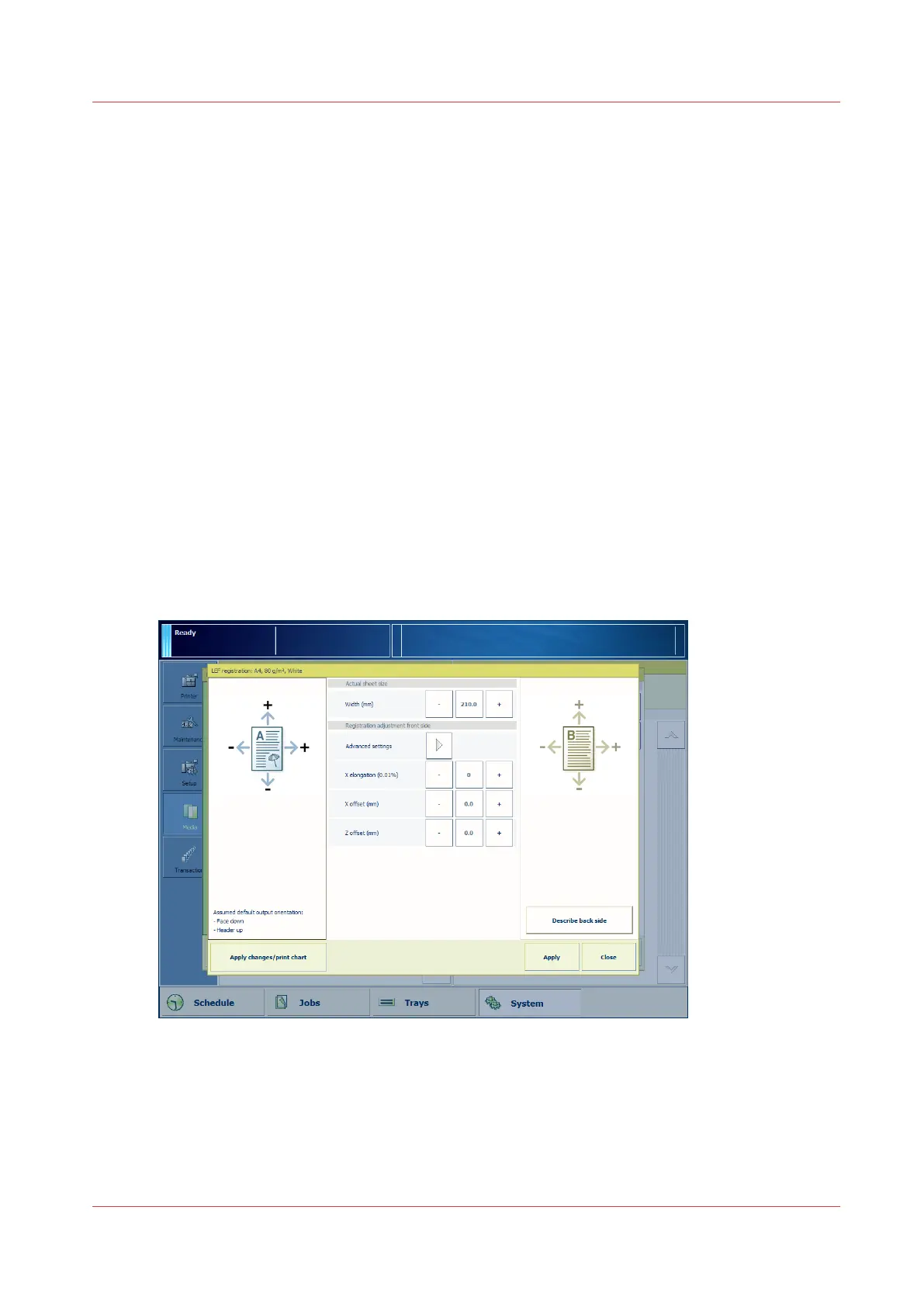
Option 2 - Manual Media Registration Adjustment (Only Needed in Incidental
Cases)
When to Do
• You already performed the automatic registration adjustment via the control panel (option 1),
but the result is still not optimal, or
• The media is 1-sided media. Examples of 1-sided media are tab sheets and transparency media
with paper backing.
Description
You can do the manual adjustment of the media registration via the control panel and via the
Settings Editor. Both procedures have the same result. The manual adjustment via the control
panel is preferred because you can print the verification chart immediately after you changed a
setting.
Determine the kind of adjustment you need. This depends on the image on the sheet, for example
elongation, image shift or skew.
You can define the following settings:
• Standard settings for front side and back side
• X elongation
• X offset; in the feed direction
• Z offset; perpendicular to the feed direction
• Advanced settings for front side and back side. Touch [Advanced settings] to display these
settings.
• Trapezoid
• Diamond
• Skew
Option 2 - Manual Media Registration Adjustment (Only Needed in Incidental Cases)
Chapter 5 - Media Handling
95
Canon varioPRINT 135 Series














 To Next Page