Introduction to the [Trays] View
Introduction
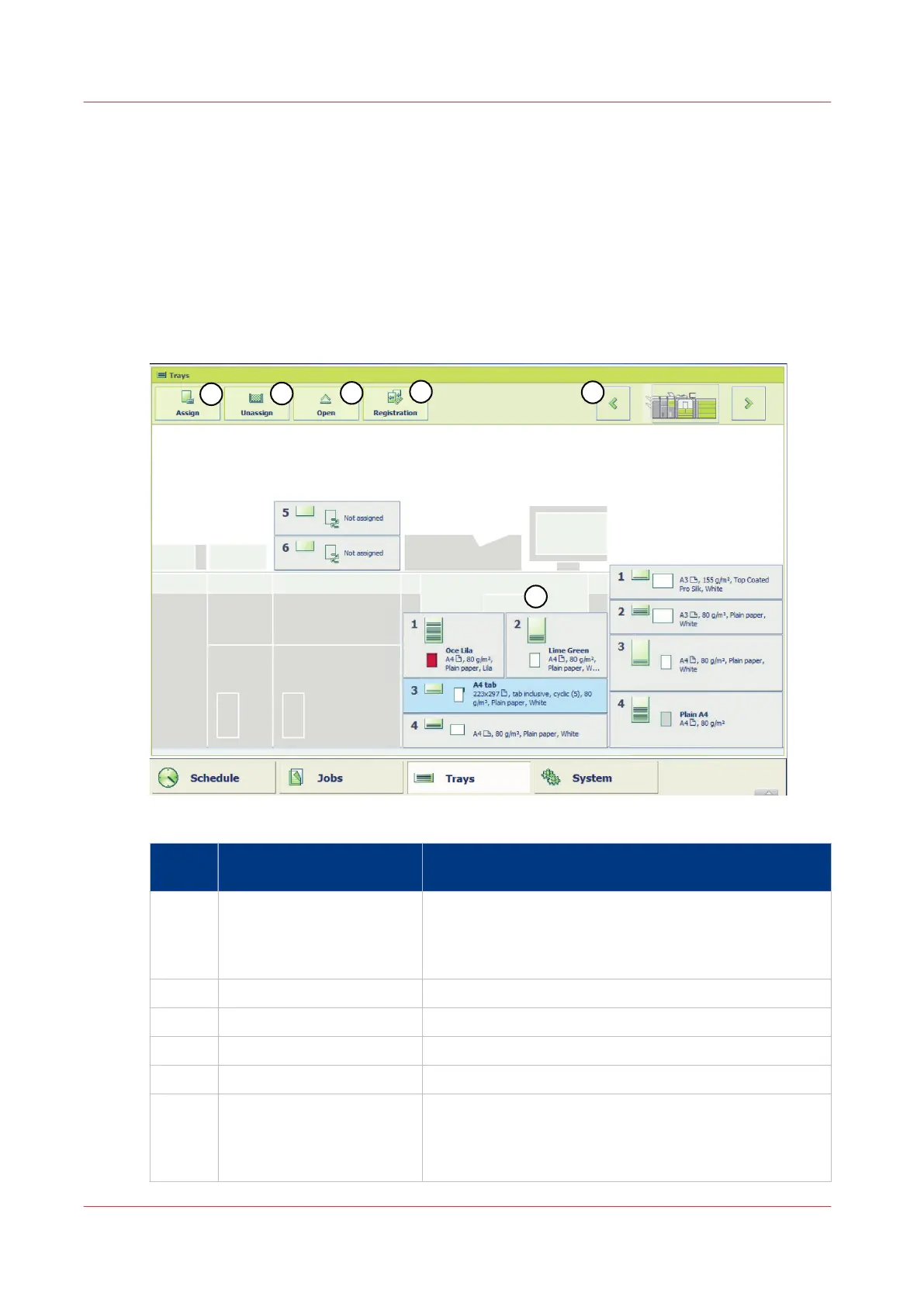
The [Trays] view has the following functions.
• Display the current content and filling level of the paper trays
• Open the paper trays and assign the media to paper trays
• Change the media that is currently assigned to a paper tray.
The Items of the [Trays] View
[18] Example of a configuration with 1 external paper module
Num‐
ber
Item Function
1 Content of the paper trays Indicate the current content and filling level of the paper
trays. The [Trays] view displays the parameters of the
media that are currently in the paper trays. The parame-
ters are a combination of icons and texts.
2 [Assign] button Assign media from the media catalogue.
3 [Unassign] button Unassign media from the paper tray.
4 [Open] button Open the selected paper tray to load the media.
5 [Registration] button Perform a media registration on the selected media.
6 Arrow buttons When your configuration contains more paper modules
than the [Trays] view can display in one screen, you can
touch the arrow buttons to change the part of the ma-
chine displayed.
Introduction to the [Trays] View
56
Chapter 5 - Media Handling
Canon varioPRINT 135 Series














 To Next Page