NOTE
It is recommended to perform the media registration when the list of [Scheduled jobs] is empty.
Otherwise, other jobs can start printing while the media registration takes place.
Via the Control Panel
Before you begin
NOTE
• The media-specific registration adjustment overwrites any automatic or manual media
specific registration performed previously.
• You cannot perform media-specific registration for temporary media. You must add the
temporary media to the media catalogue first.
Print the verification chart to verify the media registration.
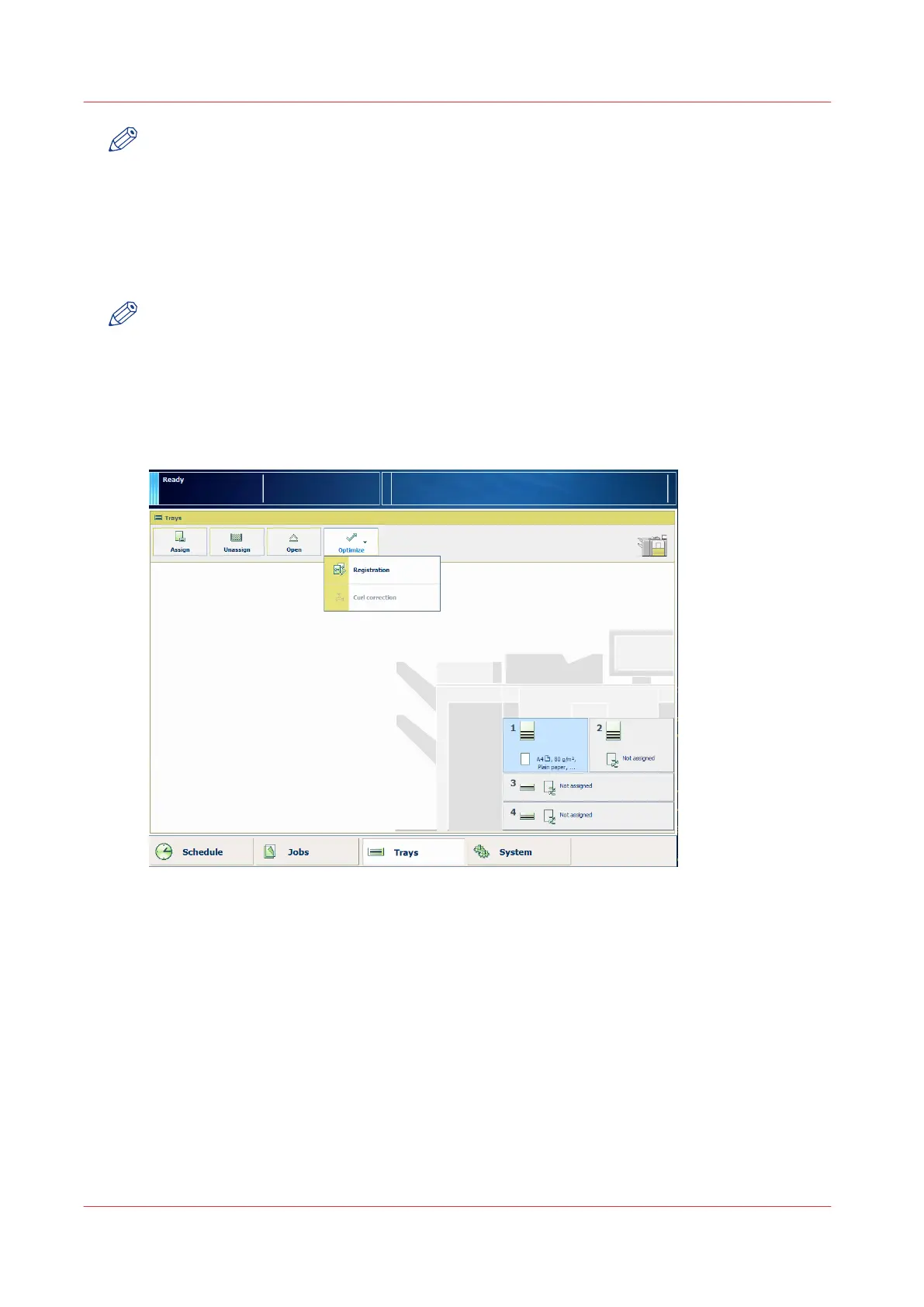
1. On the control panel, touch [Trays] to open the trays view.
2. Select the media for which you want to perform the media registration.
3. Touch [Optimize] -> [Registration].
When the media is larger than 420 mm (16.5") in X direction (feed direction), you get a
reminder to enter the actual sheet size via the manual adjustment.
4. At [Manual adjustment], touch [Start].
When a maintenance PIN is defined in the Settings Editor, a numerical keyboard appears.
5. Enter the maintenance PIN to start the manual adjustment.
6. Touch [Next].
You can also select the media via the media catalogue, instead of via the trays view.
1. On the control panel, touch [System] -> [Media] to open the media catalog.
Via the Control Panel
96
Chapter 5 - Media Handling
Canon varioPRINT 135 Series














 To Next Page