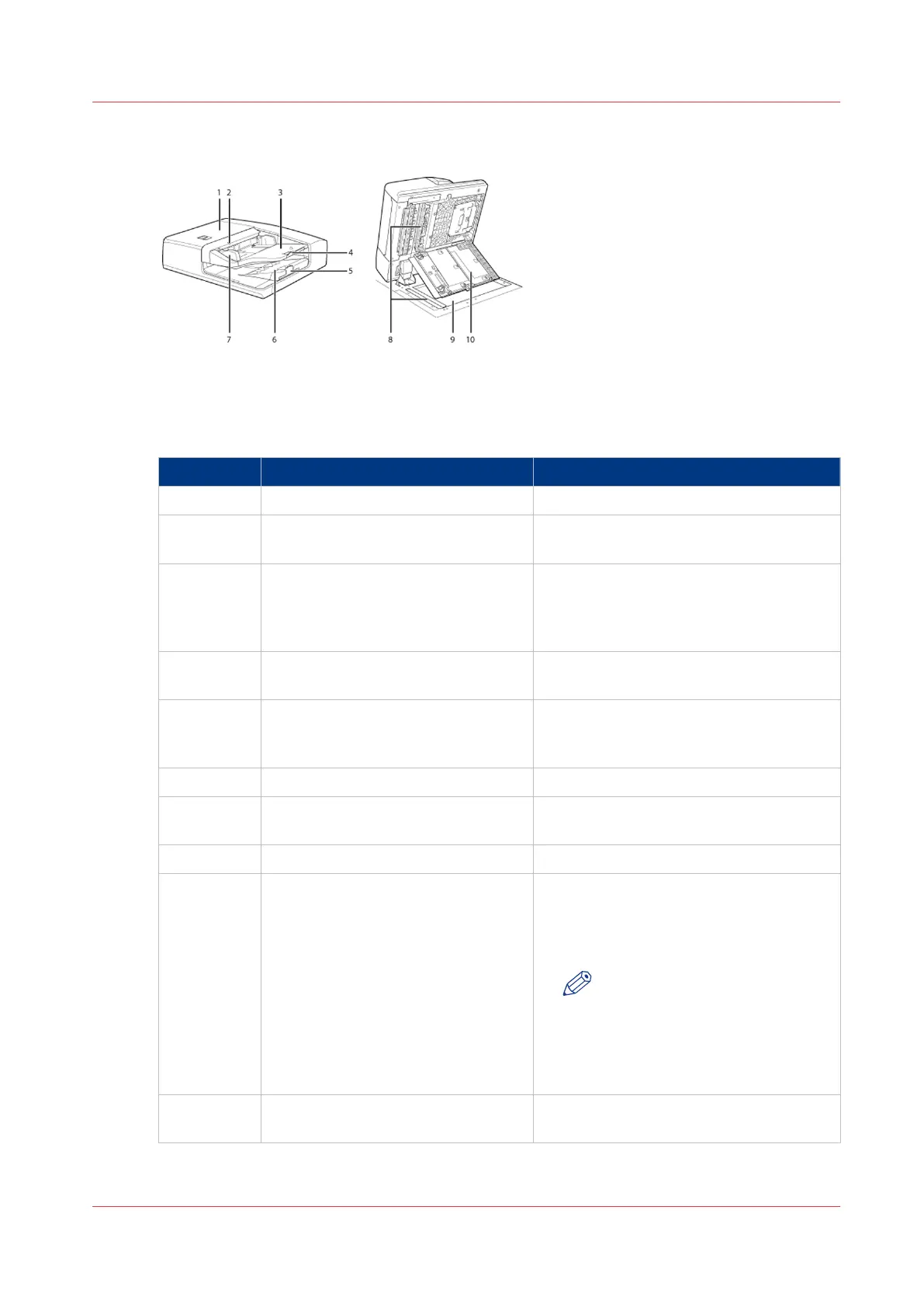
Illustration
[3] Main parts of the scanner
Parts and their Function
Main parts of the scanner
Component Function
1 ADF cover Open this cover to clear a paper jam.
2 Originals indicator Lights when originals are placed in the
originals tray of the scanner.
3 Originals tray Originals placed here are automatically
fed sheet by sheet into the ADF. Place
originals into this tray with the surface
that you want to scan face up.
4 Auxiliary originals tray Pull out this tray when you want to feed
large originals.
5 Auxiliary originals receiving tray The originals output tray receives the
scanned originals. Pull out the auxiliary
tray before you scan large originals.
6 Originals output tray Receive the scanned originals.
7 Paper guides Adjust the paper guides to match the
width of the original.
8 Document feed scanning area Scan documents sent from the ADF.
9 Glass plate Use the glass plate to scan special origi-
nals such as books, heavyweight origi-
nals, lightweight originals and transpar-
encies.
NOTE
When you use the glass plate to
copy or scan heavyweight origi-
nals, such as books or maga-
zines, do not press down hard
on the ADF.
10 Inner cover Open this cover to clean the document
feed scanning area.
The Main Parts of the Scanner
Chapter 2 - Main Parts
25
Canon varioPRINT 135 Series














 To Next Page