CDE360 Vector Control AC Drive Chapter 6 Parameters Description
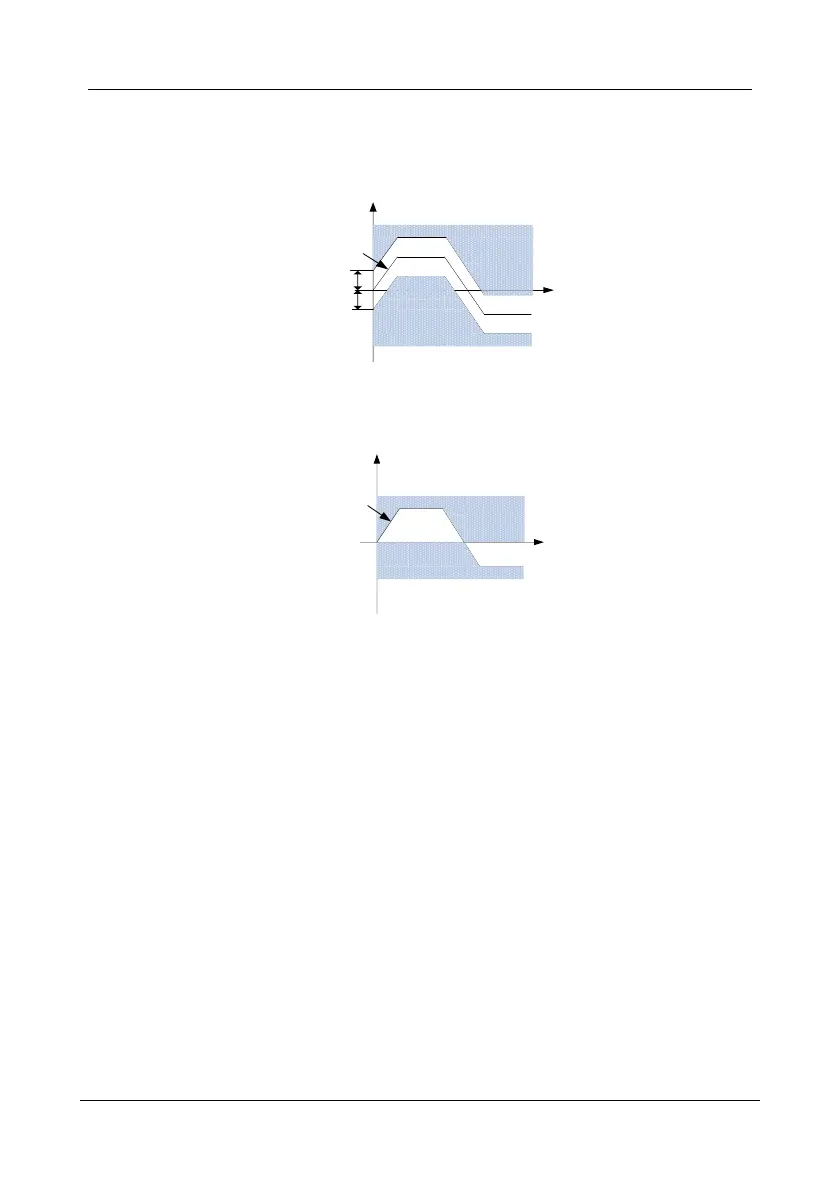
When d3.05 is set to 4 (Running frequency + windows), speed limit mode is shown by
Fig6-D11:
Running frequency
Negative window
t
Speed control
is active
Positive window
Speed control
is active
Torque control
is active
Speed
Figure 6- 30 d3.05=4 Running frequency + windows
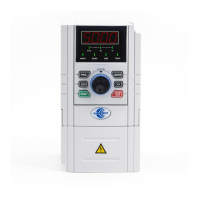
When d3.05 is set to 5 (0Hz to running frequency), speed limit mode is shown byFig6-D12:
Running frequency
t
Speed control
is active
Speed control
is active
Torque control
is active
Speed
Figure 6- 31 d3.05=5 0Hz to running frequency
Static torque
compensation
To overcome the static friction, static torque compensation is helpful.
100% of the setting corresponds to rated motor torque.
Dynamic torque
compensation
To overcome the dynamic friction, dynamic torque compensation is
helpful. 100% of the setting corresponds to rated motor torque.
Inertia torque
compensation
To overcome the system inertia, inertia torque compensation is helpful.
100% of the setting corresponds to rated motor torque.
This defines the time required for actual torque reference to change from


 To Next Page