3-CONTROLSANDINSTRUMENTS
Instrumentclusterdisplaysetting
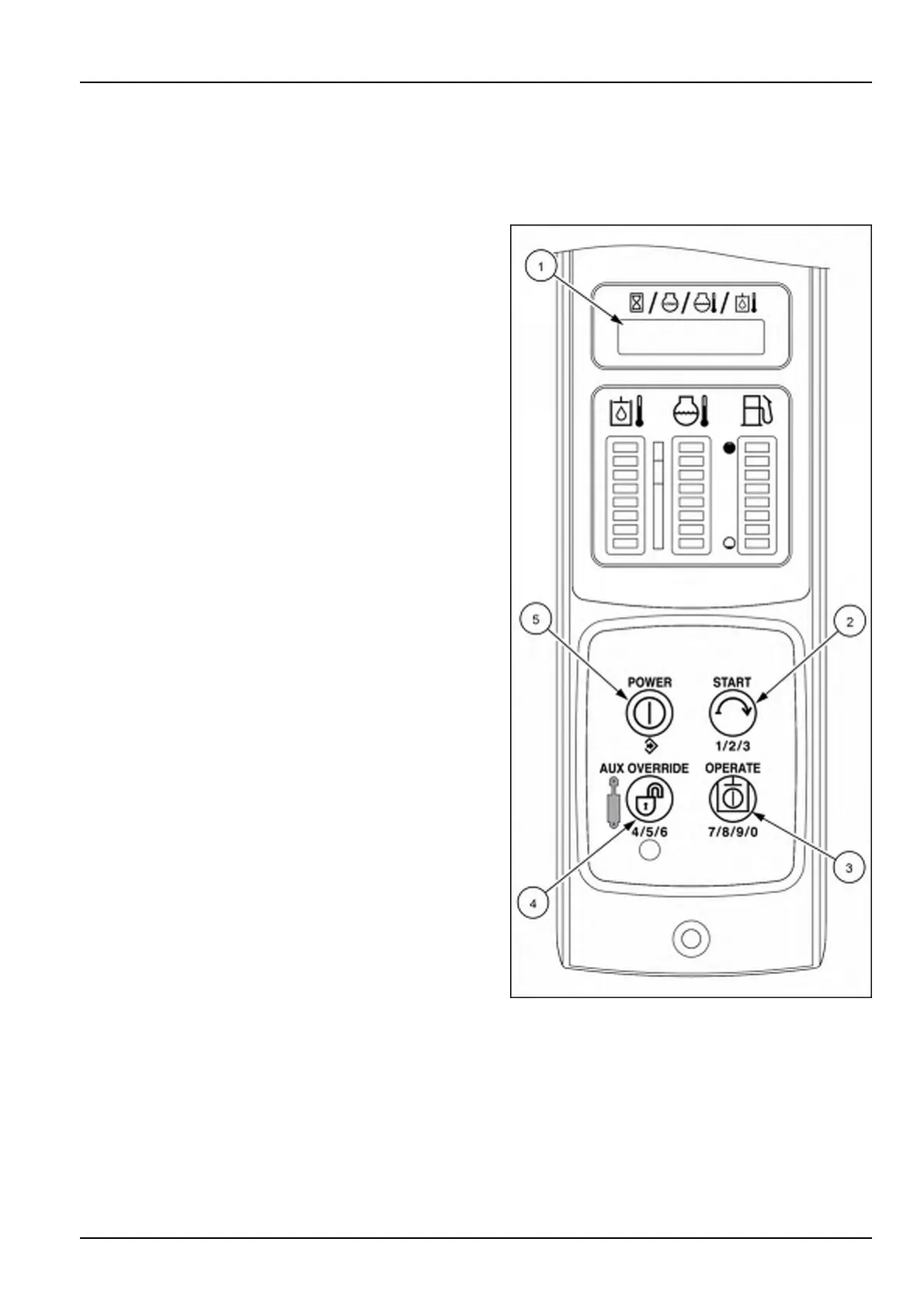
NOTE:TheAdvancedInstrumentCluster(AIC)imagesareshowninthissectionforthefourswitchbuttons(2),(3),
(4),and(5)usedtonavigatethroughtheinstrumentcluster.ThetoptwoswitchbuttonsontheElectronicInstrument
Cluster(EIC)arefunctionbuttonsandfunctionthesameasthePOWER(5)andSTART(2)switchbuttonsonthe
AICinstrumentpanelforthesetupmenufunctions.
Theoperatormaychooseacontinuousdisplayofoneof
thefourfollowingparametersorselectcyclefromthe
dSPLYtoplevelmenuandmomentarilydisplayallfour
oftheparametersinacycleforafewsecondseach.
•
HOUR-Enginehours.
•
RPM-EngineRPM.
•
COOLT-Enginecoolanttemperature.
•
HOILT-Hydraulicuidtemperature.
•
CYCLE-Cyclethoughallfourparameters.
NOTE:Theinstrumentclusterisprogrammedtodisplay
thelastsettingselectedwhenyousitintheseat.
TochangeorselectfromthedSPLYtoplevel
menu
Onceinthe“Setup”menu,presstheSTARTbuttonuntil
dSPLYappearsonthescreen.
1.PushthePOWERbutton(5)todisplaythecurrentse-
lection.
2.PushtheSTARTbutton(2)totogglethroughthese-
lections.
3.Oncethedesiredselectionappearsonthetextdisplay,
pushthePOWERbutton(5)tosavetheselection.
RAIL15SSL0143CA1
3-51


 To Next Page