3-CONTROLSANDINSTRUMENTS
Instrumentcluster
Menunavigationcontrols
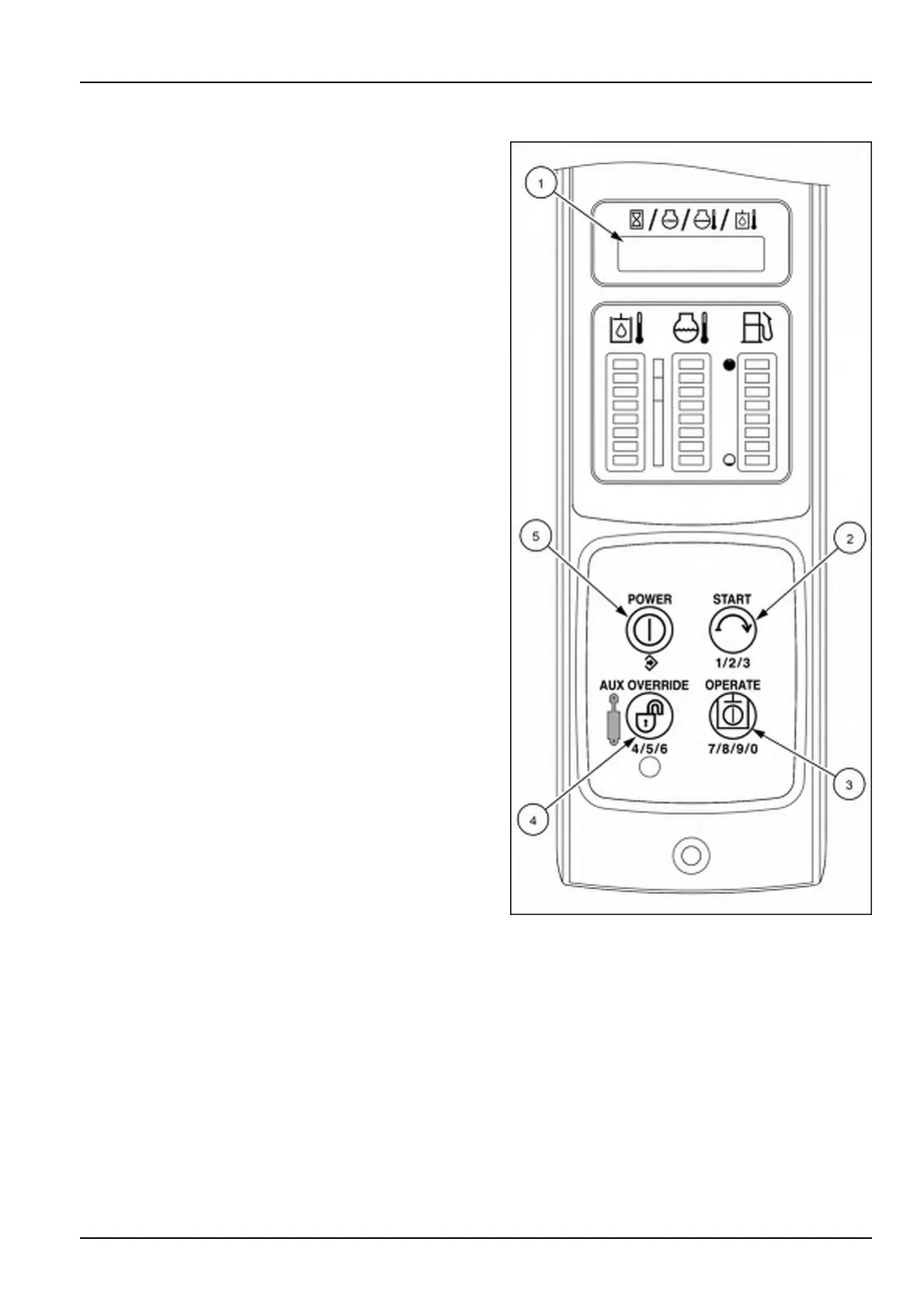
Usethefourswitchbuttonstonavigatethroughtheinstru-
mentclusterMenubyfollowingthesetupmenufunctions.
Manyofthesetupmenufunctionsareintendedforser-
vicetechniciansandowners.Contactyourdealerforthe
servicemanualorsecuritycodeinformation.
(1)TEXTDISPLAY
Displaysthemenutext.
(2)START
Navigatesselectionsoneverymenulevel.
Certainmenuswillprompttheusertoenteranaccess
codeorallowtheusertochangeanumericalvalue.
NOTE:PushingtheStartbuttonwillincrementtheash-
ingdigit1,2,3fornumberentry.
(3)OPERATE
Incrementstheashingdigit7,8,9,0fornumberentry.
(4)AUXOVERRIDE:
Exitsthesub-menuandmovestopleveltothenext
option.
Incrementstheashingdigit4,5,6fornumberentry.
(5)POWER
Fornumberentry,movesashingdigittothenextplace.
Savesentry.
Entersthesub-menu.
Toplevelmenuoptions
•
EXIT—Exitthesetupmenu.
•
EH—Customizethespeedofthemachine’sElectro
hydrauliccontrols(ifequipped).
•
dSPLY—Alternatemethodtoselectbetweenthese-
lecteddisplayparameters.
•
UNITS—AllowstheoperatortoselectFahrenheit(Im-
perialunits)orCelsius(StandardImperialunits).
RAIL15SSL0143CA1
•
JTIME—Jobtimer.Timerthatdisplaysengineoperat-
inghourssincelastreset.Idealforrentalsorjobtrack-
ing.
•
LOCK—Usedtocreate/changeownerandusercodes
NOTE:TheAdvancedInstrumentCluster(AIC)images
areshowninthissectionforthefourswitchbuttons(2),
(3),(4)and(5)usedtonavigatethroughtheinstrument
cluster.ThetoptwoswitchbuttonsontheElectronicIn-
strumentCluster(EIC)arefunctionbuttonsandfunction
thesameasthePOWER(5)andSTART(2)switchbut-
tonsontheAICinstrumentpanelforthesetupmenufunc-
tions.
3-49


 To Next Page