3-CONTROLSANDINSTRUMENTS
Electro-Hydraulic(EH)controllabilityselection
SettingcontrollabilitywithEasy-Electro–Hy-
draulic(EZ-EH)
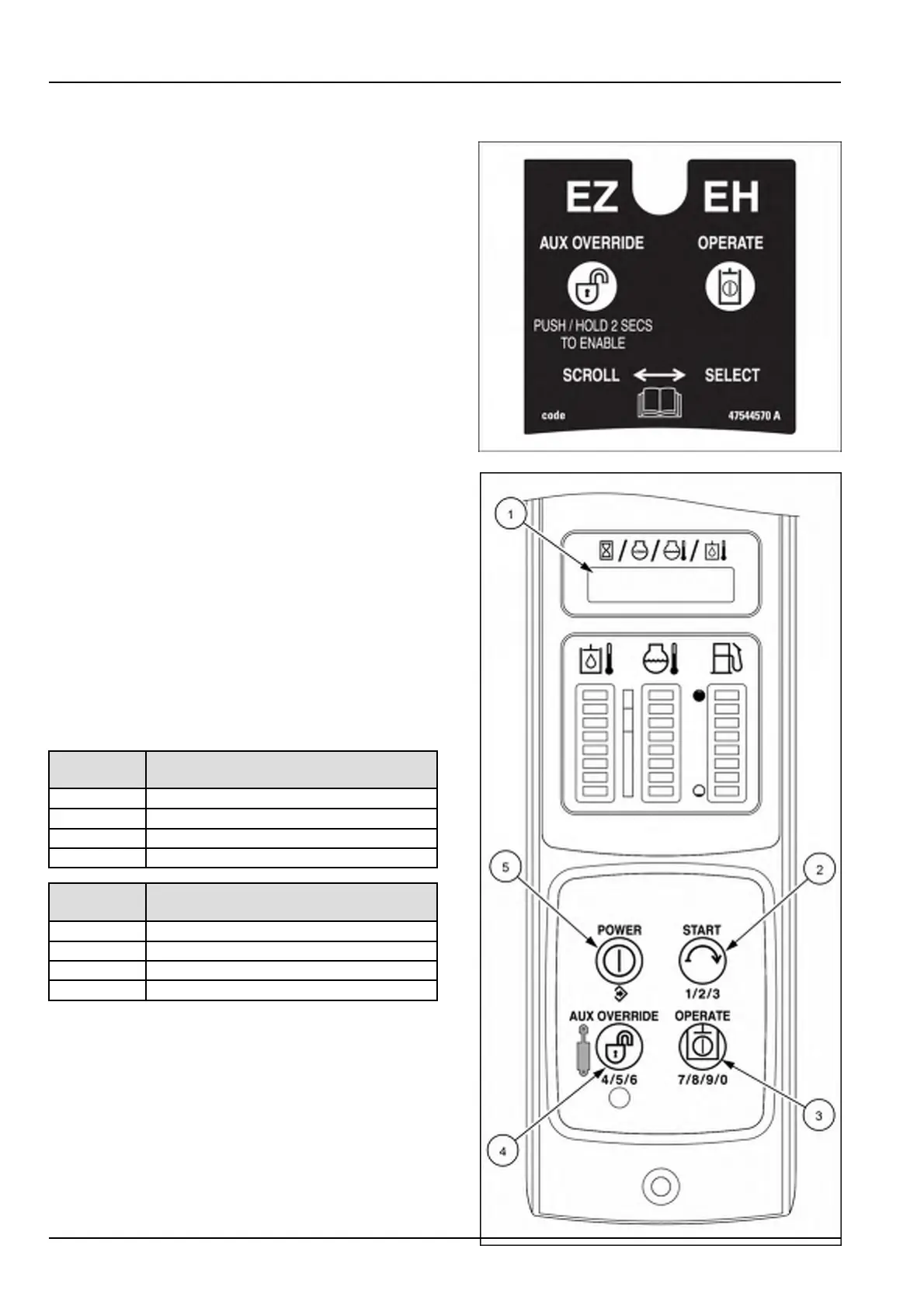
TheEasyElectro-Hydraulic(EZ-EH)machineshavethe
EZ-EHinformationsignlocatedatthetopoftheinstru-
mentclusterontheright-handcolumn.Thefollowing
instructionsarefortheshortcuttotheElectro-Hydraulic
(EH)setup.Usethesesettingstosetthespeedofthe
drive,liftandtilt.Alsothedriveandloaderliftarmset-
tings.
Allchangesmustbemadewiththehydraulicsdisabled
andtheoperatorintheoperator’sseat.
1.PressandholdtheAUXOVERRIDEbutton(1)fortwo
secondstoentertheEHshortcutmenu.
2.SPEEdwilldisplayonthedisplay(2).PresstheAUX
OVERRIDEbutton(1)toselectadifferentmenuitem
(DRIVE,EXIT,HOUR,HOILT,COOLT,RPM,orCY-
CLE).
3.PresstheOPERATEbutton(3)toentertheSPEEd
menu.Thecurrentsettingwillbedisplayed.
4.PresstheAUXOVERRIDEbutton(1)tochangethe
SPEEdsetting.
5.PresstheOPERATEbutton(3)tosaveanewsetting.
IfEXITisselected,youwillexitbacktothetopmenu
level.
NOTE:Ifanewsettingissaved,SAVEdwillbedis-
playedandyouwillexittothetoplevelshortcutmenu.
TheCTRLmenuworksthesameastheaboveSPEEd
menu.
Speed
setting
Drive,lift,andtiltresponsetocontrol
levermovement
SP-CCustomordefaultsetting
SP-LSlowresponse
SP-M
Mediumresponse
SP-HQuickresponse
Control
setting
Driveandloaderarmresponseto
controllevermovement
CR-CCustomordefaultsetting
CR-LSmoothresponse
CR-M
Mediumresponse
CR-H
Aggressiveresponse
RAIL13SSL0751BA1
RAIL15SSL0143CA2
3-52


 To Next Page