3-CONTROLSANDINSTRUMENTS
VieworresetJobTimer(JTIME)
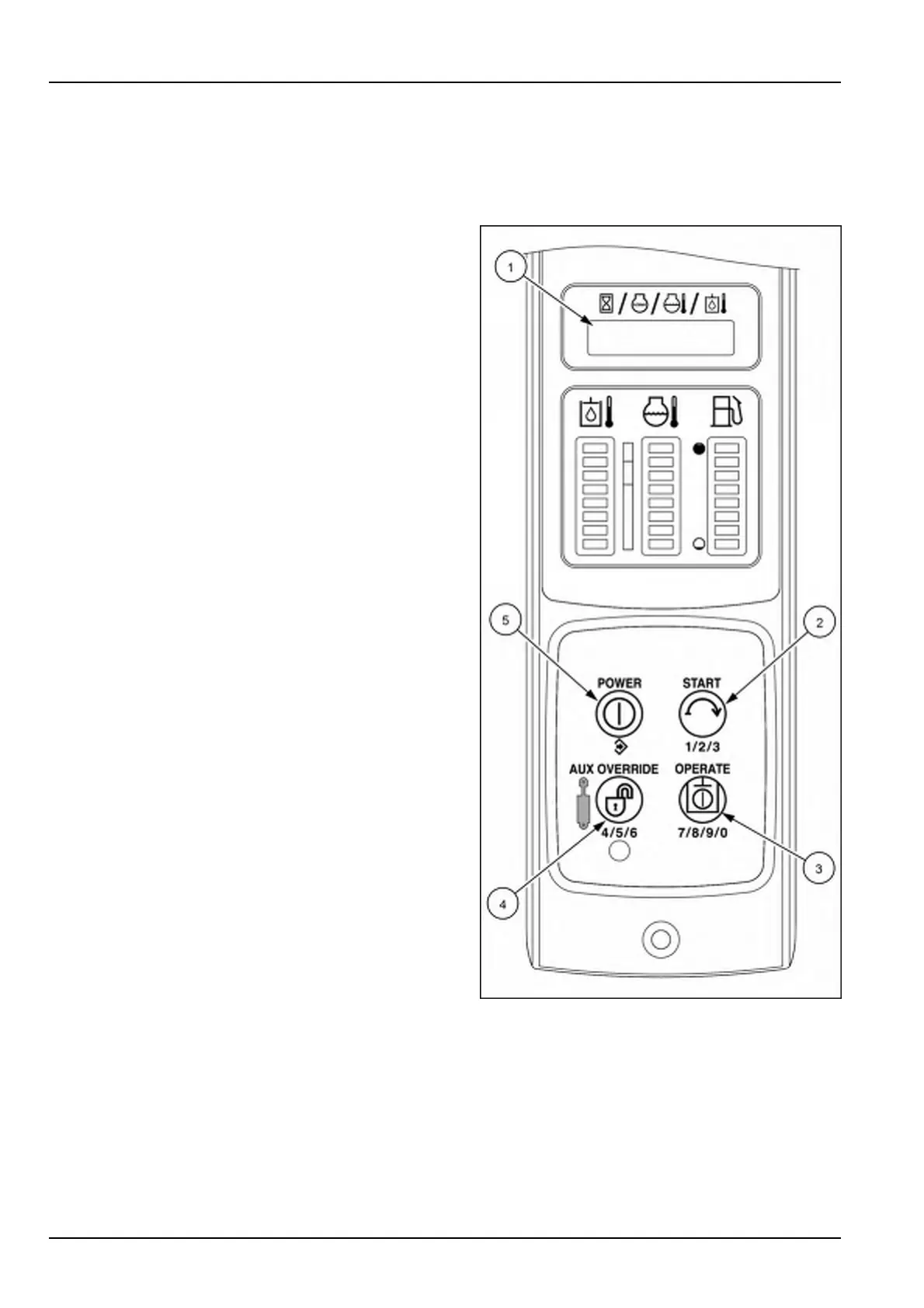
NOTE:TheAdvancedInstrumentCluster(AIC)imagesareshowninthissectionforthefourswitchbuttons(2),(3),
(4),and(5)usedtonavigatethroughtheinstrumentcluster.ThetoptwoswitchbuttonsontheElectronicInstrument
Cluster(EIC)arefunctionbuttonsandfunctionthesameasthePOWER(5)andSTART(2)switchbuttonsonthe
AICinstrumentpanelforthesetupmenufunctions.
Theoperatormaychoosetosetatimerthatwillrunin-
dependentfromthemachinehours.T ovieworresetthe
timer:
Onceinthe“Setup”menu,presstheSTARTbuttonuntil
JTIMEappearsonthescreen.
1.PushthePOWERbutton(5)toviewthecurrenttimer.
2.PushtheSTARTbutton(2)toresetorviewthetimer.
3.UsethePOWERbutton(5)tosavetheselection.
RAIL15SSL0143CA1
3-58


 To Next Page