3-CONTROLSANDINSTRUMENTS
Creatingcodes
Thepanelcannotbelockeduntilacodeiscreated.The
instrumentpanelhasoneownercodeanduptotenuser
codes.Theownercodewillalwaysunlockthepanel.
Theownercodewillberequiredtocreateorchangeuser
codesandtomodifytheownercode.
Ownercode:
OnceintheSETUPmenu,presstheSTARTbuttonto
movetotheLOCKmenu.PressthePOWERbuttonto
entertheLOCKmenu.
Tocreateanownercode:
Ifnoownercodeexists,thedisplaywillshowtheword
OWNCR(OwnerCreate),followedby00000.Writedown
theplanned5digitcodeoruseacodeyoualreadyknow.
NOTICE:Oncethecodeiscreated,thepanelcannotbe
unlockedwithoutthecode.Ifthepanelcannotbeun-
locked,contactyourDealer.
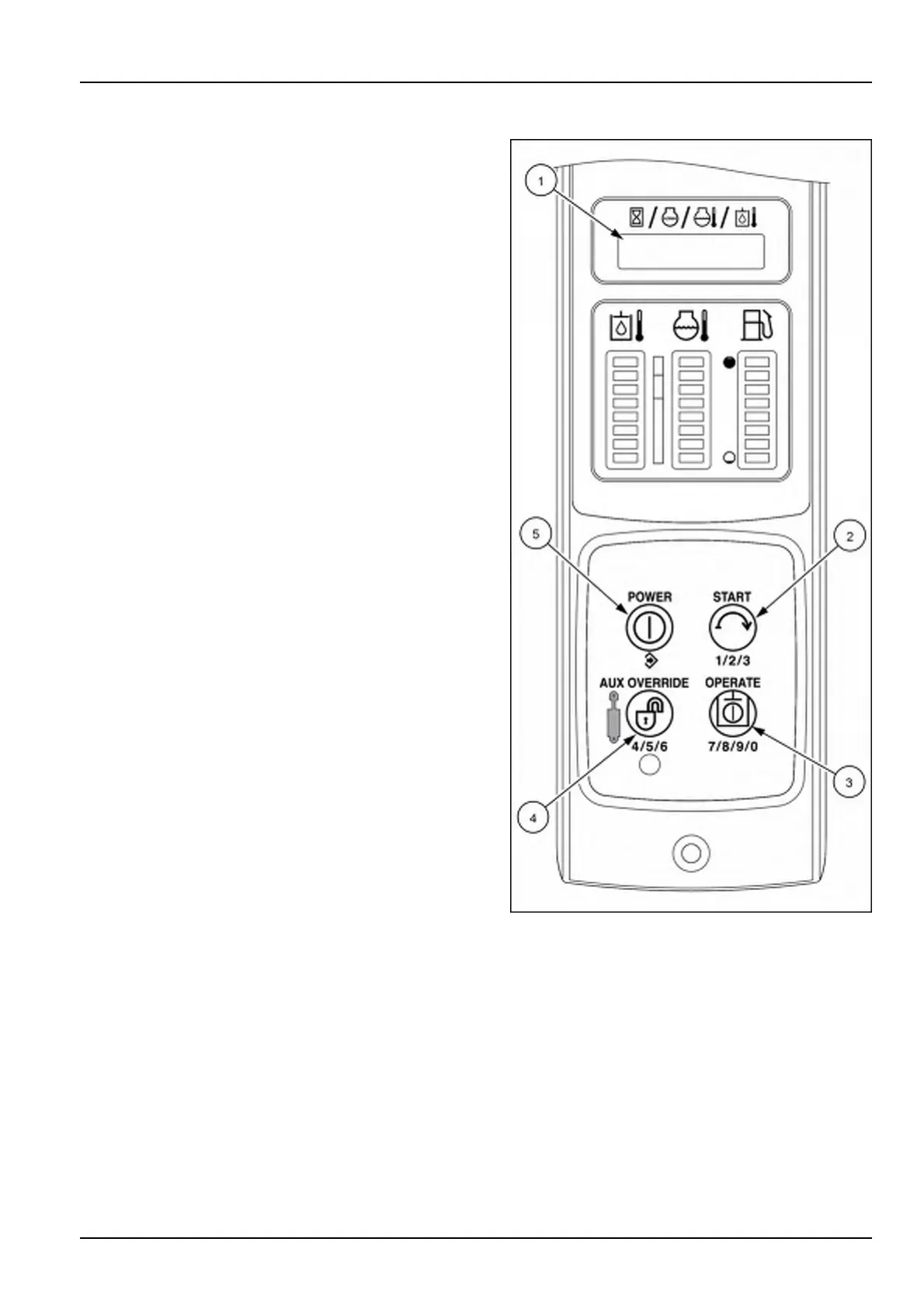
1.EntercodebyusingmultiplepressesoftheSTART
button(2),AUXOVERRIDEbutton(4),andOPERATE
button(3).PressthePOWERbutton(5)tosaveeach
digitandmovetothenext.
NOTE:Fornumbers1,2,3usetheSTARTbutton.
Fornumbers4,5,6usetheAUXOVERRIDEbutton.
Fornumbers7,8,9,0usetheOPERATEbutton.
2.PressthePOWERbutton(5)afterthefthdigittoenter
thecode.Theenginepreheatlampwillilluminateand
thedisplaywillbeginthethirtysecondcountdown.
3.PresstheSTARTbutton(2)tomovetotheexitmenu,
andpressthePOWERbutton(5)toexitthe“Setup”
menu.Thepanelisnotlockedatthispoint.
RAIL15SSL0143CA3
3-61


 To Next Page