Chapter 3 – Illuminator Description
Section 3.7 – Illuminator Settings
3-27
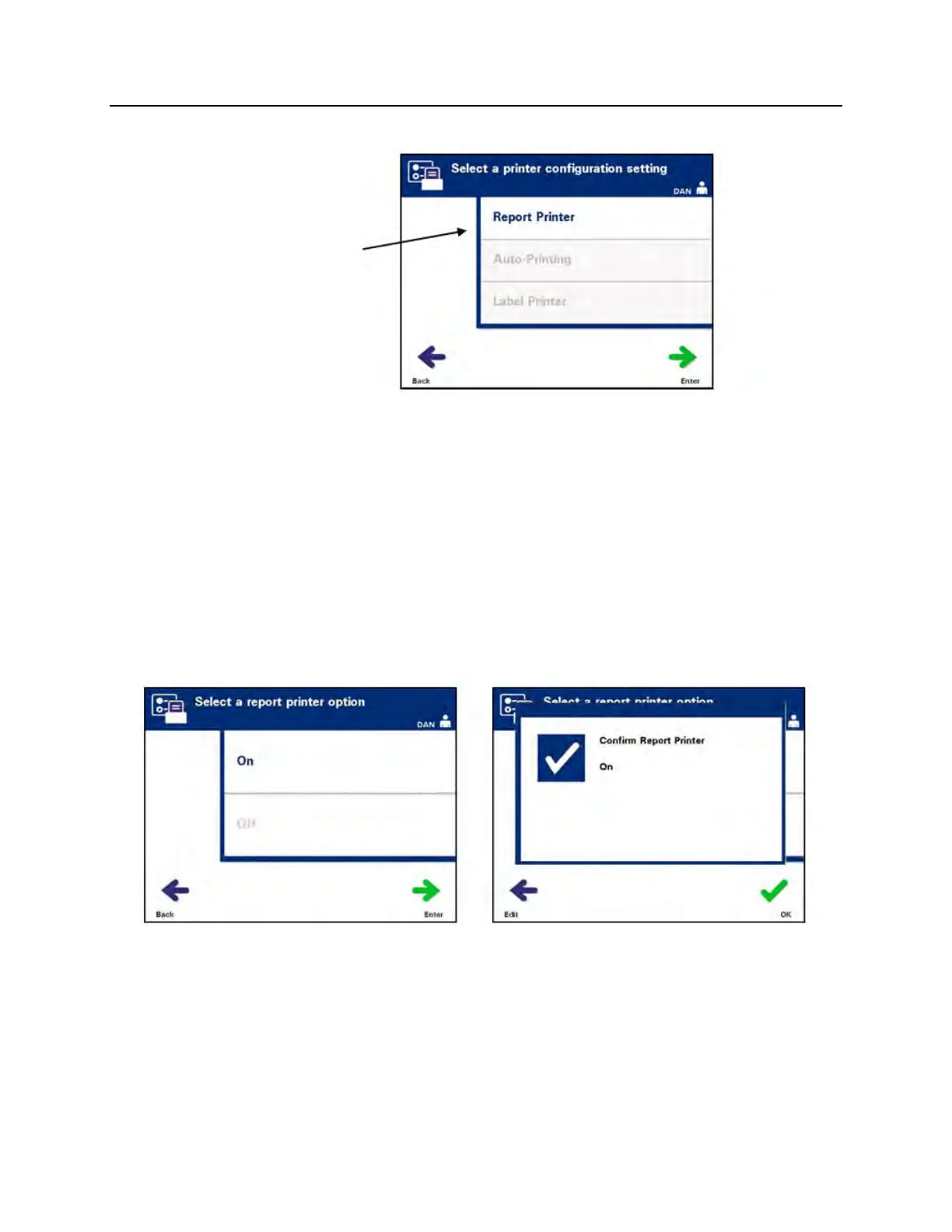
• The ‘Select a printer configuration setting’ screen will appear.
• Use the arrow buttons to choose the ‘Report Printer’ option.
• Press the ‘Enter’ button to select the ‘Report Printer’ option.
The ‘Select a report printer option’ screen will appear.
• Use the arrow buttons to choose either ‘On’ or ‘Off’. Selecting
the ‘On’ option will allow you to print the last treatment
report, a specific treatment report, a shift report for a given
day, or all treatment reports in a date range. If not using the
optional printer, select the ‘Off’ option. (Refer to Chapter 4 for
printing directions.)
• Press the ‘Enter’ button to select ‘On’ or ‘Off’. A confirmation
screen will appear.
• If the option is incorrect, press the ‘Edit’ button to return to the
‘Select a report printer option’ screen. Use the arrow buttons
to select the correct option.
• If the selection is correct, press the ‘OK’ button to confirm the
selection. The ‘Select a printer configuration setting’ screen
will appear.



 To Next Page