Chapter 3 – Illuminator Description
Section 3.7 – Illuminator Settings
3-33
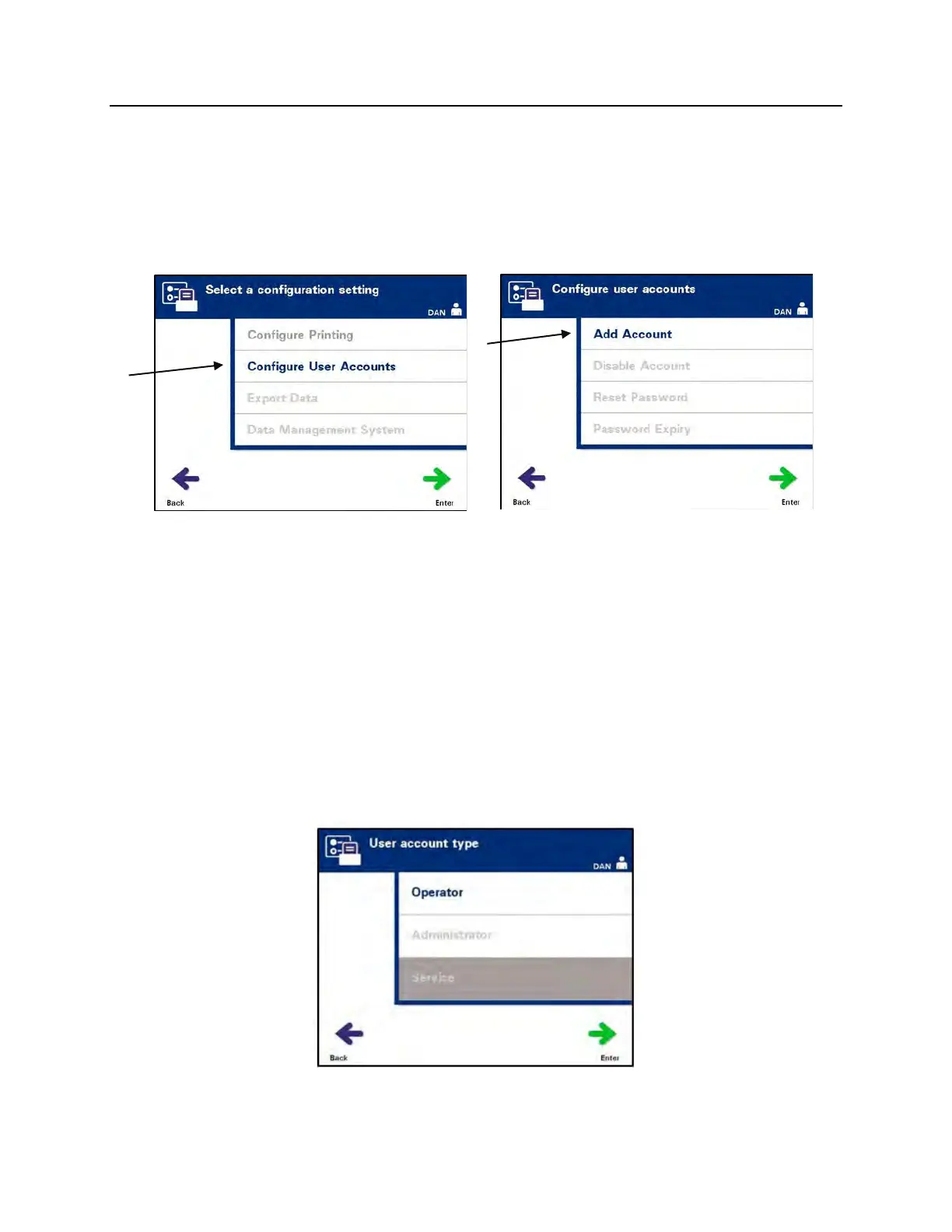
Configure User Accounts
Add Account
Use to add User accounts to the Illuminator.
• From the ‘Select a configuration setting’ screen, use the arrow
buttons to choose the ‘Configure User Accounts’ option.
• Press the ‘Enter’ button to select the ‘Configure User
Accounts’ option. The ‘Configure user accounts’ screen will
appear.
• Use the arrow buttons to choose the ‘Add Account’ option.
Press the ‘Enter’ button to select the ‘Add Account’ option.
• The ‘User account type’ screen will appear and provide a
choice of user account to add, either Operator or
Administrator.
NOTE:
The Service account option is accessible only by a Cerus-
authorized field service engineer. This option is disabled for
Administrators.
• Use the arrow buttons to select the account type, Operator
or Administrator. Press the ‘Enter’ button.



 To Next Page