Chapter 3 – Illuminator Description
Section 3.7 – Illuminator Settings
3-45
Export Service
Data in Date
Range
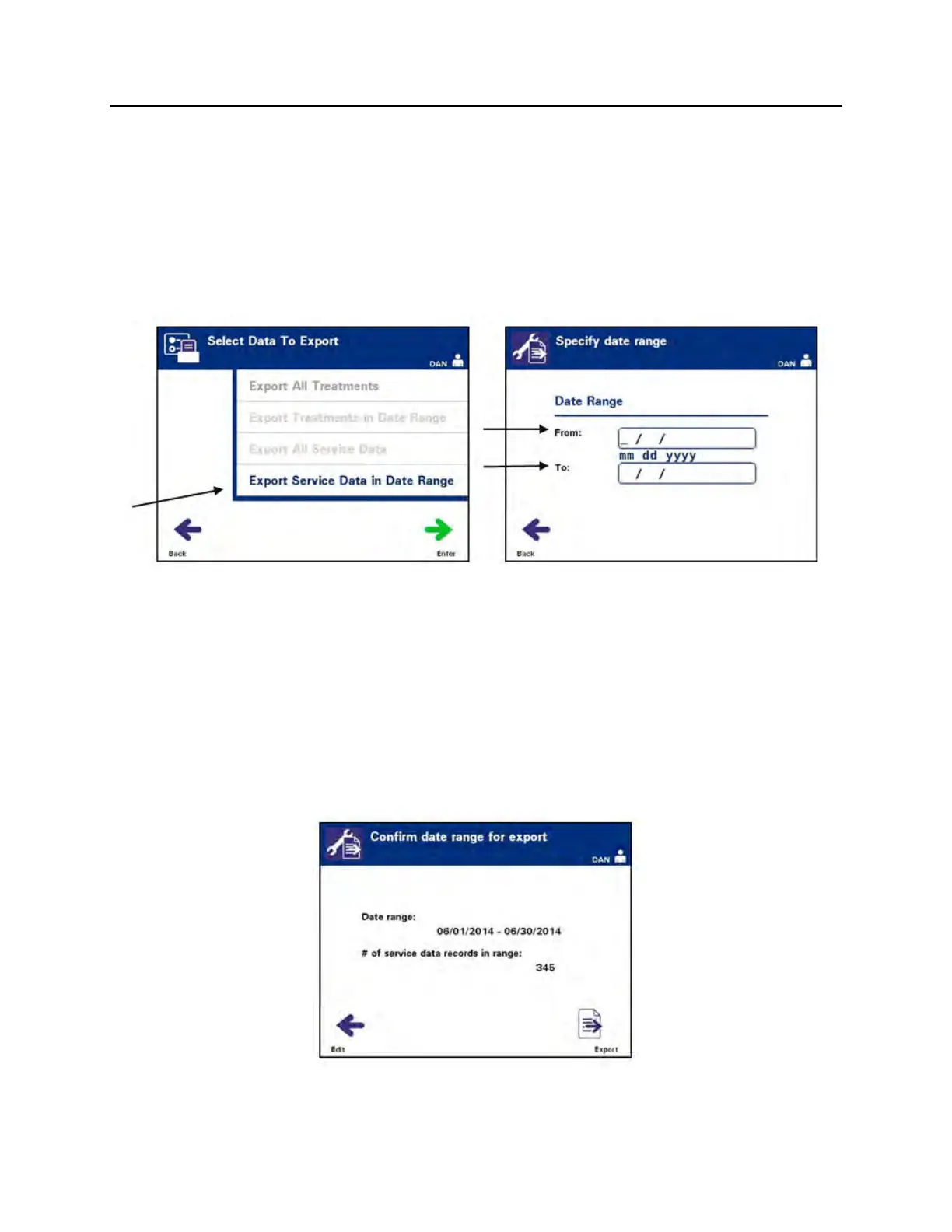
Use ‘Export Service Data in Date Range’ to export service data
within a specified date range to a host computer.
• From the ‘Select Data to Export’ screen, use the arrow buttons
to choose the ‘Export Service Data in Date Range’ option.
Press the ‘Enter’ button to select the ‘Export Service Data in
Date Range’ option.
• The ‘Specify date range’ screen will appear. Use the keypad
to enter the ‘From’ date.
• Use the arrow buttons to advance to the ‘To’ date. Use the
keypad to enter the ‘To’ date.
• Press the ‘Enter’ button.
NOTE:
After ‘Enter’ is pressed, there may be a delay while the illuminator
prepares the files. DO NOT re-press ‘Enter’.
• The ‘Confirm date range for export’ screen will appear.



 To Next Page