Home
ClearCom
Conference System
FreeSpeak II
Page 86
ClearCom FreeSpeak II - Page 86
185 pages
Manual
Save Page as PDF
To Next Page
To Next Page
To Previous Page
To Previous Page
Loading...
User Guide
|
FreeSpeak II
™ Base station version
Page
86
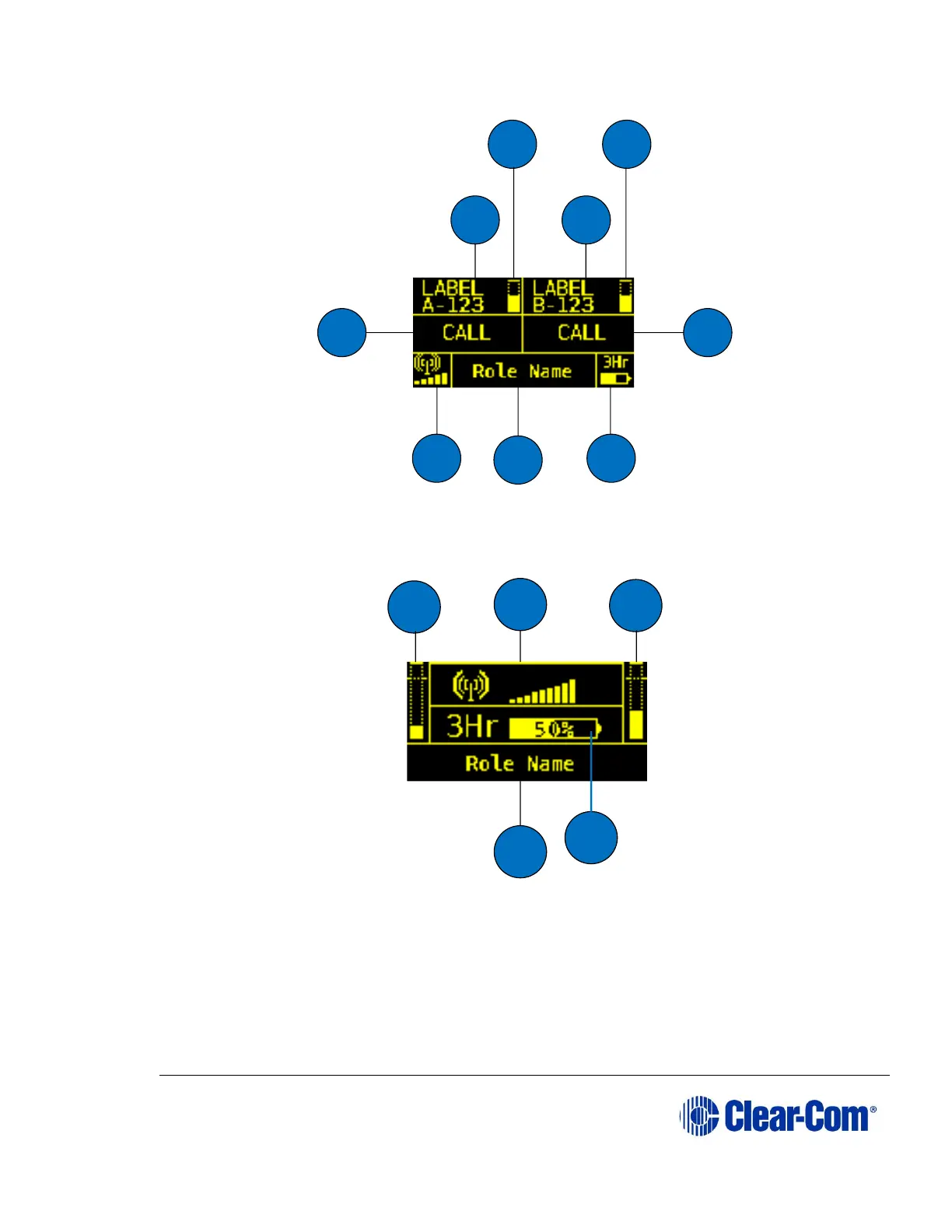
Figure 7-2 Intercom displ
ay mode
Partyline display mode
–
displays role name, signal
strength, battery level
and volume levels for channel A and
channel B.
Figure 7-3 Partyline displ
ay mode
A
B
D
C
G
H
I
E
F
H
I
G
E
F
85
87
Table of Contents
Main Page
Default Chapter
2
Document Reference
2
Table of Contents
3
1 Important Safety Instructions
10
Safety Symbols
11
2 Introduction to Freespeak II
12
An FS II Communication System
13
Freespeak II System Capacity
14
National Radio Carrier Frequencies
15
Using Multiple Base Stations in the same Radio Frequency (RF) Space
16
FSII 1.9 Ghz/Fsii 2.4 Ghz
16
3 Installing a System
17
Surveying a Site in Standalone (Rigging) Mode
17
Placing the Base Station
18
Placing the Antennas and Splitters
19
Wiring the Antennas and Splitters
19
Power Supplies to the Components of an FS II System
20
Determining Coverage Areas
22
Doing a Site Survey to Determine Coverage Areas
23
Doing a Site Survey with a Beltpack
23
Testing Antenna Handoff
25
Getting Information on Active Antenna Status
26
Assigning Beltpacks to Coverage Areas
26
Conditions Affecting Coverage Areas
27
Surveying a Site in Standalone (Rigging) Mode
27
Registering Beltpacks
29
Over the Air (OTA) Registration of a Beltpack from the Base Station
30
4 Connecting the Base Station
33
Understanding the Back-Panel Connectors
34
Connecting to Partyline Intercom Systems
37
Clear-Com and Compatible Partyline
37
Connecting to an RTS™ Wired Beltpack
39
Front-Panel Adjustments for Partyline Connections
39
Troubleshooting Partyline Connections
40
Wireless Partyline
41
Connecting to 4-Wire and Digital Matrix Intercom
42
Connecting to Clear-Com Matrix Plus
44
Connecting to Clear-Com Eclipse Digital Matrix
44
Connecting with Other Digital Matrix Intercom Systems
45
Connecting with Other 4-Wire Devices
45
Connecting to a Program Audio Source
46
IFB Configuration
46
Connecting to the Stage Announce Output
47
Connecting to a PC
48
Connecting Using the Serial Port
48
Connecting Using the LAN Port
50
Connecting to Transceiver/Antennas
50
Connecting One Transceiver/Antenna Directly to a Transceiver Port
50
Connecting Transceiver/Antennas with a Splitter (PD2203)
51
Powering an Antenna or Antenna Splitter
52
5 Operating the Base Station
53
Introduction
53
Understanding Front-Panel Operation
54
Call Channel a
54
Call Channel B
54
6 Programming a System from the Base Station
58
Introduction
59
Using the Base Station's Programming Menus
60
Saving Changes
60
Changing Beltpack Labels
60
To Change a Beltpack Label
60
Setting and Changing Port Labels
62
To Create a Port Label
62
Setting and Changing Group Labels
64
To Create a Group Label
64
Adding Group Members
66
To Assign Members to a Group
66
Beltpacks
67
Assigning Audio Routes to a Beltpack
67
Setting the Beltpack Audio Level
70
Setting Beltpack Latching
71
Over the Air (OTA) Beltpack Registration from the Base Station
71
Setting Input and Output Port Levels
71
Input Level
72
Output Level
72
To Set the Audio Level for a Port
72
Setting Port Call Destination
73
Configuring a Wired Partyline
75
To Select the Type of Partyline System for a Partyline Port
76
To Configure the Noise Gate for a Partyline Port
77
To Configure the Levels for a Partyline Port
78
Base Station System Menu
80
System Info
81
Restoring the Defaults
81
Antennas
81
Setting the IP Address
82
Locking Front-Panel Enable Buttons
83
Remote Microphone Kill
83
Kill Beltpack Microphones
84
Kill Partyline Microphones
84
Kill All Microphones
84
Battery Indicator
84
7 Operating the Wireless Beltpack
85
Overview of the Wireless Beltpack
85
Beltpack User Controls
88
Top Controls
88
Beltpack Display
89
Beltpack Headset Tones/Alerts
89
Front Controls
90
Beltpack Bottom Connectors
92
Beltpack Rear Panel
94
Using the Beltpack
94
Registering the Beltpack
94
Charging the Beltpack
96
Powering on the Beltpack
97
Using the Beltpack to Communicate
98
Entering and Exiting Menu Mode
98
Setting and Adjusting Listen Levels
98
Upgrading Beltpack Firmware
99
8 Programming on the Beltpack
101
Introduction to Programming on the Beltpack
101
Configuring the Beltpack Volume Settings
102
Configuring the Beltpack Channel Volumes and Master Volume
103
Configuring the Volume Level of the Line Input
103
Configuring the Rotary Controls
103
Configuring the Beltpack Headset
104
Setting Headset Autodetect
104
Setting the Sidetone Level
105
Setting the Headset Limiter
105
Configuring the Beltpack Microphone
105
Setting the Microphone Type
106
Setting the Microphone Echo Cancellation
106
Configuring the Beltpack Display and Leds
106
Setting the Display and LED Brightness
107
Setting the Display DIM Timeout
107
Setting the Display off Timeout
107
Configuring the Beltpack Alarm Options
108
Setting the Low Battery Alarm
108
Setting the Low Battery Alarm Threshold
109
Setting the out of Range Alarm
109
Setting the Call Alert
109
Selecting the Beltpack Role Default Set
110
Selecting the Beltpack Administration
110
Enabling OTA Registration Mode
111
Setting Full Menu Access
111
Setting System Sync Mode
112
Setting the Listen Again Option
112
Accessing Beltpack Information
113
Setting Display Mode
113
Setting System Connect
113
Enabling over the Air (OTA) Registration Mode from a Beltpack
114
Performing a Site Survey
114
9 Operating the Transceiver/Antenna
116
Transceiver/Antenna
116
IP Rating (International Protection Marking)
116
FS II Transceiver/Antenna Connector Panel
117
Cabling the Antennas
118
Beltpack Support Capacities for Transceiver/Antennas
118
Coverage Areas under Various Conditions
119
Transceiver/Antenna Setup Rules and Tips
119
Upgrading the Antenna/Transceiver Firmware
120
Transceiver/Antenna Splitter (PD2203)
121
PD2203 Front Connector Panel
121
PD2203 Rear Panel
122
Connecting an Antenna Splitter to the FS II Base Station and to Transceiver/Antennas
123
10 FS II Configuration Editor
124
Loading Configurations
125
Loading a Local Configuration File
125
Loading a Configuration File from a Base Station Using a Serial Link
126
Loading a Configuration from a Base Station Using Ethernet
127
Loading a Configuration File to the Base Station from the Configuration Editor
128
Configuration Editor Screen Basics
129
Registering Beltpacks Using the over the Air (OTA) Facility
130
Configuring Beltpacks
133
Selecting the Beltpack to Register or Edit
133
Registering Beltpacks Using the Micro USB Cable
133
Viewing Beltpack Registration Information
134
Viewing Beltpack Properties
134
Beltpack Audio Levels
136
Beltpack Alarm Options
137
Setting the Beltpack Role Options
138
Assigning Beltpack Keys
140
Configuring the Reply Key
141
Key Assignment Types
142
Configuring Ports
143
Selecting the Port to Edit
143
Changing the Label of the Port
143
Selecting the Port Type
144
Selecting a Communication Path for the Port
145
Setting the Input, Output and VOX Levels
146
Configuring Groups and Wireless Partylines
146
Selecting the Group to Edit
147
Changing the Label of the Group
147
Changing the Members of the Group
148
Displaying a Group Overview
148
Reducing Antenna Interference
149
Configuring Ifbs
149
Selecting the IFB to Edit
150
Changing the Label of the IFB
150
Changing the IFB Sources
150
Setting the IFB DIM Level
150
Configuring Base Station System Parameters
151
Editing the System Parameters
151
Change Base Station System Identifier
152
Enabling over the Air (OTA) Registration
152
Increasing or Decreasing the Number of Beltpacks Per Base Station
152
Diagnostics
154
Beltpack Status
155
Static Log
157
Antenna Status
157
Antenna Roles
158
Event Log
159
Upgrading the Configuration Editor
161
11 Upgrading the Base Station from FS to FS II
162
Setting the Base Station IP Address
162
Upgrading the Base Station Firmware
162
Upgrading the Base Station FPGA
162
Loading the Default Map
163
12 Menu Maps
168
Base Station Menu Map
168
Beltpack Menu Maps
173
13 Specifications
178
Freespeak II Base Station
178
Freespeak II Beltpack
179
Freespeak II Transceiver/Antenna
180
Freespeak II Transceiver/Antenna Splitter
180
Transmission Method
181
14 Compliance
182
Other manuals for ClearCom FreeSpeak II
Quick Guide
2 pages
Quick Start Guide
2 pages



 To Next Page