Codes
01, 10, or
11
select one
of
three
possible registers
from the normal
color register group,
from
which the
actual color data
is
taken.
Sprite
a
or
1
'{
00
01
10
11
Sprite 2
or
3
'{
00
01
10
11
Sprite 4
or
5
'{
00
01
10
11
Sprite 6
or
7
'{
00
01
10
11
"V
Color Register Set
Unused
Unused
Unused
Unused
Figure
4-6:
Color Register Assignments
16
~
~YieldS
~
Transparent
V
28
31
If
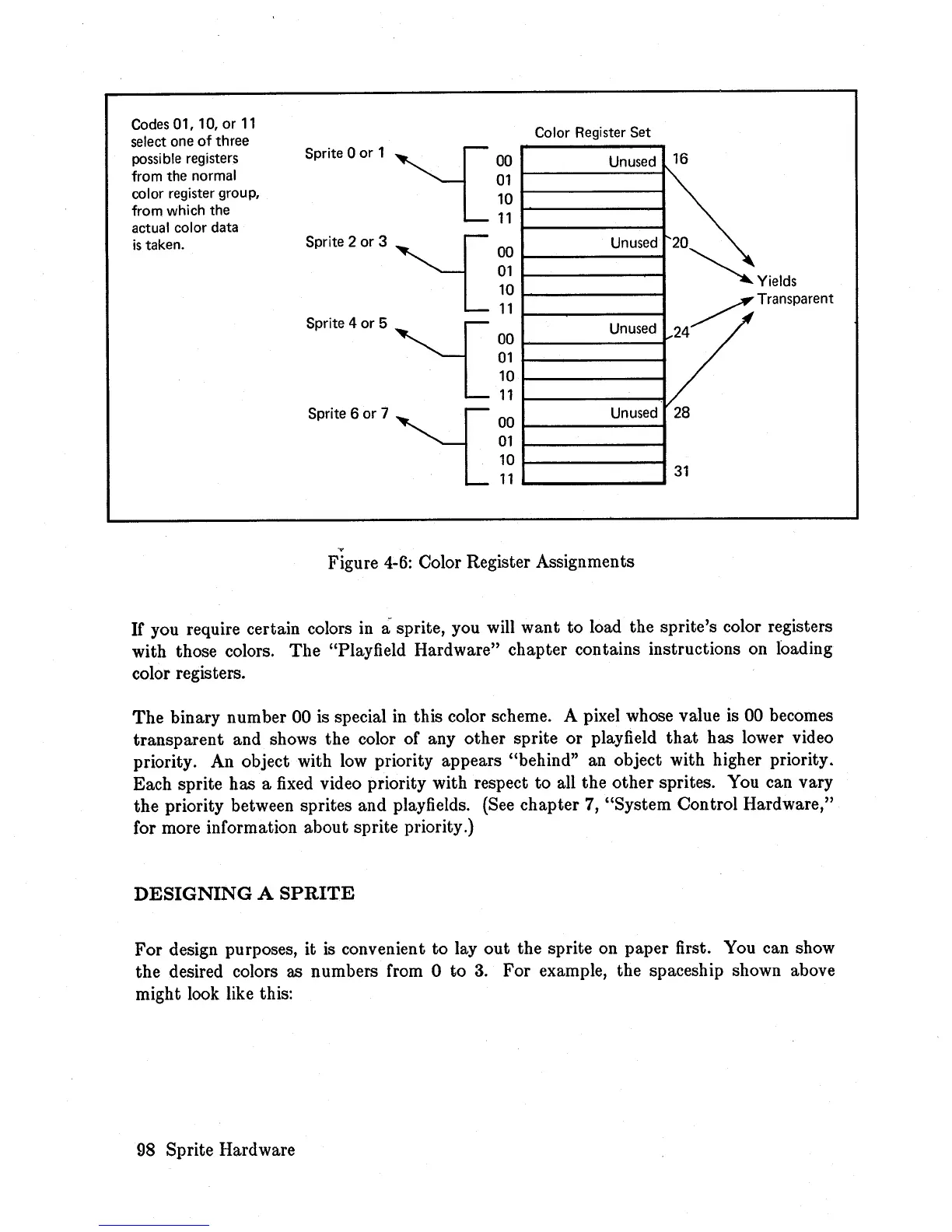
you require certain colors in a sprite, you will want to load the sprite's color registers
with those colors.
The
"Playfield Hardware" chapter contains instructions on loading
color registers.
The
binary number 00 is special
in
this color scheme. A pixel whose value is 00 becomes
transparent and shows the color of any other sprite or playfield
that
has lower video
priority. An object with
low
priority appears "behind" an object with higher priority_
Each sprite has a
fixed
video priority with respect to all the other sprites. You can vary
the
priority between sprites and playfields. (See chapter 7, "System Control Hardware,"
for more information about sprite priority.)
DESIGNING
A
SPRITE
For
design purposes, it
is
convenient to
layout
the sprite on paper first. You can show
the desired colors as numbers from 0 to
3.
For example, the spaceship shown above
might look like this:
98 Sprite Hardware














 To Next Page