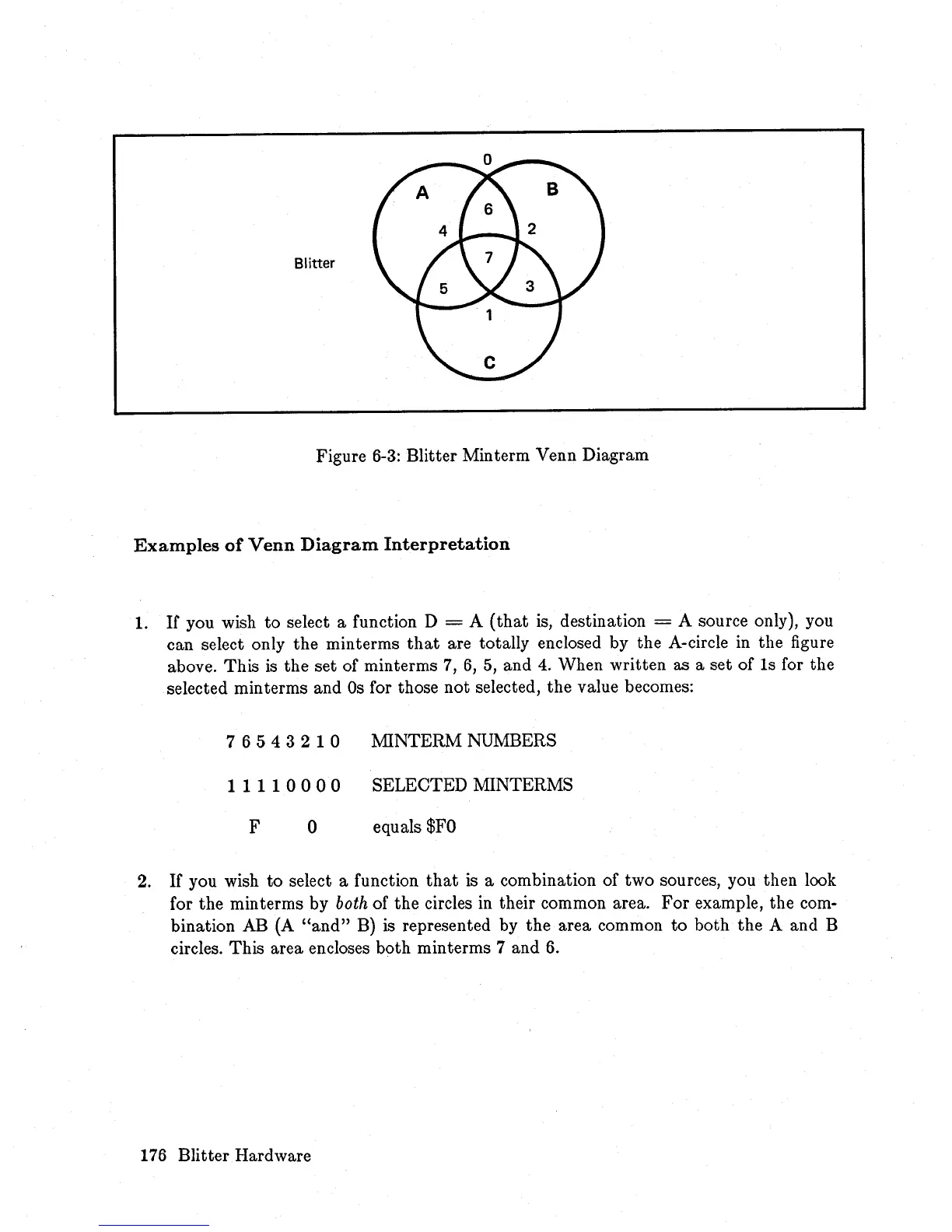
Blitter
Figure
6-3:
Blitter Minterm Venn Diagram
Examples
of
Venn
Diagram
Interpretation
1.
It
you wish
to
select a function D = A
(that
is, destination = A source only), you
can select only the minterms
that
are totally enclosed by the A-circle
in
the figure
above. This
is
the set of minterms
7,
6,
5,
and
4.
When written as a set of
Is
for the
selected min terms and
Os
for those
not
selected, the value becomes:
76543210
MINTERM NUMBERS
11110000
SELEOTED MINTERMS
F
o equals
$FO
2.
If
you wish
to
select a function
that
is
a combination of two sources, you then look
for the min terms by
both
of the circles in their common area.
For
example, the com-
bination AB (A
"and"
B) is represented by the area common
to
both
the
A and B
circles. This area encloses both minterms 7 and
6.
176
Blitter Hardware














 To Next Page