Complete
Blitter
Example
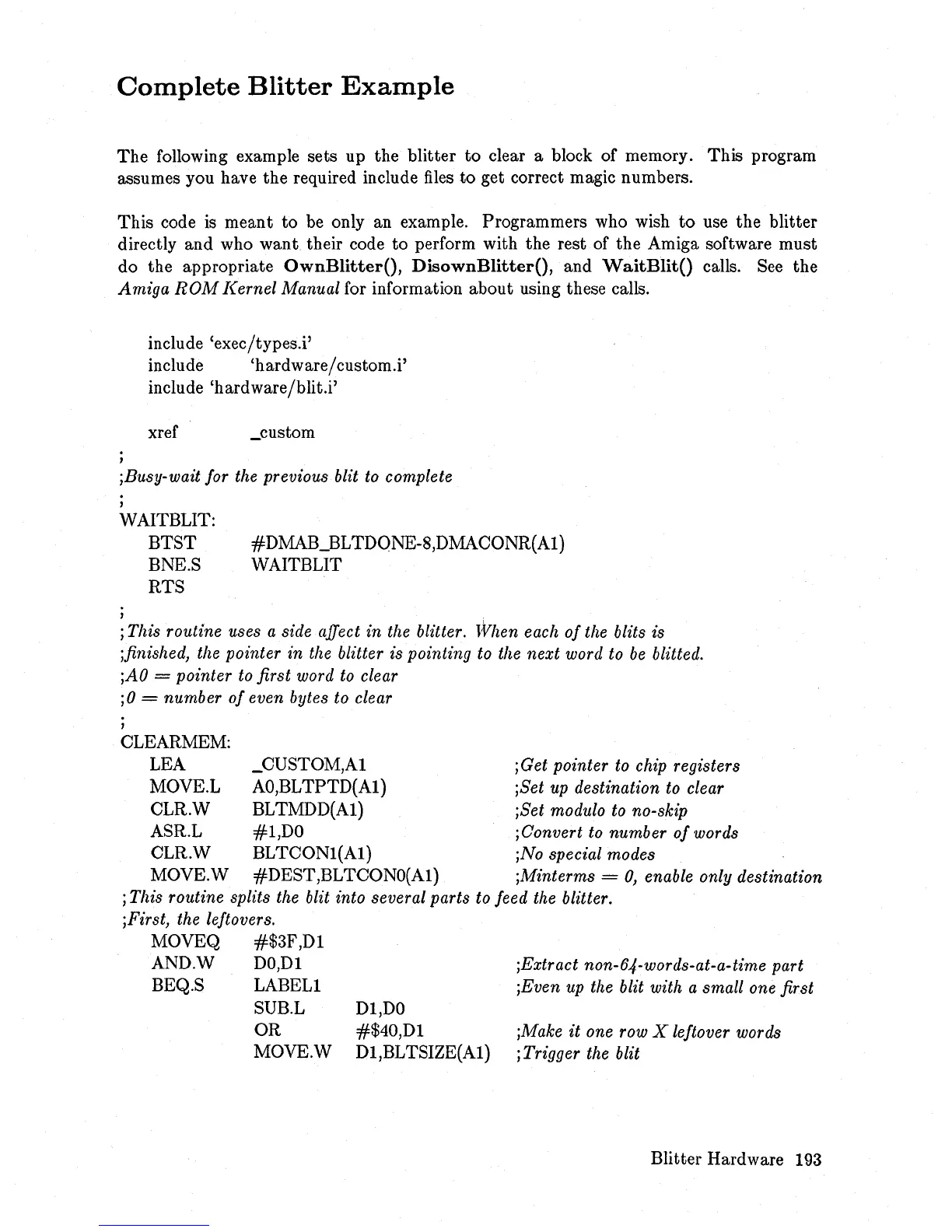
The following example sets up the blitter to clear a block of memory. This program
assumes you have the required include
files
to get correct magic numbers.
This code
is
meant to be only an example. Programmers who wish
to
use the blitter
directly and who
want
their code
to
perform with the rest of the Amiga software must
do the appropriate
OwnBlitterO,
DisownBlitterO,
and
WaitBlitO
calls.
See
the
Amiga
ROM
Kernel
Manual for information about using these calls.
include 'exec/types.i'
include 'hardware/custom.i'
include 'hardware/blit.i'
xref _custom
,
jBusy-wait for the previous blit to complete
WAITBLIT:
,
BTST
BNE.S
RTS
#DMAB_BLTDQNE-8,DMACONR(Al)
WAITBLIT
j This routine uses a side affect
in
the blitter. lVhen each
of
the blits
is
jfinished, the pointer
in
the blitter is pointing to the
next
word to
be
blitted.
jAO
= pointer to
first
word to clear
jO
=
number
of
even bytes to clear
CLEARMEM:
LEA _CUSTOM,Al
jGet pointer to chip registers
MOVE.L AO,BLTPTD(Al) jSet up destination to clear
CLR.W BLTMDD(Al) jSet modulo to no-skip
ASR.L
#l,DO
jConvert to
number
of
words
CLR.W BLTCONl(Al) jNo special modes
MOVE.W #DEST,BLTCONO(Al) jMinterms =
0,
enable only destination
j This routine splits the blit into several parts to feed the blitter.
j Firs
t,
the leftovers.
MOVEQ
#$3F,Dl
AND.W DO,Dl
BEQ.S LABELl
SUB.L
OR
MOVE.W
Dl,DO
#$40,Dl
Dl,BL TSIZE(Al)
jExtract non-64-words-at-a-time part
jEven up the blit with a small one first
jMake
it
one row X leftover words
j Trigger the blit
Blitter Hardware
193














 To Next Page