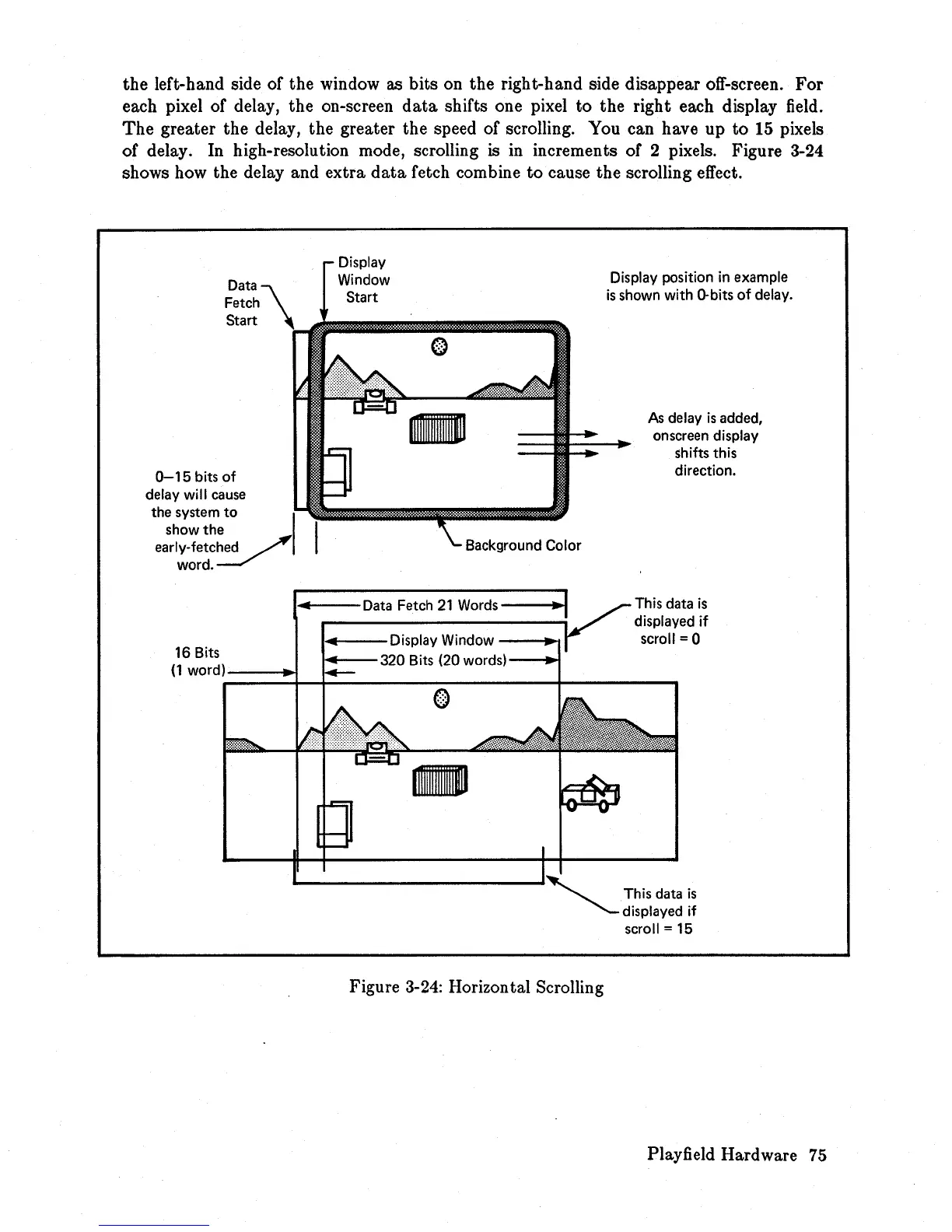
the left-hand side of the window as bits on the right-hand side disappear off-screen.
For
each pixel of delay, the on-screen
data
shifts one pixel to the right each display field.
The
greater the delay, the greater the speed of scrolling. You can have up
to
15
pixels
of delay. In high-resolution mode, scrolling
is
in
increments of 2 pixels. Figure 3-24
shows how the delay and extra
data
fetch combine
to
cause the scrolling effect.
0-15
bits
of
delay
will
cause
the system
to
show the
early-fetched
word.
Background Color
''''--Data
Fetch
21
Words---.I
•
..---Display
Window
--~
Display position
in
example
is
shown with
D-bits
of delay.
As
delay
is
added,
on screen display
shifts this
direction.
This data
is
displayed
if
scroll = 0
16 Bits
....
--320
Bits
(20
words)---I~
(1
word)~=::::!+-+!::~
________
+-
____
....
o
-
Figure
3-24:
Horizontal Scrolling
This data
is
displayed
if
scroll =
15
Playfield Hardware
75














 To Next Page