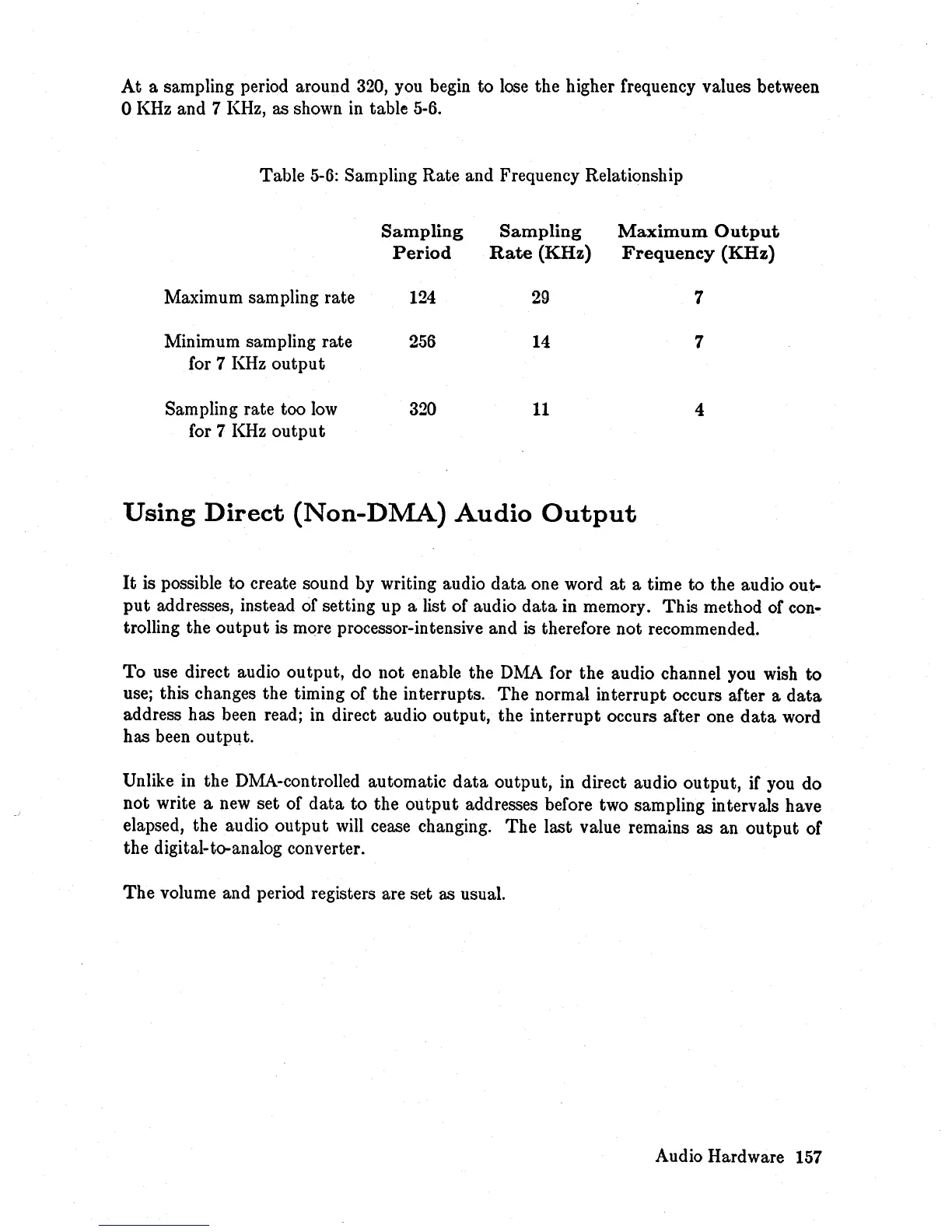
At
a sampling period around
320,
you begin to
lose
the higher frequency values between
o KHz and 7 KHz, as shown
in
table 5-6.
Table
5-6:
Sampling Rate and Frequency Relationship
Sampling
Sampling
Maximum
Output
Period
Rate
(KHz)
Frequency
(KHz)
Maximum sampling rate
124
29
7
Minimum sampling rate
256
14
7
for 7
KHz
output
Sampling rate too
low
320
11
4
for 7
KHz
output
Using
Direct
(Non-DMA)
Audio
Output
It
is possible to create sound by writing audio
data
one word
at
a time to the audio out-
put
addresses, instead of setting up a list of audio
data
in memory. This method of con-
trolling the
output
is more processor-intensive and
is
therefore not recommended.
To
use direct audio output, do not enable the
DMA
for the audio channel you wish
to
use; this changes the timing of the interrupts. The normal interrupt occurs after a
data
address has been read; in direct audio output, the interrupt occurs after one
data
word
has been output.
Unlike in the DMA-controlled automatic
data
output, in direct audio output, if you do
not write a
new
set of
data
to
the
output
addresses before two sampling intervals have
elapsed, the audio
output
will
cease changing. The last value remains as an
output
of
the digital-to-analog converter.
The
volume and period registers are set as usual.
Audio Hardware
157














 To Next Page