EasyManua.ls Logo

Commodore Amiga - Page 285

Commodore Amiga
321 pages
Print Icon
To Next Page IconTo Next Page
To Previous Page IconTo Previous Page
Loading...
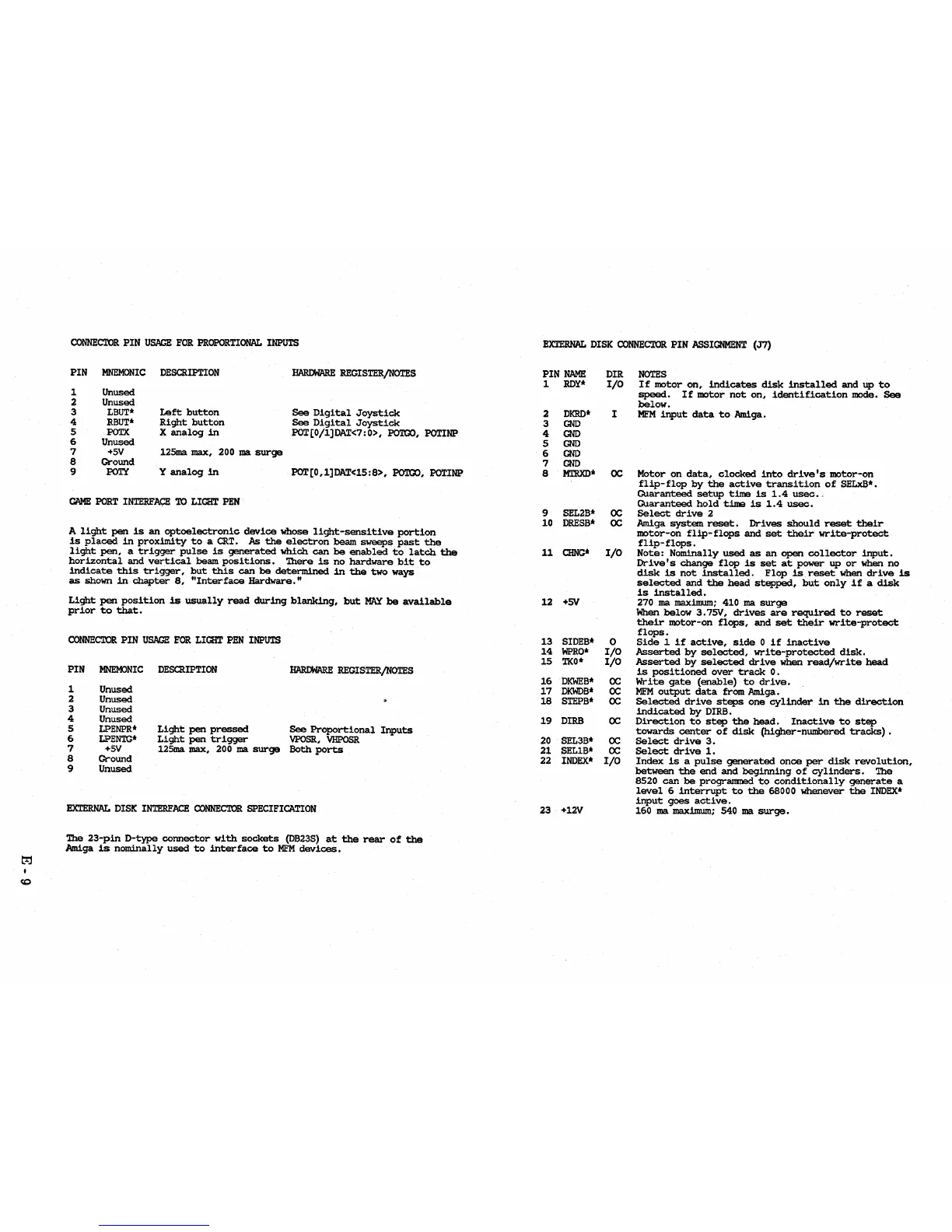
CONNECTOR
PIN
USAGE
FOR
PROPORTIONAL
INPUTS
PIN
1
2
3
4
5
6
7
8
9
MNEMONIC
Unused
Unused
LBUT*
RBUT*
POTX
Unused
+5V
Ground
POT.(
DESCRIPTION
Left
button
Right
button
X
analog
in
125ma max, 200
ma
surge
Y
analog
in
HARDWARE
REGISTER/NOTES
See
Digital
Joystick
See
Digital
Joystick
POT[0/l]DAT<7:0>,
POTOO,
POTINP
POT[O,l]DAT<15:8>,
POTOO,
POTINP
CAME
PORT
INTERFACE
TO
LIGHT
PEN
A
light
pen
is
an
optoelectronic
device
Whose
light-sensitive
portion
is
placed
in
proximity
to
a
CRT.
As
the
electron
beam
sweeps
past
the
light
pen,
a
trigger
pulse
is
generated
Which
can
be
enabled
to
latch
the
horizontal
and
vertical
beam
positions.
There
is
no
hardware
bit
to
indicate
this
trigger,
but
this
can
be
determined
in
the
two
ways
as
shown
in
chapter
8,
"Interface
Hardware."
Light
pen
position
is
usually
read
during
blanking,
but
MAY
be
available
prior
to
that.
CONNECTOR
PIN
USAGE
FOR
LIGHT
PEN
INPUTS
PIN
MNEMONIC
DESCRIPTION
HARDWARE
REGISTER/NOTES
1 Unused
2 Unused
3 Unused
4 Unused
5
LPENPR*
Light
pen
pressed
See
Proportional
Inputs
6
LPENTG*
Light
pen
trigger
VPOSR,
VHPOSR
7
+5V
125ma max, 200
ma
surge
Both
ports
8
Ground
9
Unused
EXTERNAL
DISK
INTERFACE
CONNECTOR
SPECIFICA.TION
The
23-pin
D-type
connector
with
sockets
(OB23S)
at
the
rear
of
the
Amiga
is
nominally
used
to
interface
to
MFM
devices.
EXTERNAL
DISK
CONNECTOR
PIN
ASSIGNMENT
(J7)
PIN
NAME
DIR
1
ROY*
I/O
2
DKRD*
I
3
GND
4
GND
5
GND
6
GND
7
GND
8
MTRXD*
OC
9
SEL2B*
OC
10
DRESS*
OC
11
CHNG*
I/O
12
+SV
13
SIDEB*
0
14
WPRO*
I/O
15
TKO
*
I/O
16
DKWEB*
OC
17
DKWDB*
OC
18
STEPB*
OC
19
DIRB
OC
20
SEL3B*
OC
21
SELIS*
OC
22
INDEX*
I/O
23
+12V
NOTES
If
motor
on,
indicates
disk
installed
and
up
to
speed.
If
motor
not
on,
identification
mode.
See
below.
MFM
input
data
to
Amiga.
Motor
on
data,
clocked
into
drive's
motor-on
flip-flop
by
the
active
transition
of
SELxB*.
Guaranteed
setup
time
is
1.4
usec.
Guaranteed
hold
time
is
1.4
usec.
Select
drive
2
Amiga
system
reset.
Drives
should
reset
their
motor-on
flip-flops
and
set
their
write-protect
flip-flops.
Note:
Nominally
used
as
an
open
collector
input.
Drive's
change
flop
is
set
at
power
up
or
when
no
disk
is
not
installed.
Flop
is
reset
when
drive
is
selected
and
the
head
stepped,
but
only
if
a
disk
is
installed.
270
ma
maximum;
410
ma
surge
When
below
3.7SV,
drives
are
required
to
reset
their
motor-on
flops,
and
set
their
write-protect
flops.
Side
1
if
active,
side
0
if
inactive
Asserted
by
selected,
write-protected
disk.
Asserted
by
selected
drive
when
read/write
head
is
positioned
over
track
O.
Write
gate
(enable)
to
drive.
MFM
output
data
from Amiga.
Selected
drive
steps
one
cylinder
in
the
direction
indicated
by
DIRB.
Direction
to
step
the
head.
Inactive
to
step
towards
center
of
disk
(higher-nwnbered
tracks)
Select
drive
3.
Select
drive
1.
Index
is
a
pulse
generated
once
per
disk
revolution,
between
the
end
and
beginning
of
cylinders.
The
8520
can
be
programmed
to
conditionally
generate
a
level
6
interrupt
to
the
68000 whenever
the
INDEX*
input
goes
active.
160
ma
maximum; 540
ma
surge.

Table of Contents

Other manuals for Commodore Amiga

Related product manuals