EasyManua.ls Logo

Commodore Amiga - Page 300

Commodore Amiga
321 pages
Print Icon
To Next Page IconTo Next Page
To Previous Page IconTo Previous Page
Loading...
00
systems
programner
and
should
generally
not
be
used
by
applications
programners.
Systems
software
nonnally
is
configured
to
handle
the
setting
of
particular
Signals,
no
matter
how
the
physical
connections
may
change.
In
other
words,
if
you
have
a
version
of
the
system
software
that
matches
the
rev.
level
of
the
machine
(nonnally
a
true
condition),
when
you
ask
that
a
particular
bit
be
set,
you
don't
care
which
port
that
bit
is
connected
to.
Thus
applications
progranmers
should
rely
on
system
documentation
rather
than
going
directly
to
the
ports.
Note
also
that
in
this,
a
multi-tasking
operating
system,
many
different
tasks
may
be
conpeting
for
the
use
of
the
system
resources.
Applications
programmers
should
follow
the
established
rules
for
resource
access
in
order
to
assure
coupat1hl1ity
of
their
software
with
the
system.
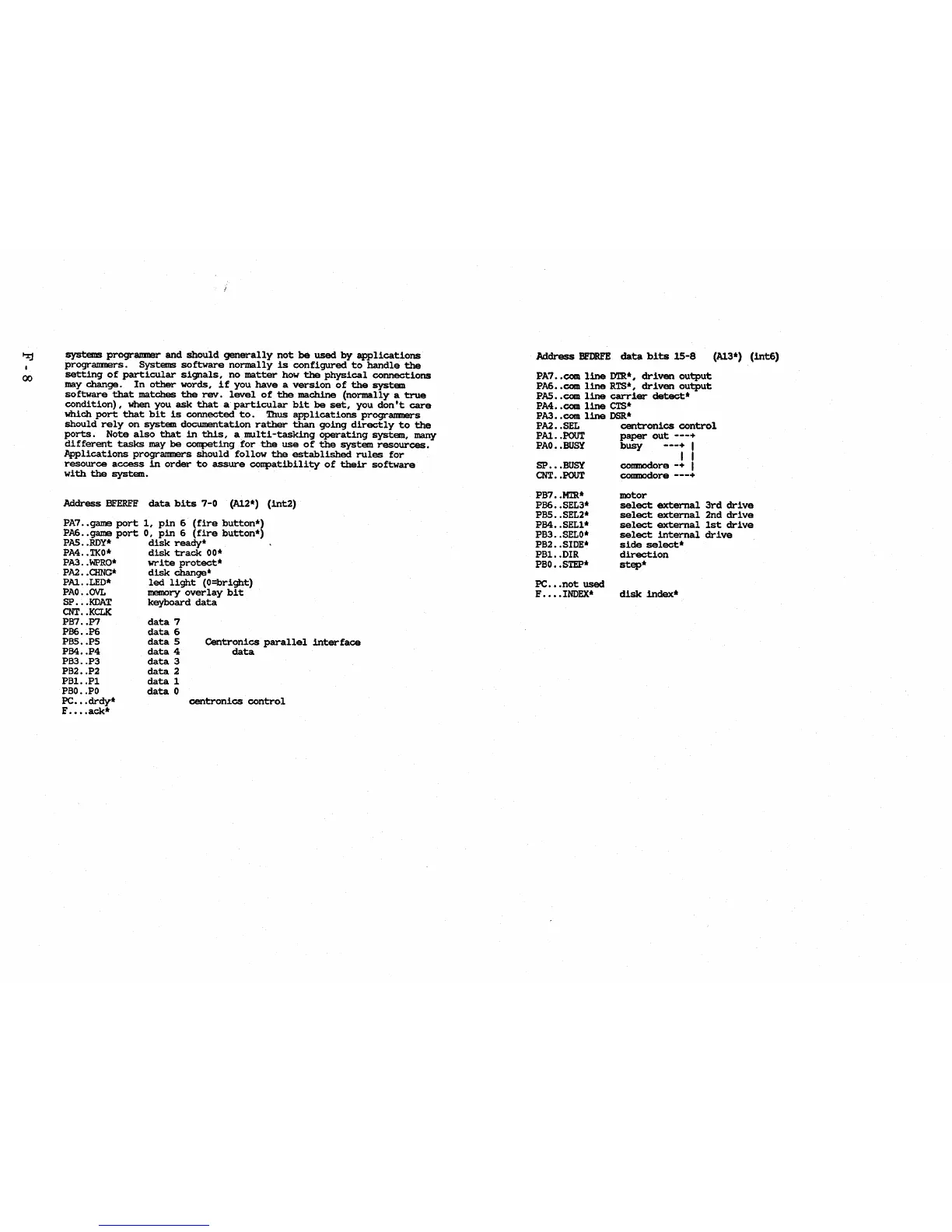
Address
BFERFF
data
bits
7-0
(Al2*)
(int2)
PA7
..
game
port
1,
pin
6
(fire
button*)
PA6
..
game
port
0,
pin
6
(fire
button*)
PAS
•.
ROY.
disk
ready'
PA4
..
TKO.
disk
track
00*
PA3
..
WPRO*
write
protect*
PAl
•.
CHNG'
disk
change'
PAl
..
LED.
led
light
(O=bright)
PAO
. .fNL memory
overlay
bit
SP
•••
KDAT
keyboard
data
CNT
••
KCLK
PB7
.•
P7
PB6
..
P6
PBS
•• PS
PB4
.•
P4
PB3
..
P3
PB2
•.
P2
PBl.
.Pl
PBO
•.
PO
PC
•••
drdy*
F
••••
ack·
data
7
data
6
data
5
data
4
data
3
data
2
data
1
data
0
Centronics
parallel
interface
data
centronics
control
Address
BEDRFE
data
bits
15-8
(Al3*)
(int6)
PA7
••
com
line
D'lR*,
driven
output
PA6
••
com
line
RTS*,
driven
output
PAS
••
com
line
carrier
detect*
PM
••
com
line
CTS*
PA3
••
com
line
DSR*
PAl
•.
SEL
centronics
control
PAl
•.
POUT
paper
out
---+
PAO
••
BUSY
busy
---+
I
I I
SP
•••
BUSY
COIIIDOdore
-+
I
CNT
••
POUT
COIIIIIOdore
---+
PB7
•.
MTR*
PB6
••
SEL3*
PBS
••
SEL2*
PB4
..
SELl*
PB3
•.
SELO*
PB2
•.
SIDE*
PBl.
.DIR
PBO
••
STEP*
PC
•••
not
used
F
••••
INDEX*
motor
select
external
3rd
drive
select
external
2nd
drive
select
external
1st:
drive
select
internal
drive
side
select*
direction
step*
disk
index*

Table of Contents

Other manuals for Commodore Amiga

Related product manuals