42 4 Basic Touch Screen Operations
1
1
T
T
u
u
r
r
n
n
O
O
n
n
P
P
o
o
w
w
e
e
r
r
Turn on the power with the power switch on the rear panel.
Home screen will be displayed on the LCD (Default is Standard measurement screen).
Let the power on for 5 minutes or longer for a warm-up before starting leak tests.
2
2
G
G
o
o
t
t
o
o
S
S
u
u
b
b
M
M
e
e
n
n
u
u
s
s
a
a
n
n
d
d
I
I
t
t
e
e
m
m
s
s
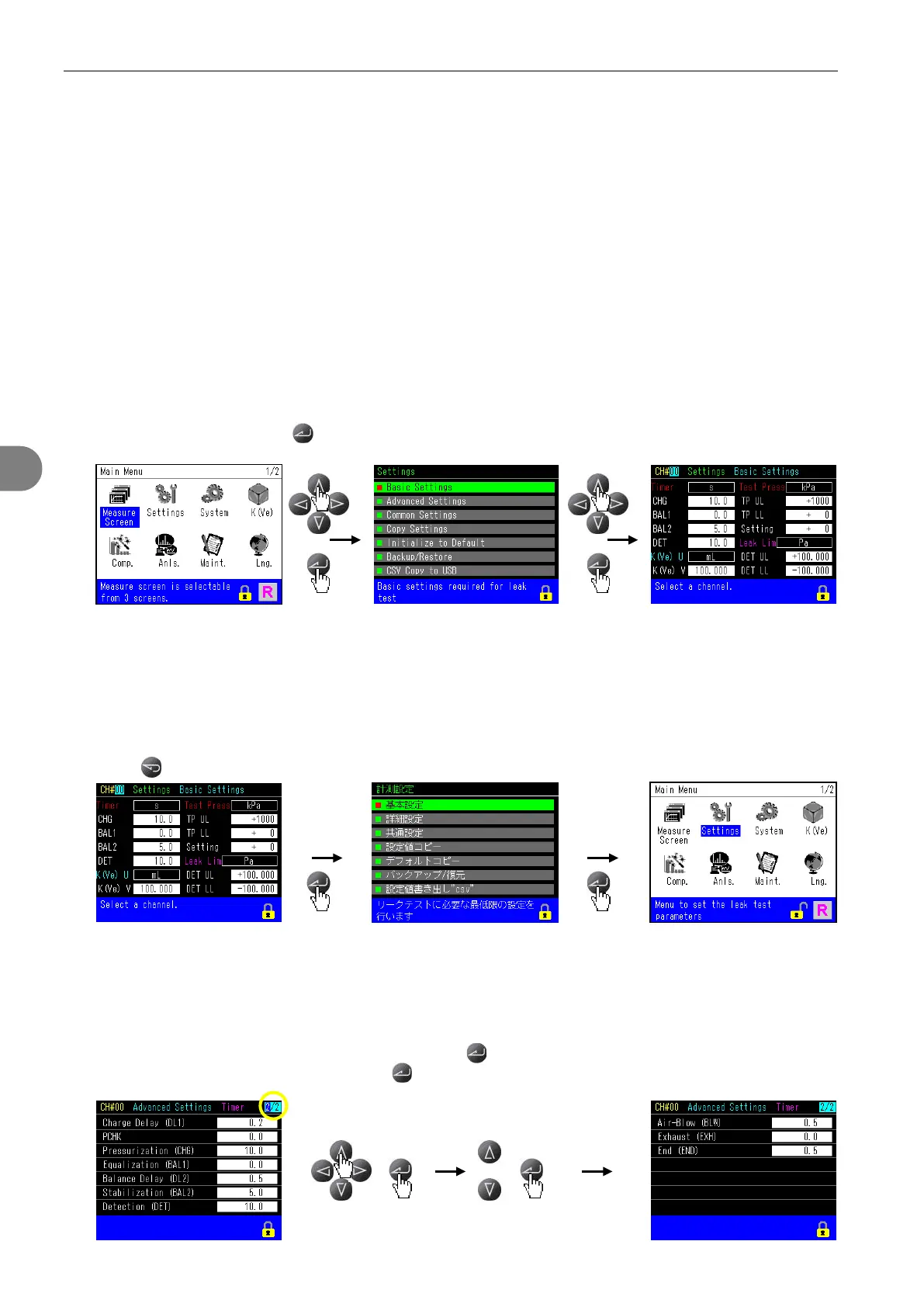
All sub menus are accessible from the Main Menu, which consists of 2 pages.
Select an item and pressing goes to the next page.
3
3
G
G
o
o
B
B
a
a
c
c
k
k
t
t
o
o
t
t
h
h
e
e
P
P
r
r
e
e
v
v
i
i
o
o
u
u
s
s
P
P
a
a
g
g
e
e
Press .
4
4
S
S
w
w
i
i
t
t
c
c
h
h
P
P
a
a
g
g
e
e
s
s
Move to the page number with cursor keys and press , the change the page number with up/down cursor
key to change the page number and press .


 To Next Page