4 Basic Touch Screen Operations 43
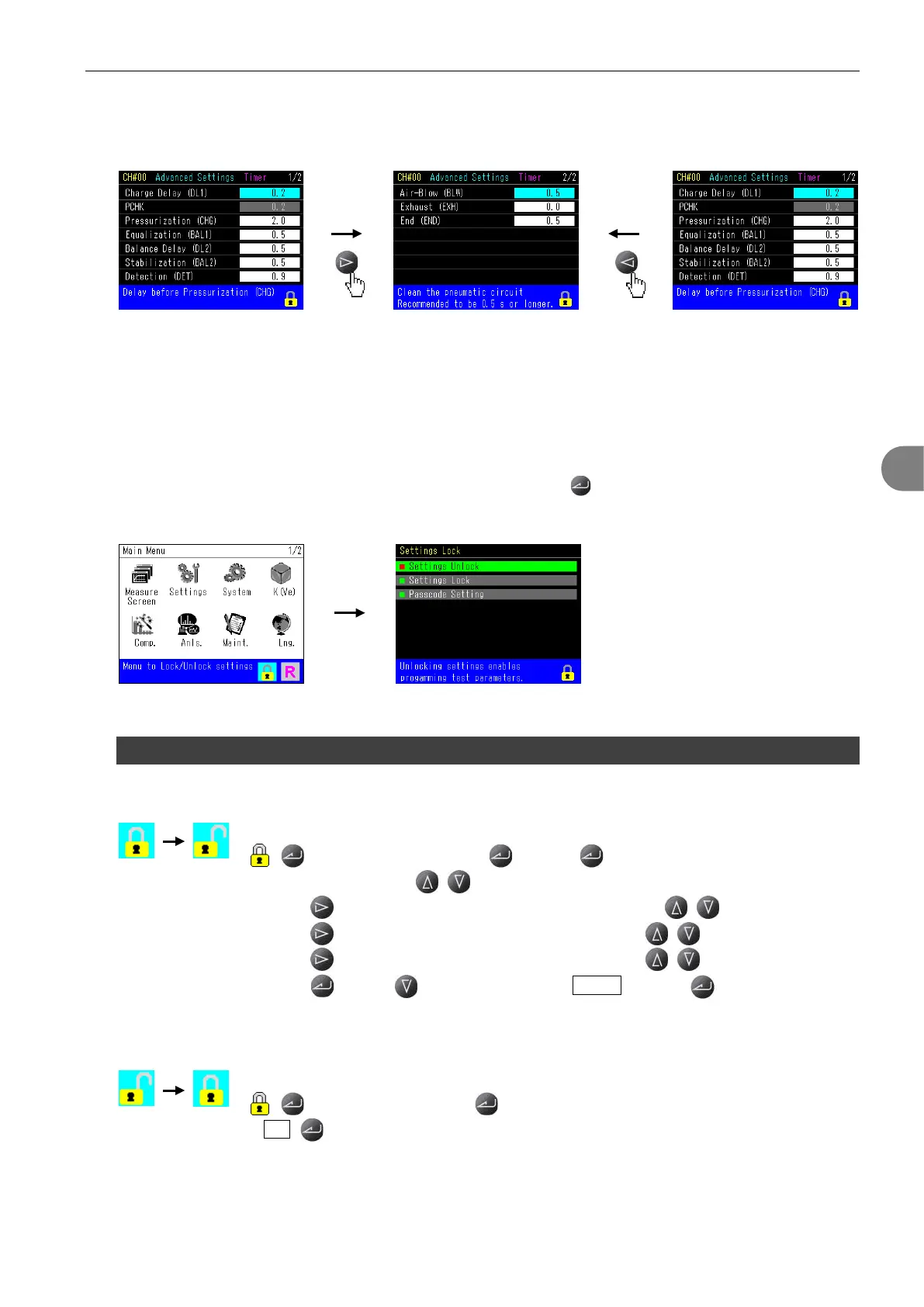
Pages can be switched also with right/left cursor key.
5
5
S
S
e
e
t
t
t
t
i
i
n
n
g
g
s
s
L
L
o
o
c
c
k
k
/
/
U
U
n
n
l
l
o
o
c
c
k
k
Unlocking the settings enables settings change. (Settings cannot be changed when it’s locked)
Move the cursor to the pad lock icon on the Main menu and press .
Lock menu includes Settings Unlock, Settings Lock and Passcode.
5.1 Lock / Unlock Settings
To unlocking settings
Go to:
> Select Settings Unlock > Press to enable programming.
> Select a number with / .
> Press to move the cursor to the second digit > Press / to select a number.
> Press to move the cursor to the third digit > Press / to select a number.
> Press to move the cursor to the forth digit > Press / to select a number.
> Press >Press to move the cursor to Unlock . > Press to complete.
(Default is 0000)
To locking settings
Go to:
> Select Settings Lock > “Locking settings OK to continue?”
> Yes


 To Next Page