Using the Monitor Ports
7-14 Operator's Manual
Select MAIN MENU to return to the Main screen. The INVOS™ system will begin to communicate
with the PC via HyperTerminal™* in real-time format. This setting will be retained until changed
by selecting a different output format.
In Run Function—Case History Data Output
Once the INVOS™ system components and the PC are connected, the INVOS™ monitor is on and
rSO
2
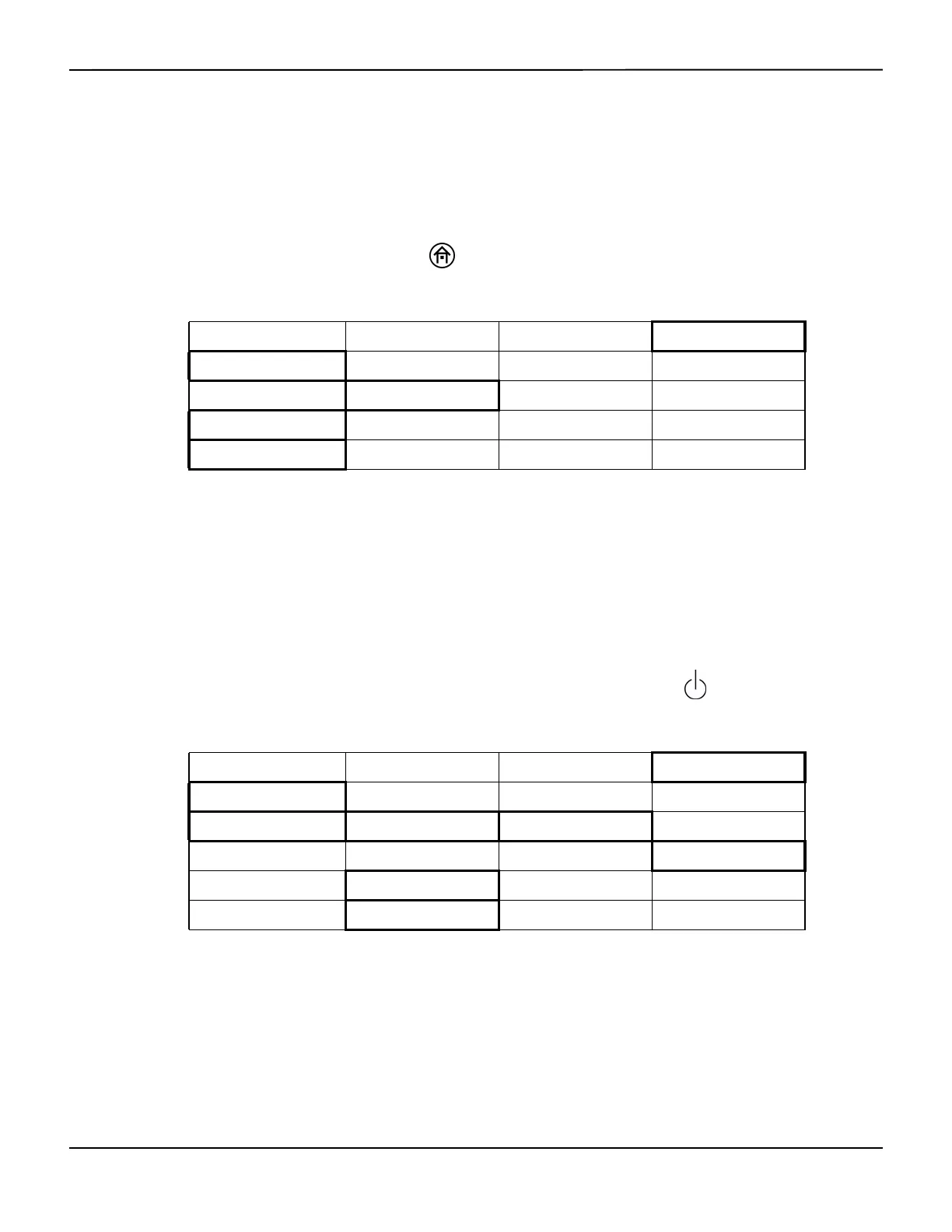
data is trending, press the HOME key to display the Main screen and perform the fol-
lowing navigation bar options to begin interfacing:
The INVOS™ system will begin to communicate with the PC via HyperTerminal™*. This setting will
be retained until changed by selecting a different output format.
The case history data will output until complete. The time required is short; there is no cancel
option. While outputting case history data, monitoring will cease and the INVOS™ system will
display the last rSO
2
value measured before the output started. Monitoring will resume when the
outputting function is complete. Up to 24 hours of data may be stored per case history file.
In Case Archive Function—Case History Data Output
To access Case archive function and download a case, press the ON/OFF key to display the
Start screen, then perform the following navigation bar options:
Select DIGITAL OUTPUT to download the case history data. The INVOS™ system will begin to
communicate with the PC via HyperTerminal™*.
When capturing a case, a message in yellow may be displayed in the upper area to alert for “COM
PORT UNAVAILABLE.”This message will appear until the error is corrected and the screen is
refreshed.
BASELINE MENU EVENT MARK ALARM AUDIO ON/OFF NEXT MENU
OUTPUT SELECT USER CONFIGURATION TIME SCALE PREVIOUS MENU
USB DIGITAL OUTPUT PREVIOUS MENU
PC LINK VUELINK PREVIOUS MENU MAIN MENU
CASE HISTORY OUTPUT FORMAT PREVIOUS MENU MAIN MENU
NEW PATIENT PREVIOUS PATIENT DATE/TIME NEXT MENU
CASE ARCHIVE START SCREEN
NEXT FILE PREVIOUS FILE SELECT FILE START MENU
<– TREND GRAPH TREND GRAPH –> FULL GRAPH NEXT MENU
TABULAR TRENDS DOWNLOAD PREVIOUS MENU NEXT MENU
USB STORAGE DIGITAL OUTPUT PREVIOUS MENU




 To Next Page