Screens
5-8 Operator's Manual
5.1.6 Event Mark List Screen
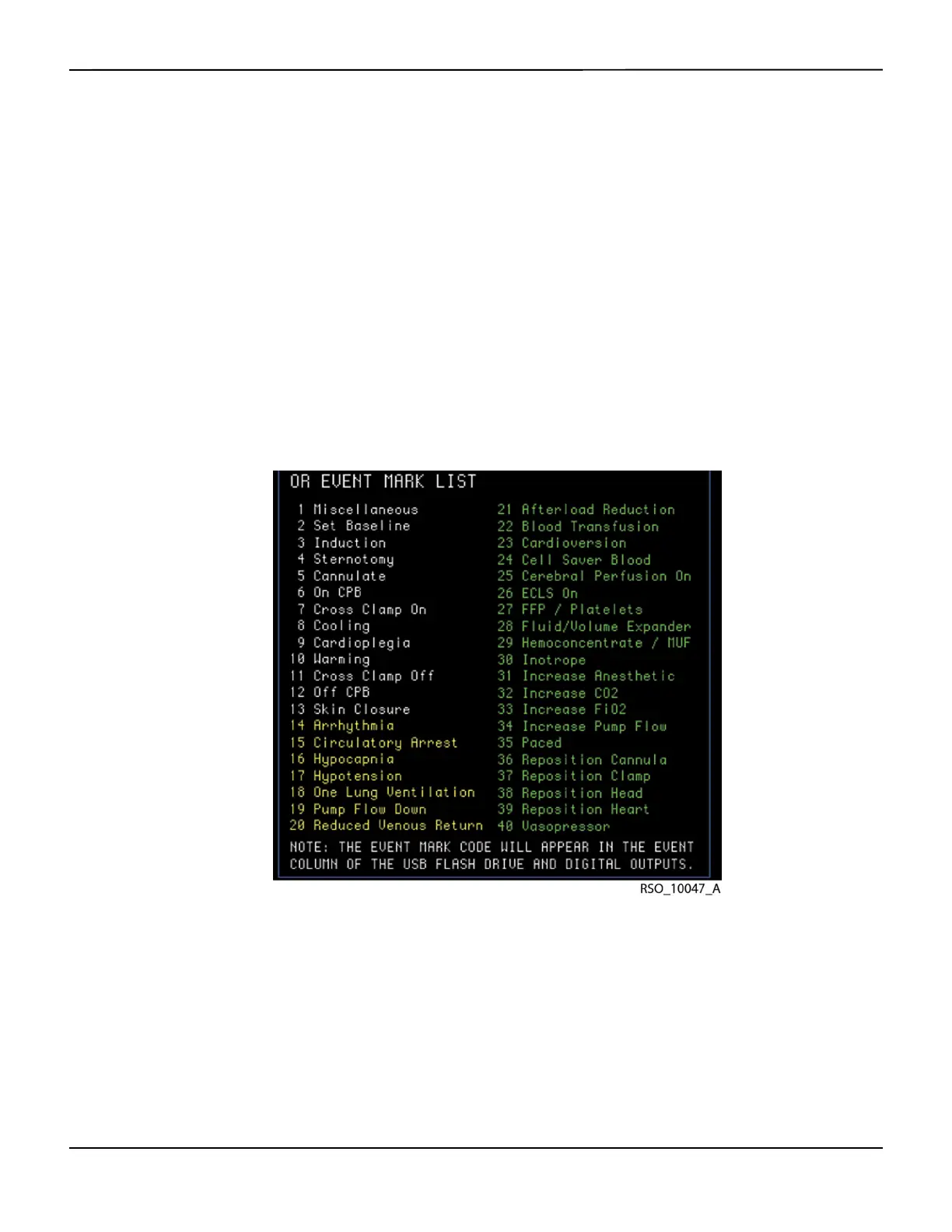
An event mark may be stored in memory and displayed on the screen to mark significant events.
A vertical dashed line and event code will appear on the Main screen at the event time, and an
event code will appear in the event mark column of the Tabular trends screen, digital output, or
USB flash drive output data (see section 6.5.2 Event Mark).
There are four event mark lists to choose from: OR, ICU, vascular, and NICU. White events reflect
relatively routine occurrences. These are listed in the order they typically occur during a case.
Yellow events mark events clinicians may consider “cautionary” because they could cause isch-
emia. These are listed alphabetically. Green events mark interventions taken and are listed alpha-
betically.
Only one list is “in use” at a time. The list may be changed in the User configuration menu (see
section 6.5.8 Event Mark List).
Figure5-8.Event Mark List Screen (OR Event Mark List)















 To Next Page