7-23
7
UPS Operation
BYPA.
MAIN
2010 - 06 - 01
11 : 59 : 59
UNIT : #1.1
LOAD UNPROTECTED
ON AUTO BYPASS
6
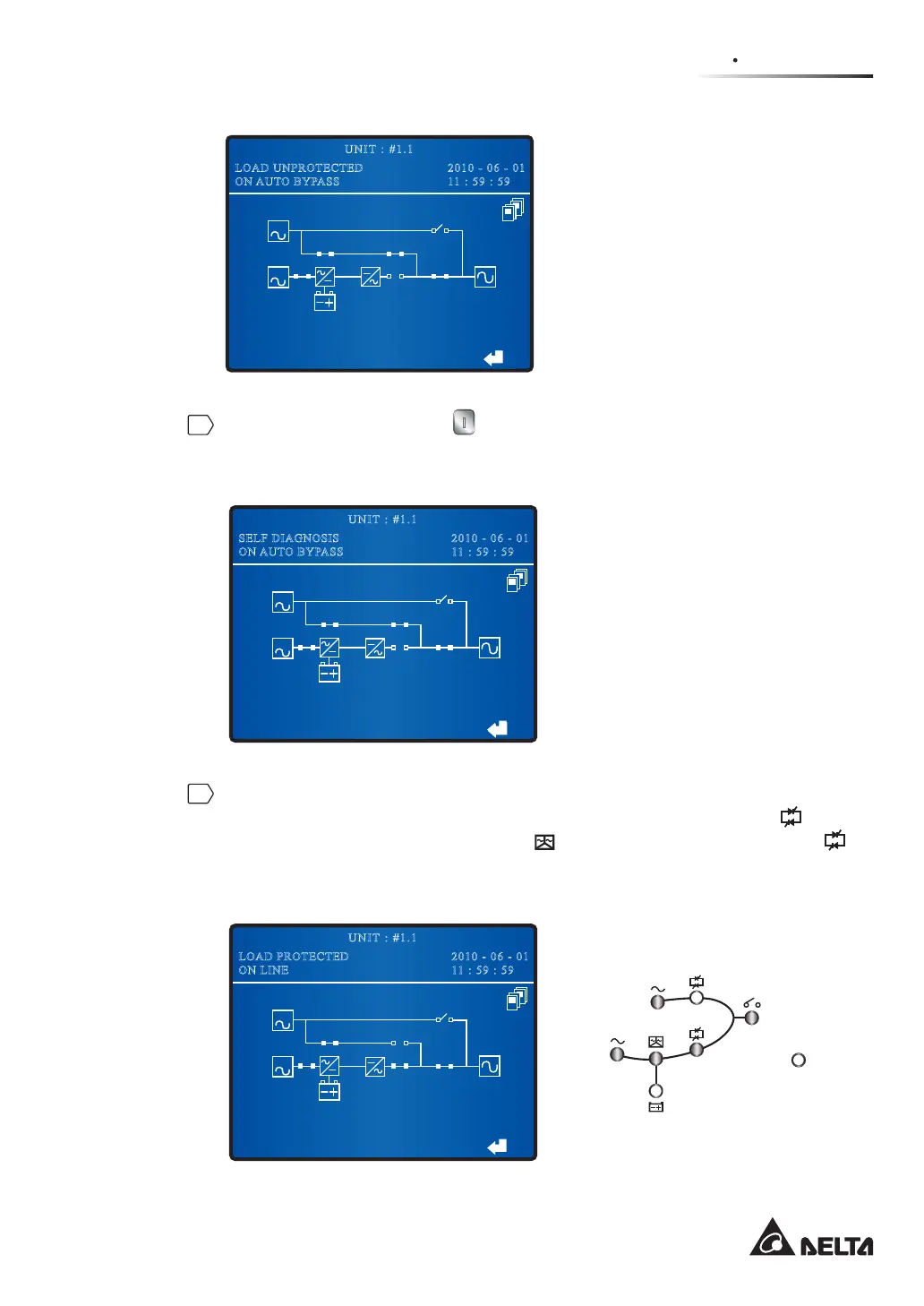
Press each UPS’s ON button on the control panel for three to ten seconds and
release it after you hear one beep. At this moment, each UPS’s LEDs illuminate
without any change and each unit’s LCD shows the following screen.
BYPA.
MAIN
2010 - 06 - 01
11 : 59 : 59
UNIT : #1.1
SELF DIAGNOSIS
ON AUTO BYPASS
7
After each UPS’s inverter voltage establishes, all parallel UPSs will transfer into
normal mode. At this moment, each UPS’s Bypass Power Supply LED
turns
off, each UPS's Inverter Start-up LED
and Inverter Power Source LED
illuminates. Each unit’s LCD shows the following screen and LEDs are on as
follows.
BYPA.
MAIN
2010 - 06 - 01
11 : 59 : 59
UNIT : #1.1
LOAD PROTECTED
ON LINE
Fault











 To Next Page