6-9
6
Top Cable Entry Cabinet
6.6 Wiring
y
2QO\TXDOL¿HGVHUYLFHSHUVRQQHOFDQSHUIRUPZLULQJ
y
%HIRUHZLULQJPDNHVXUHWKDWWKH836DQGWKH7RS&DEOH(QWU\&DELQHWDUH¿UPO\¿[HG
on the ground. This avoids the unit from toppling over during wiring process. Please re-
fer to 5.1 Before Installation, 5.2 Installation Environment and 6.5 Installation.
y
Before wiring, please first refer to 2.6.3 Wiring Terminal Block, 5.4.1 Pre-wiring
Warnings, 6LQJOH,QSXW'XDO,QSXW0RGL¿FDWLRQ, 5.4.3 Single Unit Wiring and
5.4.4 Parallel Unit Wiring.
y
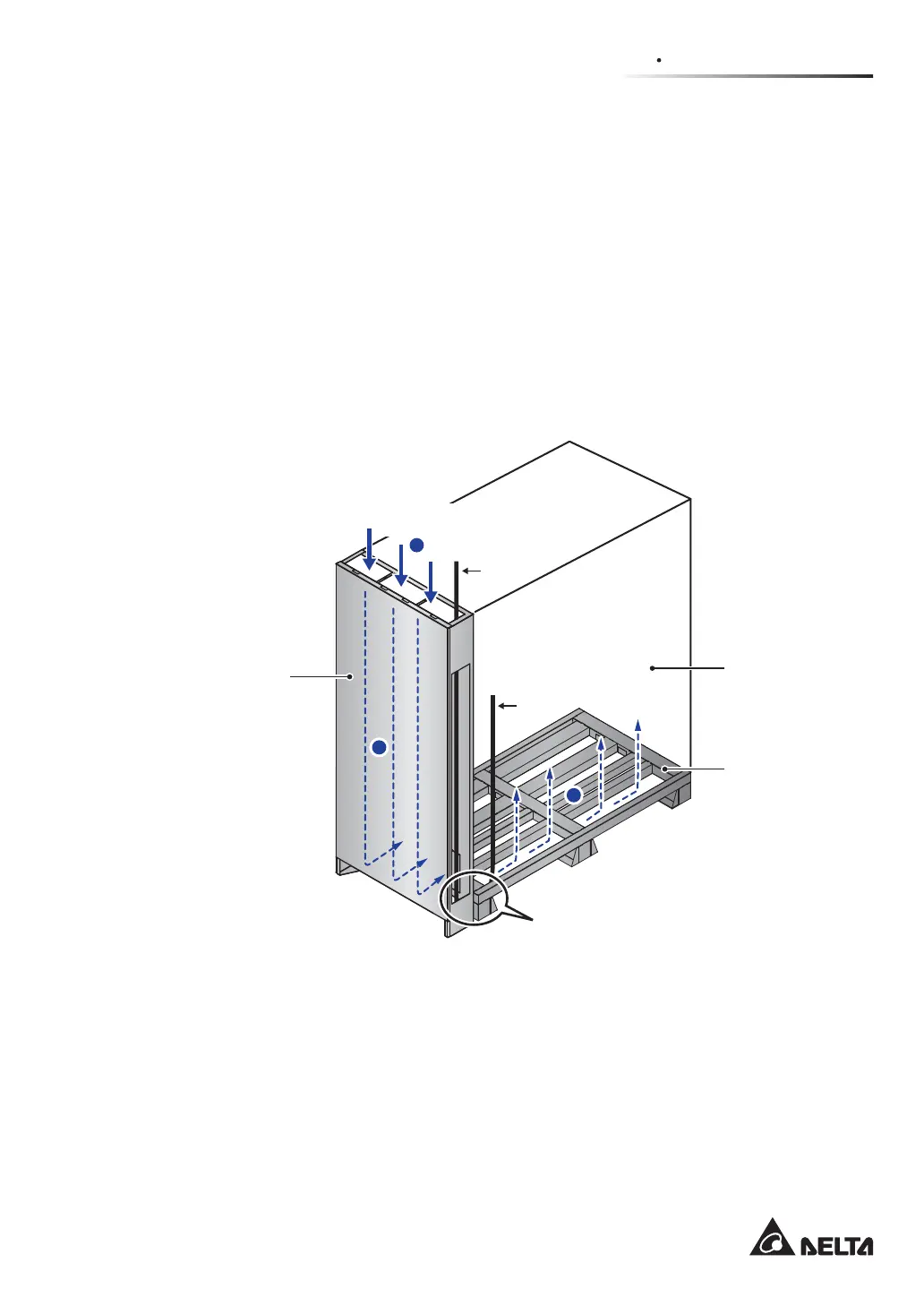
For cable entry location and suggested cable placement, please refer to Figure 6-9~
Figure 6-11.
(Figure 6-9: Cable Entry Location Illustration)
The Bottom
of the UPS
UPS
1
2
3
Cable Entry
Location
Cable
Cable
Top Cable
Entry Cabinet
Each of the cables goes through
the bottom of the Top Cable
Entry Cabinet and the UPS











 To Next Page