5-2
Ultron DPS Series
5.1 Before Installation
Due to different installation environments, it is highly recommended that you read this
user manual before installation. Only authorized Delta engineers or service personnel can
perform installation and maintenance. If you want to install the UPS by yourself, installation
must be under the supervision of authorized Delta engineers or service personnel. If you
use a forklift or other equipment to move the UPS, please make sure its load bearing is
VXI¿FLHQW3OHDVHUHIHUWRTable 5-1.
5.2 Installation Environment
y
Install the UPS indoors. Do not place it outdoors.
y
Make sure that transportation routes (e.g. corridor, door gate, elevator, etc.) and instal-
lation area can accommodate and bear the weight of the UPS, external battery cabinets
and forklifts. Please see Table 5-1IRUÀRRUZHLJKWORDGLQJLQIRUPDWLRQ
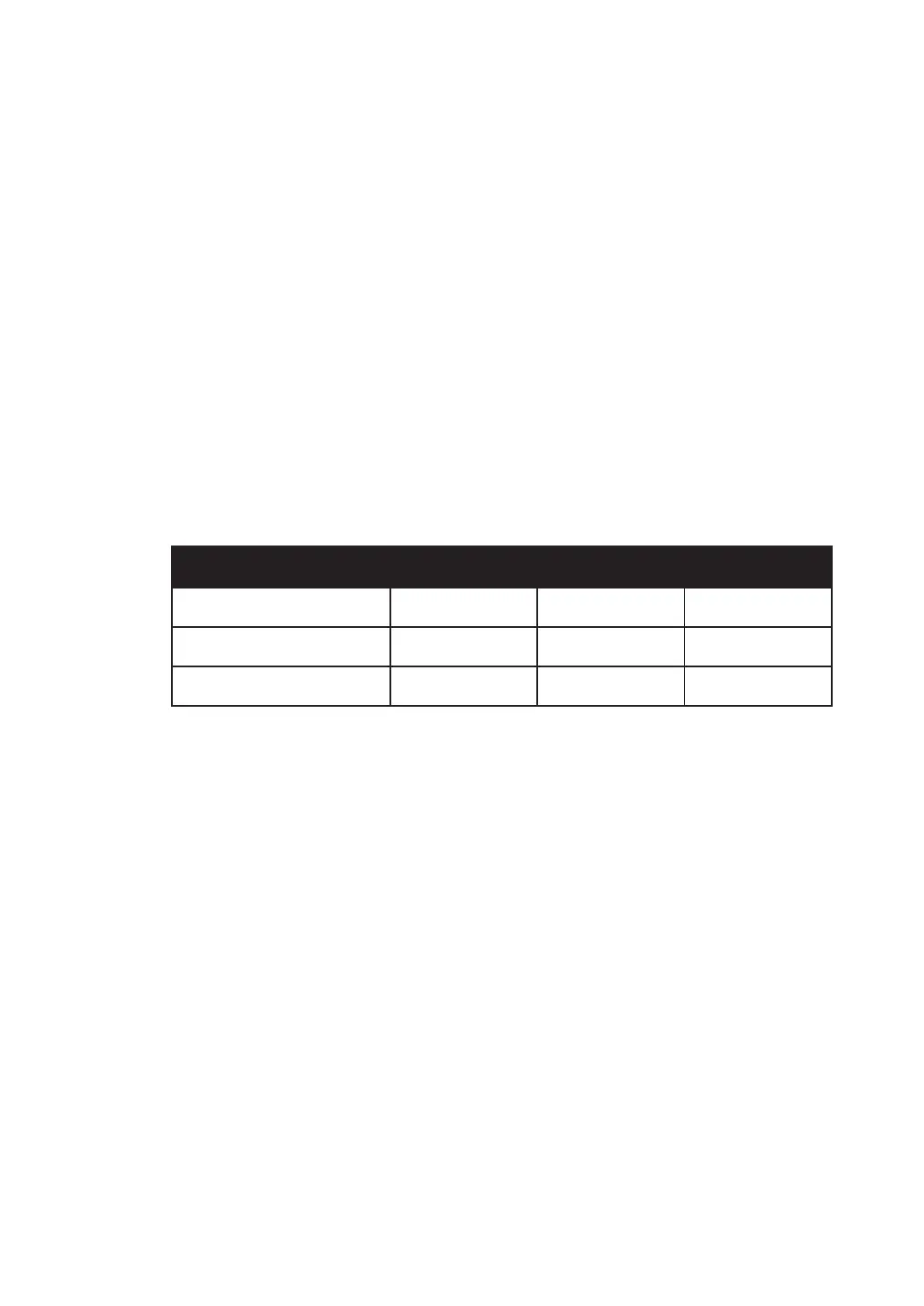
Table 5-1: DPS UPS Floor Weight Loading Table
DPS UPS
Rating (kVA) 300 400 500
Weight (Kg) 1130 1130 1220
Weight Loading (kg/m²) 816 816 890
y
Keep the installation area clean. Please note that wiring routes must be hermetic to pre-
vent possible damage from rodents.
y
Ensure that the installation area is big enough for maintenance and ventilation. Since
the fans of the UPS ventilate from bottom to top (please see Figure 5-1) and external
battery cabinets must be placed next to the UPS, we suggest that you:
1. Keep a distance of 100cm from the front of the UPS for maintenance and ventilation.
2. Keep a distance of 60cm from the back of the UPS for maintenance and ventilation.
3. Keep a distance of 100cm from the top of the UPS for maintenance.











 To Next Page