7-6
Ultron DPS Series
7.1.3 Bypass Mode Start-up Procedures (Single)
1
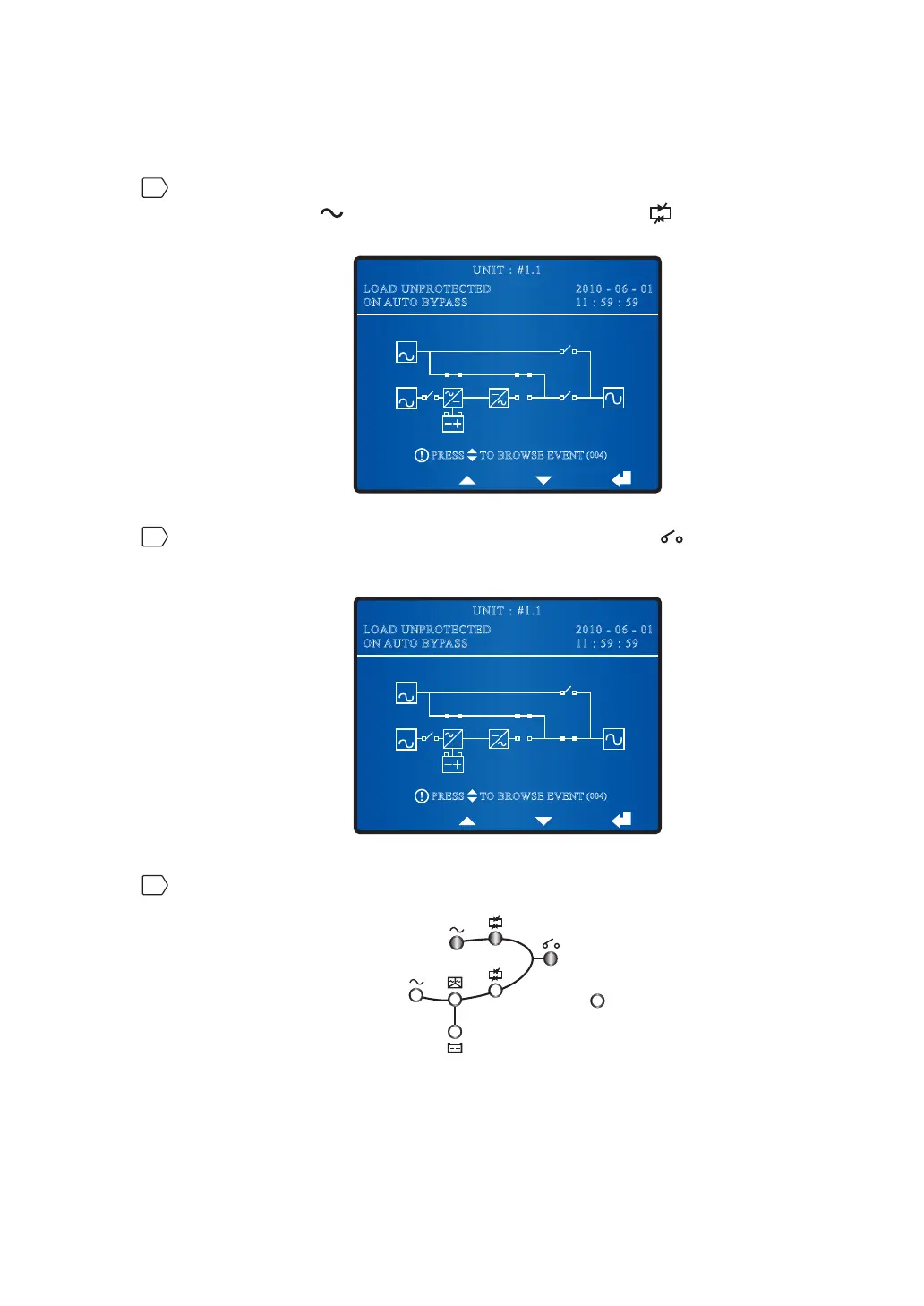
Switch on the Bypass Switch (Q2). After initialization, all fans start running, the Bypass
AC Source LED
and the Bypass Power Supply LED illuminate, and the
following screen appears.
BYPA.
MAIN
2010 - 06 - 01
11 : 59 : 59
UNIT : #1.1
LOAD UNPROTECTED
ON AUTO BYPASS
TO BROWSE EVENT
(004)
PRESS
2
Turn on the UPS Output Switch (Q4). The Output Switch LED illuminates and the
following screen appears. The bypass supplies power to the output.
BYPA.
MAIN
2010 - 06 - 01
11 : 59 : 59
UNIT : #1.1
LOAD UNPROTECTED
ON AUTO BYPASS
TO BROWSE EVENT
(004)
PRESS
3
After you complete the bypass mode start-up procedures, LEDs illuminate as follows.
Fault











 To Next Page