2-11
2
Introduction
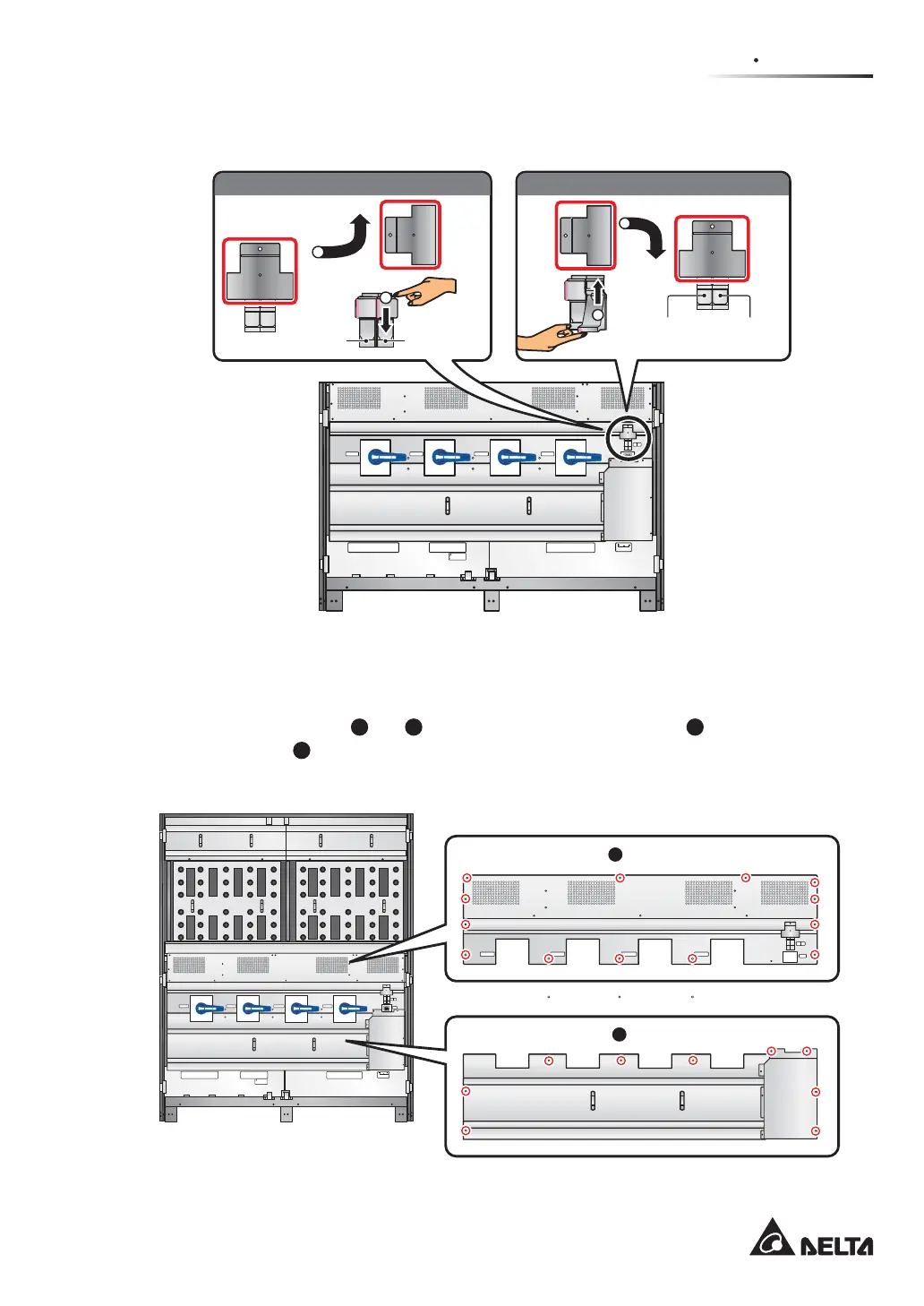
3OHDVHVHHWKHIROORZLQJ¿JXUHWRRSHQFORVHDIXVHKROGHU
(Figure 2-10: Open/ Close a Fuse Holder)
P.S.
FUSE
AC OUTLET
FUSE
AC OUTLET
220/230/240Vac,8A
O OFF
ON I
O OFF
ON I
O OFF
ON I
O OFF
ON I
Isolate Uninterruptible Power System (UPS)
Then check for Hazardous Voltage between all
terminals including the protective earth
See installation instructions before connecting to the supply
Apparatet er egnet for tilkopling til et IT forsyningsnett
RISK OF VOLTAGE BACKFEED
BEFORE WORKING ON THIS CIRCUIT
T
SR
N
UPS O UTPU T
TSRN
AC INPUT
R
S
T
BYPASS INPUT
240VDC240VDC
BATTERY INPUT
N
BYPASS SWITCH
INPUT SWITCH
MANUAL BYPASS SWITCH
OUTPUT SWITCH
1
90°
2
90°
1
2
Open a fuse holder: Close a fuse holder:
Auxiliary
Power
Fuse
Holder
AC Outlet
Fuse Holder
Auxiliary Power
Fuse Holder
AC Outlet
Fuse Holder
2.6.3 Wiring Terminal Block
Remove the two panels (
1
and
2
) shown in Figure 2-11. For panel
1
, there are nine M4
screws; for panel
2
, there are thirteen M4 screws. After removing the two panels, you can
see the wiring terminal block shown in Figure 2-12.
P.S.
FUSE
AC OUTLET
FUSE
AC OUTLET
220/230/240Vac,8A
O OFF
ON I
O OFF
ON I
O OFF
ON I
O OFF
ON I
Isolate Uninterruptible Power System (UPS)
Then check for Hazardous Voltage between all
terminals including the protective earth
See installation instructions before connecting to the supply
Apparatet er egnet for tilkopling til et IT forsyningsnett
RISK OF VOLTAGE BACKFEED
BEFORE WORKING ON THIS CIRCUIT
T
SR
N
UPS OUT PUT
TSRN
AC INPUT
R
S
T
BYPASS INPUT
240VDC240VDC
BATTERY INPUT
N
BYPASS SWITCH
INPUT SWITCH
MANUAL BYPASS SWITCH
OUTPUT SWITCH
Panelඨġ(M4 screwท13)
2
Panelඨġ(M4 screwท9)
1
P.S.
FUSE
AC OUTLET
FUSE
AC OUTLET
220/230/240Vac,8A
BYPASS SWITCH
INPUT SWITCH
MANUAL BYPASS SWITCH
OUTPUT SWITCH
(Figure 2-11: Panel Location)











 To Next Page