8-21
8
LCD Display & Settings
Use the function keys below the symbols ‘
’ and ‘ ’ to select 'YES' or 'NO'. Once you
se-lect 'YES' and press the function key below the symbol ‘
’, the system will transfer
from bypass mode into inverter mode. The administrator password is required.
8.8.5 Others
Ä
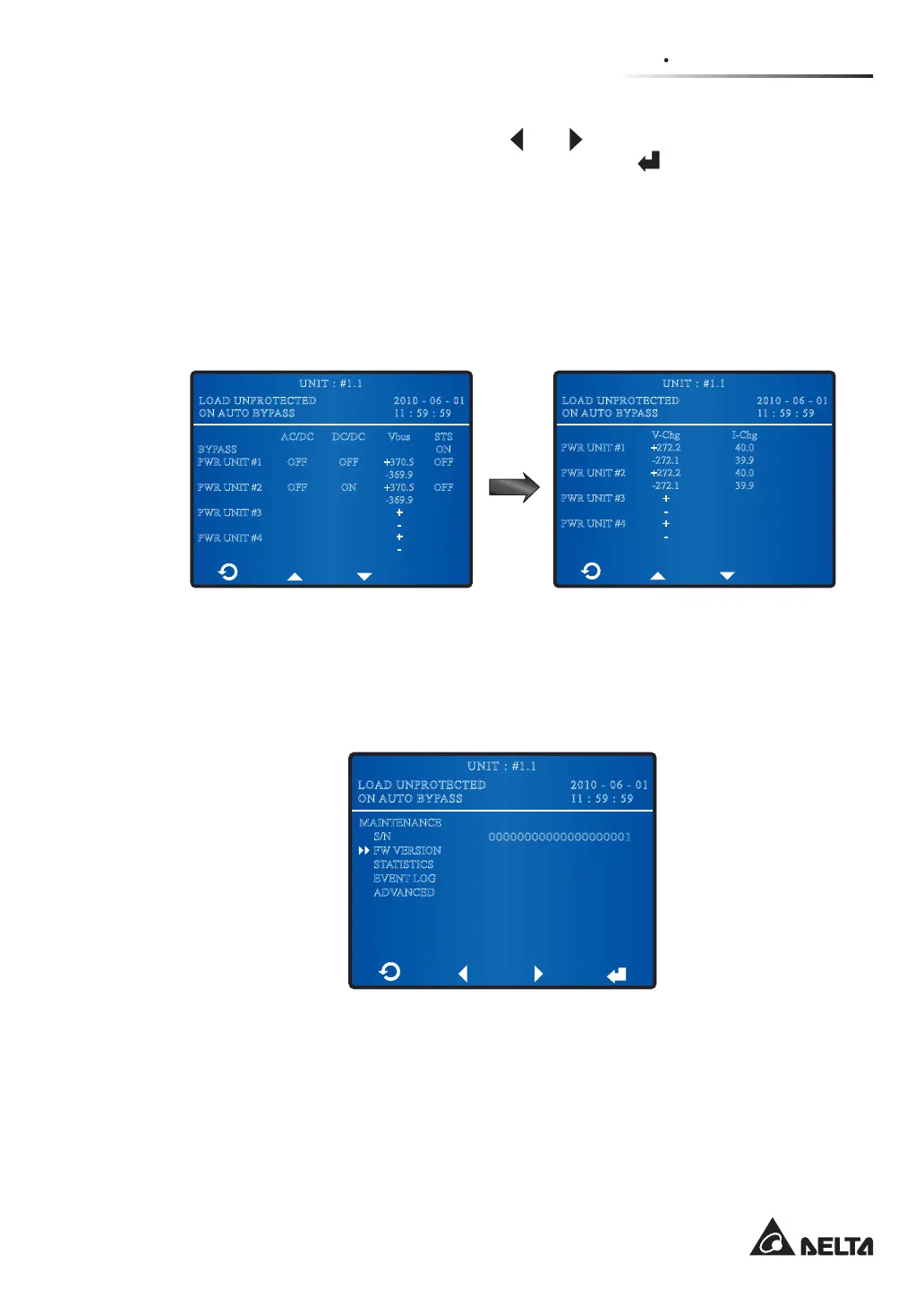
If you want to know the UPS’s PWR UNIT #n PFC status, DC bus voltage, static switch
status, charge voltage and charge current, please go to:
0DLQ6FUHHQĺ0DLQ0HQXĺ0DLQWHQDQFHĺ$GYDQFHGĺ2WKHUV
BYPASS
PWR UNIT #1
PWR UNIT #2
PWR UNIT #3
PWR UNIT #4
Vbus
+370.5
-369.9
+370.5
-369.9
+
-
+
-
AC/DC
OFF
OFF
STS
ON
OFF
OFF
DC/DC
OFF
ON
PWR UNIT #1
PWR UNIT #2
PWR UNIT #3
PWR UNIT #4
V-Chg
+272.2
-272.1
+272.2
-272.1
+
-
+
-
I-Chg
40.0
39.9
40.0
39.9
2010 - 06 - 01
11 : 59 : 59
UNIT : #1.1
LOAD UNPROTECTED
ON AUTO BYPASS
2010 - 06 - 01
11 : 59 : 59
UNIT : #1.1
LOAD UNPROTECTED
ON AUTO BYPASS
AC/DC & DC/DC, Vbus, STS, V-Chg, and I-Chg mean PWR UNIT #n PFC status, DC
bus voltage, static switch status, charge voltage and charge current respectively.
Ä
If you want to know the UPS’s serial No., please go to:
0DLQ6FUHHQĺ0DLQ0HQXĺ0DLQWHQDQFHĺ61
2010 - 06 - 01
11 : 59 : 59
UNIT : #1.1
LOAD UNPROTECTED
ON AUTO BYPASS
MAINTENANCE
S/N
FW VERSION
STATISTICS
EVENT LOG
ADVANCED
00000000000000000001











 To Next Page