5-5
5
Installation and Wiring
T
S
R
N
UP
S
O
U
T
P
UT
NN
2
4
0
V
D
C
2
4
0
V
D
C
BA
TT
ER
Y
IN
P
U
T
TS
R
N
A
C
I
N
P
U
T
R
S
T
B
Y
PAS
S
I
N
P
U
T
OUTPU
T SWITCH
MANUAL BYPASS SWITCH
BYPAS
S SWIT
C
H
INPU
T SWITCH
Iso
l
a
t
e
U
n
i
n
t
e
r
r
u
pt
i
bl
e
P
o
w
e
r
S
y
s
t
e
m
(
U
P
S
)
T
h
e
n
c
h
e
c
k
f
o
r
H
a
z
a
r
do
u
s
V
o
l
ta
g
e
b
et
w
e
e
n
a
l
l
t
e
r
m
i
na
l
s
in
cl
ud
i
n
g th
e
p
r
o
t
e
ct
i
ve
e
a
r
th
S
e
e
i
n
s
t
a
l
l
a
t
i
on
i
ns
t
r
u
c
t
i
o
ns
be
f
or
e
co
n
ne
c
t
i
ng
t
o
th
e
su
pp
l
y
A
p
pa
r
a
t
e
t
e
r
e
g
n
e
t
f
o
r
t
i
l
k
o
p
l
in
g
t
i
l
e
t
IT
f
o
r
s
y
n
i
n
g
s
n
e
t
t
R
I
S
K
OF V
O
L
T
A
G
E
B
A
C
K
F
EE
D
B
E
FO
R
E
W
O
R
K
I
N
G
O
N
T
H
I
S
C
I
R
C
U
I
T
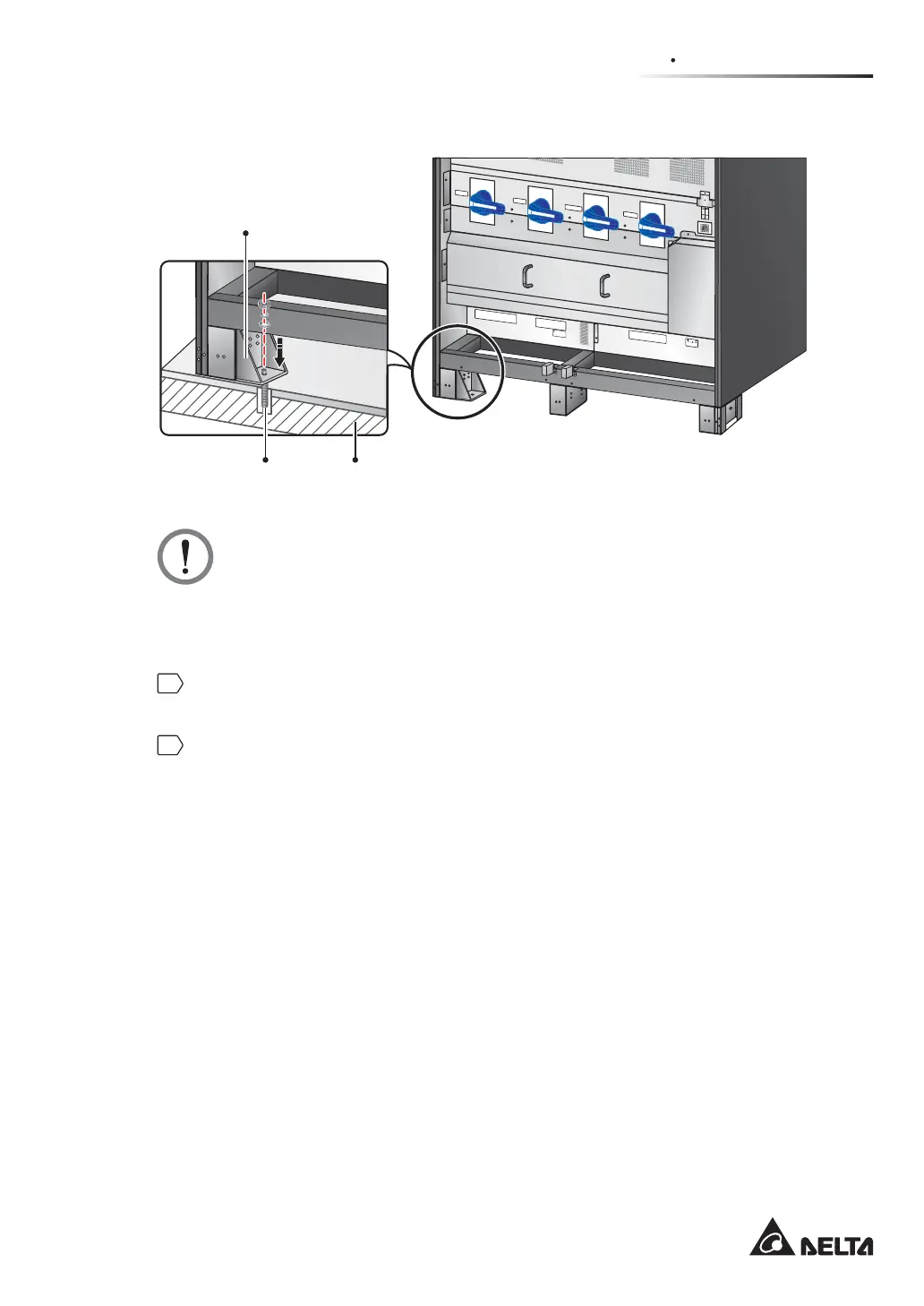
Balance Support
(Front View)
Expansion Screw x 1 Ground
(Figure 5-3: Balance Support Installation)
WARNING:
There are eight balance supports locating at the front bottom and the rear bottom
of the UPS. If you don’t fix the eight balance supports on the ground, the UPS
PLJKWWRSSOHRYHU)RUVDIHW\FRQFHUQVSOHDVH¿[WKH836¶VEDODQFHVXSSRUWVRQ
the ground.
3
Remove the two panels shown in Figure 2-11 and follow 5.4 Wiring to perform wiring.
After wiring, reinstall the two panels.
4
To prevent possible damage from rodents, please take the provided six rodent shields
(including 24 M4 screws) out of the accessory package and install them on the UPS.
The provided rodent shields have three types, A, B and C. Each type has two pieces.
1. Follow Figure 5-4 to install a rodent shield A and a rodent shield B at the front
bottom of the UPS.
2. Follow Figure 5-5 to install the other rodent shield A and the other rodent shield B
at the rear bottom of the UPS.
3. Install each rodent shield C at the bottom of each lateral side of the UPS. Please
refer to Figure 5-6.











 To Next Page