Media3-10
Use single side only paper that is
- Suitable for plain paper laser printers, such as standard or recycled office
paper
- Plain paper that has been printed on with same printer
DO NOT use single side only paper that is
- Not approved for use as plain paper
Special Paper
You can print continuously with special paper. However, this could affect the
media feed, depending on the media quality and printing environment. If
problems occur, stop the continuous printing and print one sheet at a time.
Select this setting when special paper, for example, color high-quality paper,
is loaded as plain paper with a weight of 60 to 90 g/m².
Use special paper that is
- Approved for laser printers
DO NOT use special paper that is
- Not approved for use as plain paper
Orientation Tray 1 Face down
Tray 2/3 Face up
Driver
Media Type
[Single Side Only (60–90g/m²)]
Weight 60 to 90 g/m²
Duplexing Not supported
Capacity Tray 1 Up to 100 sheets, depending on the paper
weight.
Tray 2 Up to 250 sheets, depending on the paper
weight.
Tray 3 Up to 500 sheets, depending on the paper
weight.
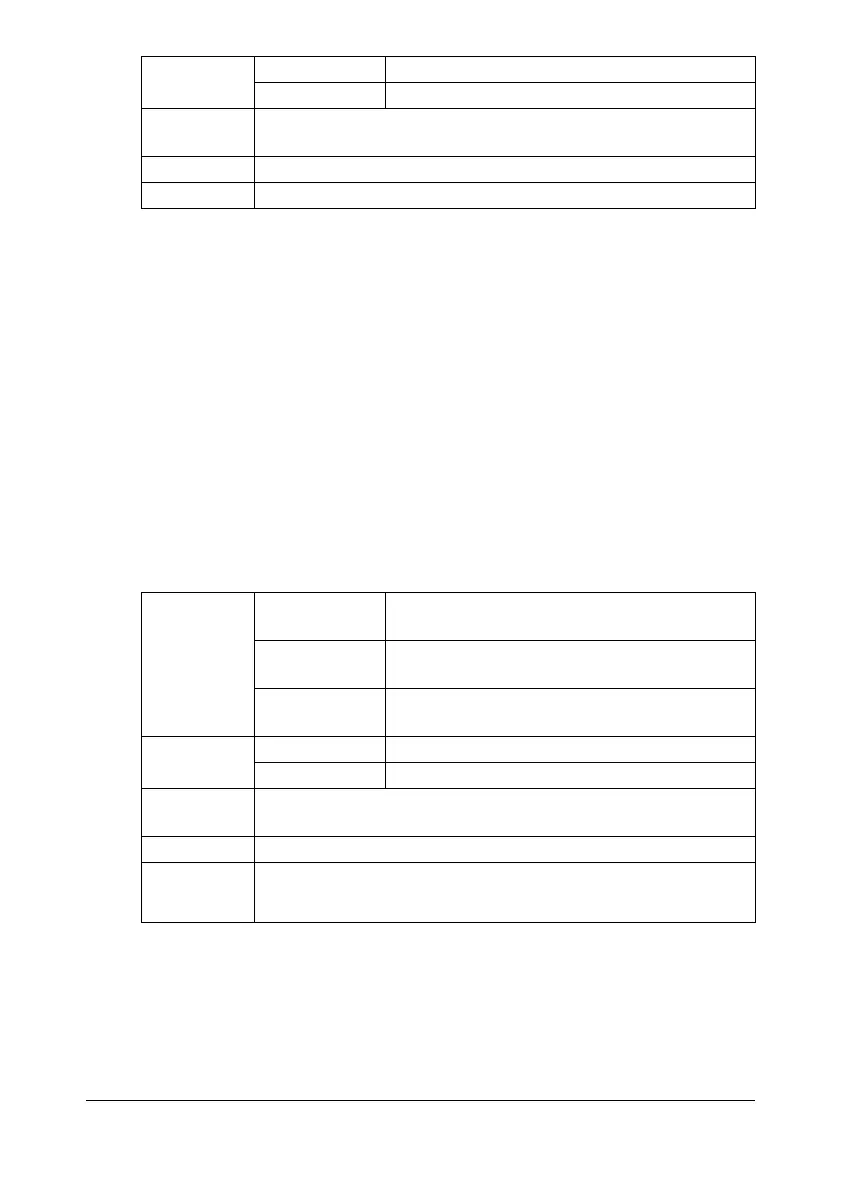
Orientation Tray 1 Face down
Tray 2/3 Face up
Driver
Media Type
[Special Paper (60–90g/m
2
)]
Weight 60 to 90 g/m²
Duplexing Not supported with copy functions
Supported with printing functions










 To Next Page